live_tv
Livestream Starting Soon
00
Hours
:
00
Minutes
:
00
Seconds
Up next in 10



Lenovo Duet Chromebook at Amazon*: https://geni.us/duetchrome
Apple iPad 7 at Amazon*: https://geni.us/ipad102
My Review: https://mynexttablet.com/lenovo-duet-chromebook-review/
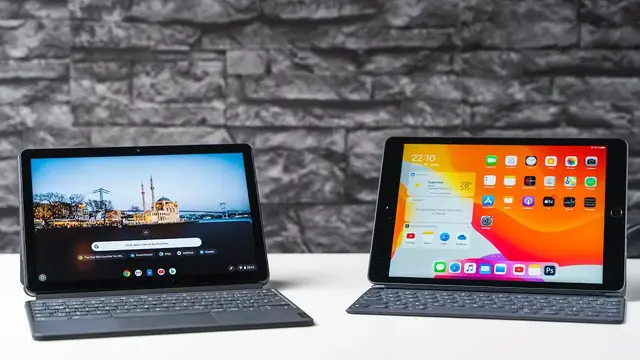
How does the Lenovo Duet Chromebook compare against the Apple iPad 7? In this video, you'll learn about the major differences between Chrome OS for tablets and iPadOS, as well as which tablet is better suited for who. Is the Apple Pencil better than the HP USI Stylus? What about their keyboards and how well does Google Docs perform in Safari and Chrome? That's what you'll learn in this Lenovo Duet Chromebook vs iPad 7 comparison.
Website: https://mynexttablet.com
Twitter: https://twitter.com/mynexttablet
What I use for my videos:
Camera 1*: https://geni.us/sonya7markiii
Camera 2*: https://geni.us/sonyal6400
Lens 1*: https://geni.us/sonyfe1635f4
Lens 2*: https://geni.us/tamronfe2875f28
Lens 3*: https://geni.us/sonyfe90
Lens 4*: https://geni.us/sonye1018f4
Microphone 1*: https://geni.us/rodentusbmic
Microphone 2*: https://geni.us/rodevideomicromic
Light 1*: https://geni.us/aputureh672s
Show More Show Less View Video Transcript
0:00
The Lenovo Duet Chromebook promises a fantastic value
0:03
It offers a desktop glass browser, a keyboard, Android and Linux app support as well as a
0:09
stylus option. We get all of that for under $300. But how well does it compete in real life against the iPad 7 which has been the best value
0:18
so far? I'm Angel for my next tablet.com and that's what we will discuss in this iPad 7 with the
0:24
Stuart Chromebook comparison. Before we start, don't forget to subscribe to this channel, I'm reviewing pretty much every
0:33
tablet that gets released, all from Chrome OS to Android to iPad OS and Windows tablets, of course
0:39
Let's start with their design and build quality. Regarding this, the LenovoDwed Chromebook and Apple iPad 7 are quite similar
0:46
Not perfect, both have some downsides, but overall they do feel like well-made tablets
0:52
The iPad 7 is made of aluminum and is premium feeling. It just does not look as high end because it has the old design with huge black basils
1:02
and the home button on the bottom. On a positive note, it does have the touch ID fingerprint scanner which works great
1:10
The Lenovo does not have a fingerprint scanner and no facial recognition
1:14
On the duet Chromebook, the biggest part of the body is metal too, but part of the tablet
1:20
is covered by a blue plastic. It certainly looks unique. The transition from the body to the screen is not as smooth as on the iPad, but it's not too
1:29
much of a deal. With 483 grams, the Apple tablet is a bit heavier than the 450 grams of the Lenovo
1:37
It's also a tiny bit thicker with 7.5 millimeters compared to 7.3 millimeters
1:43
Both have connectors for optional keyboards, but the iPad is the only one with a headphone check
1:48
While the Lenovo has a USB C port, the iPad has the old lightning connector, a microestim
1:54
the cut slot is missing on both. Let's check out the keyboards. A huge advantage of the duet Chromebook is that the keyboard is included at no extra charge
2:04
That means that with the price tag of $279, it's much cheaper
2:09
For the iPad alone, you will have to pay $329. The official smart keyboard costs another $159
2:17
I'm only going to compare the official keyboards because in both cases you could connect
2:22
almost every other keyboard anyways. Overall the Apple Smart keyboard feels a bit better made
2:27
It's mostly plastic of course, but a higher end one. Folded up, the keyboard protects the screen but the back is unprotected
2:35
This keyboard folio has a stand feature built in but you can use it at just one angle
2:41
I typed a lot with the Apple keyboard and it's usable but certainly not great
2:45
The keys don't have a lot of travel, there's no background light and no touch bed either
2:51
I always described it as a good compromise of comfort and point
2:54
It's a fine tablet keyboard, but if you write all day, I would use a proper desktop
3:00
class keyboard The Lenovo keyboard feels cheaper and it a different design There a back cover with an integrated kickstand included which you attach to the tablet magnetically
3:12
While it's made of a much cheaper feeling plastic, it works well and has one huge advantage
3:17
Unlike with your iPad, you can stand up the red Chromebook in lots of different angles
3:22
That's awesome. The keyboard part attaches magnetically and is made of plastic too
3:27
Folded up it protects the screen so that both sides of the tablet are protected
3:31
Now, even though the keyboard is made of a cheaper feeling material, the keyboard itself is better
3:38
Here the keys do have a proper travel which is more comfortable
3:42
We don't get a background light either but there's a decent touchpad built in
3:47
So overall I think the Lenovo offers a better keyboard, I mean especially if you consider
3:52
the price it's a much better keyboard value. But keep in mind that both keyboards are smaller than your standard desktop keyboard
4:01
If you're working at home at your desk, I would always connect a bigger one using Bluetooth
4:05
I like that the two speakers of the Lenovo are located at the top and are separate from each other
4:11
That means you can hear a real stereo separation, which is not the case with the iPad
4:16
Apple placed both speakers on one of the shorter sides, so the sound is coming from just one
4:21
side when watching movies. Even though that's a downside, the iPad speakers do sound much better overall
4:28
The sound is clearer, fuller, has a better base. and it's just more pleasing to listen to
4:33
The Doad Chromebook features a 10.1 inch IPS screen with an aspect ratio of 16 by 10 and
4:39
the resolution of 1920 by 1200 pixels. The iPad 7 has a 10.2 inch IPS screen with 2160 by 1620 pixels
4:49
Both screens are quite similar, but if you look closely the iPad 7 is a bit sharper
4:54
It's also a bit brighter with 500 nits compared to 400 nits
4:58
Viewing angles are good on both. So the iPad screen is a bit better regarding most aspects, at least a bit, with one big exception
5:07
It does not have a laminated screen. That means there's a small visible air gap below the touchscreen
5:13
The screen of the Lenovo is fully laminated, which looks nicer. Now the non-laminated screen is not too much of an issue unless you want to use the Apple pencil
5:24
When using that stylus, you don't always have the feeling of directly writing on that screen
5:28
because there's an air gap in between. Besides that the Apple Pencil works fantastic, it's pressure sensitive and is well made, and
5:35
you can write and draw with it very precisely as long as you ignore that air gap
5:40
You can charge it using the lightning port of the tablet. You can use the USI stylus with the Lenovo Duet Chromebook, so only one I was able to
5:48
buy the HP USI stylus. It works okay, you charge it using a USBC cable and it's pressure sensitive just like the Apple Pencil
5:58
Here you are touching the screen directly which is a plus point
6:02
But with that being said, if you write fast, it's not as precise as the Apple Pencil is
6:07
Handwritten text does not always look as clear and the drawing often legs behind the screen a bit Both are not huge issues but something you should definitely know about
6:18
So to sum up both tablets are not perfect regarding the pens, but in both cases they are nice
6:24
additional features. One advantage of the iPad remains that you can use the Apple Pencil with lots of more apps
6:30
than you will find in the Google Play Store. If you want to make super fine and precise drawings, you should invest a bit more money in a
6:38
a tablet with better pen support though. Let's check out the internal hardware and performance
6:43
The LenovoDuet Chromebook features a MediaTech Helio P60T octok processor with 4 gigabytes
6:49
of RAM and a 64 gigabyte or 128 gigabyte internal storage. There's no LTE version at the moment
6:57
Inside the Apple iPad 7 on the other hand runs an Apple A10 Fusion processor with 3 gigabytes
7:03
of RAM. You can choose between 32 gigabyte and 128 gigabyte of internal storage
7:08
and LTE is an option two. Benchmarks show that the iPad 7 is much faster than pretty much all regards
7:16
That's to be expected because the iPad 7 is faster than every mid-range Android tablet
7:21
as well. My gaming test confirms this. While you can play games like PubG Mobile and Call of Duty on the Dread Chromebook, they run
7:29
with high settings only. On the iPad 7, you can set the graphics to very high in both cases and they do look a bit better
7:37
This tablet is a fantastic device to play Fortnite with two, which is not possible on the Chromebook
7:43
With other tasks, the iPad performs a bit better too. You can switch between apps faster and even render videos in an okay speed
7:51
But if you just want to do some office work and watch some YouTube, you won't notice
7:55
any major differences between the two. Now the operating systems are very different of course
8:01
The Duet Chromebook is running Chrome OS, which is promised to get updates until June of
8:06
2028. It means that it will be updated much longer than any Android tablet will be. And it might
8:13
get longer updates than the iPad 7 as well because the 810 Fusion platform is a couple of years
8:19
old already. With ChromeOS you get the desktop class browser which performs very well
8:25
and is great for web apps like Google Docs and Gmail. At the same time you can use Android
8:30
apps from the Google Play Store which usually perform great too. I installed a couple of games as
8:36
as well as Adobe Lightroom and all of that runs fine. In addition to those Android apps, you can also install traditional Linux desktop apps, like
8:45
Libre Office for instance. Now for that you've got to use a terminal and to want to install and use those you probably
8:52
have to be a kind of geeky, but it can be awesome for students who want to become a developer
8:56
for instance. An advantage of Chrome OS is that you can use it pretty much like a desktop PC once you attach
9:02
a keyboard and mouse at least. You can open apps in free floating windows, for instance
9:08
That's what Chrome OS was developed for originally. All those tablet features have been ended later
9:14
The iPad 7 is running iPad OS which has been developed with tablets and mine from the beginning In fact as a pure tablet operating system iPadOS is much better thought through You can navigate the operating system with gestures very fast it easy very stable and
9:30
there's a huge selection of apps that are optimized for tablets. Exactly this is the big advantage of iPad OS
9:37
The selection of apps that are optimized for touch screens and tablets in particular is
9:42
much larger than the Google Play Store can offer. You can choose between lots of notes apps, drawing apps, thousands of great games, music
9:50
apps and even very professional ones like Adobe Photoshop and Affinity Photo
9:56
You can use fantastic video editors as well as apps like Microsoft Word and Excel
10:01
Now Safari is a fantastic browser too, which has been quite heavily updated in the last couple
10:06
of months. By now you can use it with web apps like Google Docs and they do run as good as they do in
10:13
Chrome OS. So you do get a desktop class browser now too, but you can't use the same extensions
10:18
of course. iPad OS is lacking behind a bit if you want to use your tablet as a traditional computer
10:24
It has been improved a lot with using updates, multitasking works fantastic now, we get a decent
10:30
files app and you can connect the mouse or touchpad, and even attach external storage
10:34
storage like SSDs. But if you want to get super geeky, you do get more options with Chrome OS
10:40
I mean you can install Linux apps, the iPad can't. If you care about battery life, you will get a longer runtime with the iPad 7
10:48
When watching HD YouTube videos at maximum brightness the Apple tablet lasts 5 hours, while the
10:54
Duet Chromebook goes dark after 4.5 hours. Keep in mind that the iPad has the brightest screen, so its battery life is even better than
11:02
this test shows. Well, that's the end of my comparison of the Apple iPad 7 with the Lenovo duet Chromebook
11:09
I think both tablets offer a fantastic value. Which one is better for you depends on how much money you want to spend and especially
11:17
on what you want to do with a tablet. I think the iPad 7 is the better entertainment tablet
11:22
It's much faster for playing games. It has better speakers for watching movies and it has a much bigger selection of apps
11:28
in general that are optimized for tablets. If you're looking for a cheap tablet with pen support, I think the iPad is a bit better
11:36
choice too. It's not perfect but at least you're getting lots of great apps for the stylus
11:42
And if you want to get some office work done, you can do that with apps like Microsoft Word
11:46
but you will have to pay much more for the keyboard. The Lenovo Do at Chromebook is a better choice if you're looking for an affordable tablet
11:53
with keyboard. I think the value is fantastic if you want to do some office work, maybe for school or just while traveling
12:00
And sure, at the same time you can play some games and watch movies, all of that is possible
12:06
just not as good as with your iPad. For some, the Linux support is a fantastic feature too
12:12
Alright, that's the end of my comparison between the Lenovo Duet Chromebook and the Apple iPad 7
12:17
If you have any questions, write them down below in the comments. I'm Angel for Mynextablore.com
12:22
Thanks for watching and see you next time
#Online Video
#Computer Hardware
#Laptops & Notebooks