Up next in 10


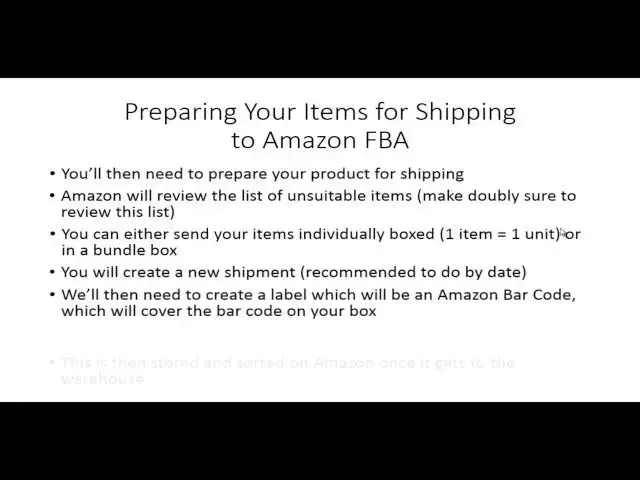
0010 Preparing Your Items For Shipping
Show More Show Less View Video Transcript
0:00
welcome back to getting started with
0:01
Amazon FBA and in this video we're going
0:04
to be talking about the next step which
0:05
is getting your items to the Amazon
0:08
warehouse you'll now need to start
0:10
thinking about how you're going to
0:12
prepare your product for shipping and
0:14
that means then you're going to need to
0:16
get it to Amazon so let's walk through
0:19
the process and how it's going to work
0:21
for you to actually get your items in
0:23
position for Amazon to sell them and
0:26
fulfill
0:27
them now Amazon when you to go through
0:30
the process they are going to be
0:31
reviewing uh with you throughout the
0:34
process the list of unsuitable items you
0:36
want to make sure that you review the
0:38
list of things that you cannot sell the
0:41
last thing you want to do is to start
0:43
listing and making sales and you don't
0:45
want to list things that Amazon finds
0:47
unacceptable so this is going to be a
0:50
process that again you're probably going
0:52
to go through a bit of a learning curve
0:54
and education but the most important
0:56
thing is to make sure that you review
0:59
the list of unsuitable items that Amazon
1:02
says that you cannot
1:07
sell now Amazon does not make this a
1:10
mystery they spell it out in great
1:12
detail as to which products you can and
1:15
cannot sell and once again this is a
1:18
list that is objective there is no gray
1:21
area in it please make sure that you are
1:24
uh looking at this and that you know
1:26
that your item is not on this list of
1:29
prohibit lied
1:34
products now obviously you can either
1:36
send your items individually boxed or in
1:38
a bundle box um you'll want to make sure
1:40
again this is suitable for the customer
1:43
and that you're following the guidelines
1:45
which you're basically doing inside of
1:47
Amazon is creating a new shipment and
1:50
creating a label now this label is very
1:52
important because you're going to
1:54
actually get an Amazon barcode that
1:57
you're going to use to put over any
1:58
barcode in your packaging so you don't
2:02
want uh the your your box or your
2:05
packaging to make it to the Amazon
2:07
warehouse and to have its barcode or UPC
2:10
code on it you want to make sure that
2:12
the Amazon barcode is on it Amazon is
2:15
going to give you labeles for that so
2:16
that it will be correctly uh categorized
2:20
it's going to be correctly warehoused so
2:22
that when somebody actually buys to get
2:24
your item and it's actually sent to
2:27
them and then when your item is actually
2:29
shipped
2:30
it's actually going to be stored and
2:32
sorted in Amazon so again the barcoding
2:35
is very vital to making sure the process
2:38
works correctly in getting your items
2:40
ready for
2:42
sale at that point you'll be selecting
2:44
your carrier and you will have the
2:47
opportunity to either ship it yourself
2:48
or to choose Amazon's preferred carrier
2:52
most successful sellers use the Amazon
2:54
preferred carrier mainly because Amazon
2:58
pays the shipper to actually get the
3:00
product and to get it to Amazon and then
3:03
you actually are charged then at the end
3:05
of the month you'll just have to make
3:07
sure that you're keeping track of what
3:09
charges you're going to have assessed to
3:12
your account when you are actually doing
3:14
FBA now hopefully you'll be selling and
3:17
then your items will be selling it'll
3:19
kind of come out of what it is that
3:20
you're selling however you do want to
3:22
track how many shipments are going to be
3:25
charged to your account at the end of
3:27
the
3:28
month now once you actually have chosen
3:31
a carrier you're going to want to take
3:32
your box items with the barcodes then
3:35
you're going to want to put them into a
3:37
larger box with a packing slip so again
3:39
this is a two-step process you're going
3:42
to get your items listed and then you're
3:43
going to get them barcoded you're going
3:45
to choose a carrier and then you're
3:47
going to actually take those boxed items
3:50
with the barcode and then ship them in a
3:53
larger box to
3:55
Amazon when you provide details on
3:57
Dimension and weight you do need to be
4:00
specific and you need to be detailed and
4:02
you need to be correct this is a very
4:04
important part of the process because
4:06
you want to be charged accurately and
4:09
you don't want Amazon to have to
4:10
recharge you or to recalculate this
4:13
could delay your your your shipment it
4:15
could delay uh your purchase so you want
4:18
to make sure that again this is
4:20
something that you do
4:21
correctly now Amazon's going to give you
4:24
anep estimated shipping cost as to what
4:26
it is that you are going to be paid and
4:28
again um you can either void uh the
4:31
charges or accept them so in other words
4:33
if you're just kind of trying to test
4:35
the process you can void out uh those
4:38
charges or if you just want to get a
4:39
sense for how much it's going to cost
4:41
you for a particular item you can go all
4:43
the way through this process so that you
4:45
can see what the shipping charges are
4:47
actually going to be if you're trying to
4:49
determine what your profit is going to
4:51
be now in order to do this you are going
4:54
to need to have a PDF viewer or Adobe
4:56
Acrobat of some kind of way that you're
4:58
going to need in order to be able to
5:00
print that label for the outside of the
5:03
box now in the next video we're going to
5:06
give you a few tips on what you can do
5:08
to be successful in packaging and
5:10
preparing your items for shipment with
5:12
Amazon
5:13
FBA so with that thanks and I will see
5:16
you in another video
#Shipping & Logistics