Up next in 10



Andrew Lanxon puts Google's AI-powered camera features to the test on the streets of Paris.
Show More Show Less View Video Transcript
0:00
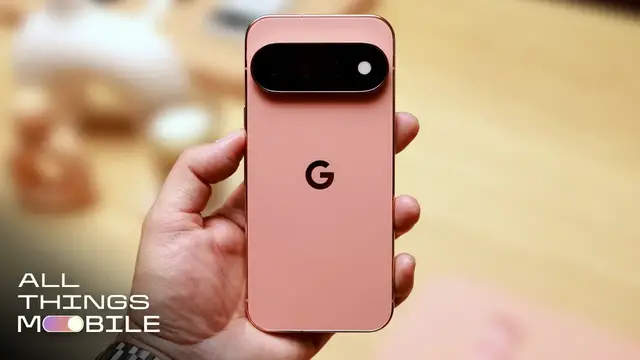
Well, I've just got my hands on Google's Pixel 11 Pro XL
0:03
and I want to put the cameras to the test in beautiful Paris. Let's go
0:17
So the Pixel 11 Pro is Google's latest flagship Android phone, and alongside a suite of upgrades like a new Tensor G6 processor
0:25
there are a host of new camera tricks. And as a photographer myself, I was keen to see what's up
0:30
So on the surface, it might seem that a lot of the camera hardware is basically the same as last year's model
0:34
Got the usual trio of wide, ultra-wide and telephoto zoom lenses, and all the resolutions are the same
0:41
But Google does say that the main camera's image sensor is entirely new and the telephoto sensor is actually bigger
0:48
But that's not really what excites me. Actually, my favorite trick is something called camera looks
0:52
Sort of similar to Apple's photographic styles on the iPhone, it basically allows you to add a bit more of a creative touch to your images
0:59
think things like color tones and different contrasts and grain basically like applying
1:05
filters except that you can see them at the point when you take the photo i actually really like many
1:10
of the looks and i had them applied to the camera basically the entire time i was doing this photo walk
1:15
you can customize the looks further adding a bit of warmth or
1:40
changing how the shadows appear and even adding some filmic grain. I actually added quite a bit of grain later on and I'm not sure it was the best idea
1:49
because I don't really love the grain look that it applies. It doesn't look especially realistic
1:54
But in the phone's defense, I did apply basically the absolute maximum amount of grain that I could
1:59
So I can't really complain at this point. Thankfully, I did shoot all of the photos in JPEG and in DNG RAW
2:05
which bypasses all of the phone's actual processing. so I could take those files into Lightroom and apply my own edits
2:12
I have done this with a few photos because I do find that some of the camera looks can be a bit..
2:17
much. The black tie effect is very high-key black and white, so it's only really going to be suitable for certain scenes
2:25
But it did play an absolute blinder when I got the phone low for this shot of this person carrying a plant Did I get that dude with the plant I sort of got the dude with the plant
2:39
And I liked it for this portrait mode shot using the five times telephoto lens
2:44
Can we go a bit further down and I'll get a bit closer to you? Yeah just there's great. Okay so
2:51
what I'm doing five times telephoto portrait mode tap on your face so we're getting the nice blur
2:57
good thing is is that five times you can't see the person behind it it's totally cropped them
3:02
out so it's perfect though I do still definitely prefer the ones we did in color using what I think
3:06
is the editorial camera look I left this on for a couple of shots but then I defaulted back to
3:11
what's called the vanilla look which I really enjoyed because it gives a slightly warmer classic
3:17
vibe. I mean if it's a skater it feels like a good opportunity for me to use one of the new
3:24
features called magic capture. Basically takes a bit of video and then pulls out the best moments
3:30
from it. So magic capture is activated the skater is coming up. So once you've taken the little magic
3:37
capture clip the phone's then got to process it. What it's basically doing is yzing the frame
3:41
and trying to decide on what the phone thinks is like the best action moment. So maybe when
3:46
the most things are kind of going on or maybe it's looking for smiles if you're taking group
3:51
pictures people looking towards the camera that kind of thing i'm getting low to catch these
3:58
skateboarders at a good angle the problem is is that i'm 38 and my knees don't really like being
4:03
on the ground like this if they don't land this trick soon i'm gonna have to give up for the sake
4:08
of my skeleton my poor ruined skeleton i think the phone has definitely highlighted the best
4:14
shots from the bunch and while it kind of takes the skill out of nailing that decisive moment
4:20
that is kind of the point it's not really for pro action photographers who know exactly when to hit
4:26
that shutter button it's more for parents who want to be able to capture an awesome moment of their
4:31
kid on their bike but don't want to have to make them try it again and again and again so that they
4:36
can get the shot just right i'm gonna play around in my color tones a little bit now i mean classic that warm
4:49
soft contrast i think looks beautiful so i'm going to customize this a little bit more i'm
4:55
not going to touch the vibrance i am just going to warm it up take that tint down i like the soft warm look i just created the good thing is it will also apply to the other lenses as well including the ultra wide and right now I got this beautiful view that with this
5:12
sort of warmer look that we've got applied right now just looks absolutely beautiful and this dude
5:18
walking through ah this shadow there. I do like the look that I got on the phone here. It's definitely
5:25
got that feeling of a summer day in Paris but I do think that that sky has been blown out too much
5:32
it's basically lost all detail and gone just to white but again I shot in raw so I also was able
5:38
to take that raw file into Lightroom and I found out that there's actually loads of detail left in
5:43
that sky for me to pull back and create a shot that's much more to my taste
5:47
maybe i can try and frame the eiffel tower in the metal struts of the bridge
6:00
they've tinkered with the telephoto lens so it can now focus a little bit closer up
6:12
so right now i'm at five times and focusing on this padlock on the bridge
6:16
lock looks really nice and sharp but the background is falling into that beautiful
6:20
shallow depth of field loveliness so it's great if you're into your kind of macro photography
6:26
the telephoto lens has five times optical zoom but you can take that
6:34
much further should you want to you can zoom all the way up to 120 times my hair is not doing me
6:42
any favours today, is it? Irrelevant. And obviously at 120 times zoom, you can get really close up on
6:49
faraway subjects. For example, you probably can't see the French flag right here-ish. Now on the phone
6:58
I can hunt that down. As you can see, it's trying to stabilise to help me get the shot
7:04
And what it will actually do beyond 30 times zoom is use generative AI to upscale the image
7:11
so you get a much clearer shot than you would expect when you have cropped in this much
7:17
The results speak for themselves. Here's the standard image processing on that shot
7:21
and here's the version with the generative AI upscaling. Not bad, but the wild part comes
7:27
when you look at the original RAW file. It basically just a small handful of pixels yet that AI has completely rebuilt it But the problem for me is that those details aren real or at least they might not be real The camera is essentially seeing
7:42
what's in front of it and then rebuilding that scene using generative AI. So that means that
7:48
what you're actually seeing in the finished image isn't actually a photo of what you saw, it's more
7:54
of an algorithm's interpretation of what you saw. But it's up to you as to whether that actually
7:59
matters. For me as a photographer, I don't want generative AI anywhere near my images. I want to
8:05
know that whatever I have seen and captured in my photo is actually what was there. It's not some
8:11
machine learning interpretation. Anyway, the afternoon rolled on and I continued my walk
8:21
with the phone, trying to indulge in some street style photography along the way
8:29
sharing a bottle of wine why don't I have a bottle of wine
8:41
I eventually came to this iconic spot overlooking the Eiffel Tower I switched lenses and styles here shooting quickly to capture
8:50
some of the moments as they unfolded in front of me I tried out what I think was the editorial camera look again
9:05
though it might have been called something else. And I do think it goes a bit hard on the teal sky in some of these
9:10
though I do think this one looks quite cool as it's got sort of fashion magazine vibes
9:15
Maybe that's why it's called editorial. It's also worked quite well here. Not realistic colors, but certainly quite punchy and eye-catching
9:23
It is too early for me to give any kind of a verdict on the cameras on the Pixel 11 Pro
9:28
I'll have to save that for the full review and for when I can put the phone side by side
9:32
against rivals like the iPhone 17 Pro and the Galaxy S26 Ultra
9:37
But I do actually really like a lot of the photos that I have taken on this Paris photo walk
9:41
The overall image quality looks solid and while I am morally opposed to the generative
9:46
AI in the 120x zoom, I do think that some of the other AI tools, especially the Magic
9:51
Capture, can actually be genuinely useful. and of course I am thrilled to see more creative shooting options with the camera looks tool
9:59
Anyway do make sure to leave your thoughts on the photos that you have seen and the phones
10:03
themselves in the comments below and make sure to keep it all things mobile for a lot more
#Celebrities & Entertainment News