0:00
In this video, I'm going to show you how
0:02
In this video, I'm going to show you how
0:02
In this video, I'm going to show you how you can adjust the width of your columns
0:05
you can adjust the width of your columns
0:05
you can adjust the width of your columns and the height of your rows. If you'll
0:08
and the height of your rows. If you'll
0:08
and the height of your rows. If you'll find this video helpful, please like and
0:10
find this video helpful, please like and
0:10
find this video helpful, please like and subscribe to this channel. Now, first
0:12
subscribe to this channel. Now, first
0:12
subscribe to this channel. Now, first I'm going to start with this column. I
0:15
I'm going to start with this column. I
0:15
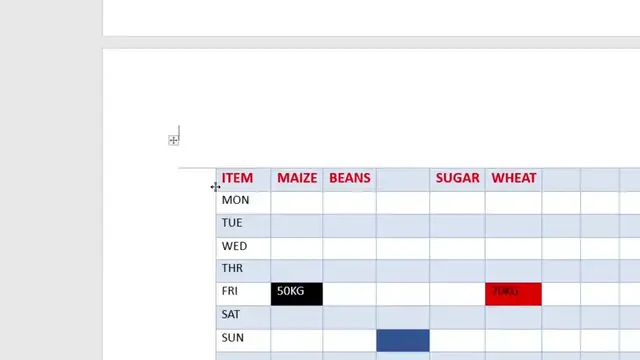
I'm going to start with this column. I want this column to be much wider. So,
0:17
want this column to be much wider. So,
0:17
want this column to be much wider. So, I'll increase the width. To increase the
0:19
I'll increase the width. To increase the
0:19
I'll increase the width. To increase the width, hover over it. And you should see
0:21
width, hover over it. And you should see
0:22
width, hover over it. And you should see we have this cursor with two sides
0:24
we have this cursor with two sides
0:24
we have this cursor with two sides expansion. Go ahead and click on it and
0:27
expansion. Go ahead and click on it and
0:27
expansion. Go ahead and click on it and then move as you wish. You can also do
0:29
then move as you wish. You can also do
0:29
then move as you wish. You can also do the same on the inside if you wish. So,
0:32
the same on the inside if you wish. So,
0:32
the same on the inside if you wish. So, and it will be adjusted. So, you can
0:34
and it will be adjusted. So, you can
0:34
and it will be adjusted. So, you can adjust this to the width that you so
0:36
adjust this to the width that you so
0:36
adjust this to the width that you so wish. Now, to increase the size of this
0:39
wish. Now, to increase the size of this
0:39
wish. Now, to increase the size of this row, it's also simple. Just hover over
0:42
row, it's also simple. Just hover over
0:42
row, it's also simple. Just hover over to the line of the row. For instance,
0:44
to the line of the row. For instance,
0:44
to the line of the row. For instance, like this, and then just drag it down to
0:47
like this, and then just drag it down to
0:48
like this, and then just drag it down to adjust to the size that you wish. You
0:49
adjust to the size that you wish. You
0:49
adjust to the size that you wish. You can also adjust the size of any of the
0:52
can also adjust the size of any of the
0:52
can also adjust the size of any of the row inside here just as you wish. So
0:55
row inside here just as you wish. So
0:55
row inside here just as you wish. So that's how you can adjust the sizes of
0:57
that's how you can adjust the sizes of
0:57
that's how you can adjust the sizes of your columns and rows in Microsoft Word
1:00
your columns and rows in Microsoft Word
1:00
your columns and rows in Microsoft Word Tables. If you have any other question,
1:02
Tables. If you have any other question,
1:02
Tables. If you have any other question, kindly let me know in the comment
1:03
kindly let me know in the comment
1:04
kindly let me know in the comment section. Otherwise, thanks for watching
1:05
section. Otherwise, thanks for watching
1:05
section. Otherwise, thanks for watching and let's meet in the next