0:00
In this explainer, we're turning that
0:01
freshly wiped, overwhelming PC back into
0:04
your perfectly running machine. You just
0:06
hit reset and the screen is blank. Don't
0:08
panic. We've got the exact road map.
0:11
Here's our rapid fire checklist to
0:13
transform that blank slate into a
0:15
secure, high-erforming powerhouse. First
0:18
up, your starting line. Keep my files
0:20
saves docs, but remove everything is a
0:21
total wipe. Crucially, either way, all
0:24
your custom settings, drivers, and apps
0:26
are gone. You've got to reinstall them.
0:29
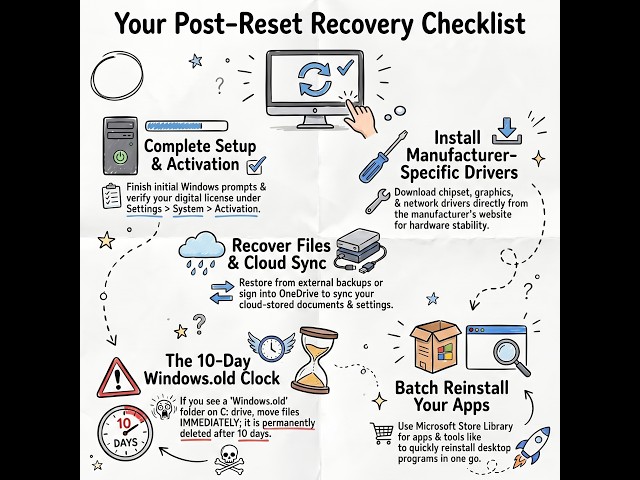
Let's knock out the basics first. Pick
0:30
your region, hop on Wi-Fi, and lock in a
0:32
PIN. Next, head to system settings.
0:36
Verify your Windows activation by
0:37
signing into your usual Microsoft
0:39
account. Hit an early snag, like no
0:42
internet? Jump straight into device
0:43
manager to update those network drivers.
0:46
Windows only hands you basic drivers.
0:48
Always hit up your manufacturer site for
0:50
specific graphics and chipset updates.
0:52
If you did a total wipe, grab your
0:54
external drive or cloud storage and
0:56
start rescuing files. But if you chose
0:59
to keep your files, listen up. You're on
1:01
a strict 10day clock. That's exactly how
1:04
long the Windows old folder sticks
1:06
around before it permanently deletes
1:08
past data. So dive into your local C
1:10
drive, open that folder, and drag your
1:12
important files to safety. Time for
1:15
apps. Pro tip: Use a tool like Nite to
1:17
mass install browsers and media players
1:19
instantly. Now make it yours again.
1:22
Tweak your power plans, fix that display
1:24
resolution, and grab a wallpaper. In
1:26
your account settings, turn on Windows
1:28
backup. It seamlessly syncs and restores
1:30
your saved cloud data. Let's lock it
1:33
down. Double check that Windows Security
1:35
Realtime Protection and your firewalls
1:37
are actively running. Run Windows Update
1:40
right now. Grab every single patch and
1:42
optional driver for absolute maximum
1:44
stability. Don't want to repeat this
1:46
process? Future proof your PC right now
1:48
with backup tools like file history.
1:51
Your absolute best friend is System
1:53
Restore. It fixes software glitches
1:55
without triggering another painful full
1:57
reset. Just search create a restore
2:00
point and pick a timestamp from before
2:02
your computer started acting up. It
2:04
safely keeps your personal documents,
2:06
but it will scrub any apps installed
2:08
after that specific point. Follow this
2:11
structured process and your system won't
2:13
just be recovered. It's going to run
2:15
cleaner than ever. So, your PC is
2:18
pristine again. What step will you take
2:20
today to prevent losing everything