Up next in 10

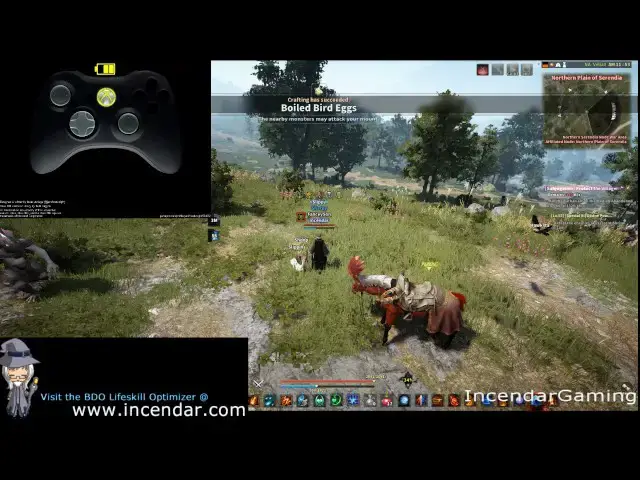
Xbox 360 Controller Complete Setup combos,Mounted Combat for Black Desert Online BDO
Nov 28, 2024
https://incendar.com/
Black Desert Online Supports controller by default and it works really well with fast response times. This is so much fun gathering or grinding kicking back on the couch and having the game on a big TV and so much better then sitting at a desk and getting carpal tunnel! And I also show its easy to do combos like residual lightning on wizard, EVEN MOUNTED!
Uno asked me how to setup controller and I realized after sending 10 screenshots this may be easier just to make a video. Hope this helps post any questions comments or improvements in comments!
Show More Show Less View Video Transcript
0:00
okay YouTube and send our here video
0:05
today on using the Xbox 360 controller
0:09
black desert does have built-in
0:12
compatibility with controllers and it's
0:14
actually really good you know a lot of
0:16
games have it but they're terrible with
0:18
it uh this came up recently with a guy
0:22
in guild who was who just got a
0:24
controller and asked me how to set it up
0:25
and I had to send a bunch of screenshots
0:27
so I'm just gonna do a video with how
0:29
I've set this one up that works pretty
0:31
well okay so I had a little problem with
0:36
the controller up here in the upper left
0:37
working I think I got it working now so
0:40
you can see what I'm doing here
0:42
for controllers set up on the 360 first
0:47
you want to go over here into settings
0:49
game use gamepad and vibration or not
0:57
depending upon what you want hopefully
1:00
this works where you can see what I'm
1:02
doing here okay so at the end I'll do
1:06
all the different I'll show you all the
1:08
different hockey's I set up for this
1:10
[Music]
1:13
and you can see hopefully while I'm
1:17
doing this what the kids man look like
1:24
[Music]
1:39
so it's really fluid fast response times
1:44
you might still prefer keyboard/mouse in
1:48
PvP situations and this does take a
1:51
couple days to get used to you want
1:53
probably to start grinding down some low
1:55
mobs to get the hang of this the green
1:58
bar is actually the trigger
2:07
all right so there we have some basic
2:08
stuff one thing about how I've set this
2:10
up is it works well with mounted combat
2:12
- which is a big thing and one of the
2:16
things that can cause a lot of problems
2:18
if you're just setting this up - the
2:19
first time I'll show you a little bit
2:23
here Sam just running now with lightning
2:33
this is pretty helpful if you're gone
2:35
for any titles
2:36
[Music]
2:47
and yeah you can use mana absorption or
2:51
whatever it is residual lightning so to
2:59
set up I have now you've got all the
3:01
skills over really easy using that
3:02
controller this is a lot of fun to use
3:04
you can just kick back and not be stuck
3:06
at a desk hurting your back and getting
3:07
carpal tunnel all the time
3:09
I actually switch back and forth between
3:10
these two works out really well so
3:17
anyway let's go into what I have for the
3:19
setup here alright I can see this is
3:23
still working
3:33
all right so for settings and you can
3:36
change us to get it to where you want
3:37
the default is okay but I ran like I
3:39
said I rented a lot of problems
3:41
switching between mounted combat and
3:42
normal okay so I will just go slow here
3:46
and you can pause or on the video
3:50
sea shoulders for the functions just a
3:54
left stick for movement main attacks
3:57
secondary attack evasion will be sprint
3:59
of course
4:00
so you set these up the way you like you
4:03
can set it up just like mine and you
4:05
know get used to this maybe in a couple
4:07
hours of grinding and you're going to
4:08
love it or you can modify it to your own
4:11
needs interactions with NPCs and whatnot
4:15
trigger on it runs I put a lot on the
4:18
d-pad special actions this comes into
4:22
play too when you're on mount it to get
4:24
all your skills working switch to
4:28
awakens and as you can see for hotkeys I
4:32
have all twenty set up down here and I
4:35
guess there is some saying that uh you
4:37
know if you use hotkeys that uses more
4:39
resources or whatnot that might be true
4:41
for wizard you pretty much have
4:43
unlimited resources you never really
4:44
need pots anyway so this might be
4:46
different for different classes
4:48
sometimes because of the function keys
4:50
here and how I have these set up so
4:51
first for function plus the buttons next
4:55
for function two plus the buttons then a
4:58
function d-pad one and then function
5:01
d-pad two and then function one and two
5:03
and the d-pad again works out really
5:05
good you xx skills ready to go can
5:07
instantly spam them with you combos no
5:10
problem to set up that you're going to
5:15
want to use custom quick slot if you
5:16
only have ten to make sure you get all
5:18
twenty set up of course for potions and
5:23
stuff or let's say T you know tea or
5:30
water in the desert you can just put
5:32
those on to and then instantly click
5:33
them while you're fighting so works out
5:37
really well let's see what else you got
5:45
[Music]
5:52
okay so I think we got through all the
5:55
functions and you can set more of these
5:57
- like I said I switch between this sure
6:01
is great just kick back and you know if
6:03
you're doing gathering or even a simple
6:05
grinding it works up grease and of
6:07
course function one function to
6:09
inventory block spirit world map player
6:11
information really easy to pull these up
6:14
whenever you want I'll see for the finer
6:19
things it's just quicker than the
6:21
controller
6:31
so I'll just put this on one more time
6:33
hopefully this will help you out and
6:35
that's everything I've got setup if you
6:38
have a better way you know by all means
6:40
do a comment this has worked out really
6:42
well for me and I hope this helps you
6:44
out subscribe for more black desert
6:46
stuff and to get notifications whenever
6:49
I put something new out and I'll see you
6:54
guys in game thanks a lot
#Game Systems & Consoles
#Computer & Video Games
#Action & Platform Games
#Massively Multiplayer Games