live_tv
Livestream Starting Soon
00
Hours
:
00
Minutes
:
00
Seconds
Up next in 10

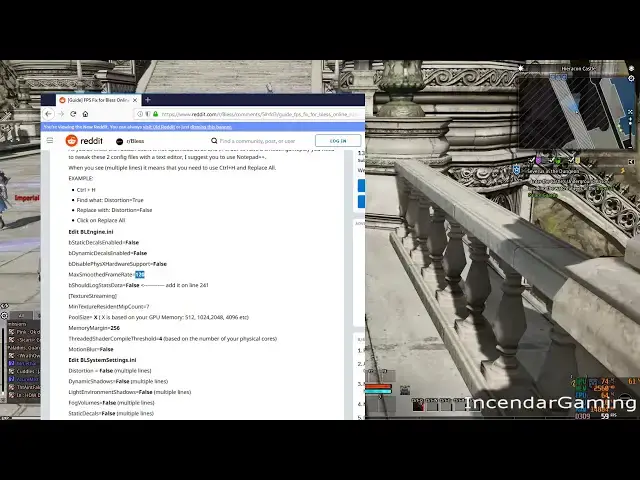
Increase Bless Online 20-30 FPS in Capital Cities remove 62 FPS lock ini edit with NO QUALITY LOSS
Nov 28, 2024
Video Game tools @ https://incendar.com/
vegax87: https://www.reddit.com/r/Bless/comments/5lhfd3/guide_fps_fix_for_bless_online_russian_client/
NotriousHaze:
https://www.reddit.com/r/Bless/comments/8n3k2r/hey_reddit_i_am_working_on_an_ini_editor_for/
Hey youtube incendar here,
Show More Show Less View Video Transcript
0:00
you Toobin send our here today with a
0:02
quick video on anyone having problems
0:04
with frame rates in the capital cities
0:06
of either faction in the game I noticed
0:08
that when I entered the cities I did
0:10
have a 20 to 30 FPS drop when I first
0:15
was playing this game I think a lot of
0:17
that has to do with the thousands and
0:18
thousands of people running around but
0:19
I'm not exactly sure yet I did notice in
0:22
the Union I had a lot more problems than
0:24
any here on capital city but anyway I
0:27
did the ini fix and today I'm gonna show
0:29
you the ones I change I only change
0:30
three things and these ones don't make
0:32
the game look worse either which is a
0:33
big thing for me and for those who don't
0:36
want to mess with actually having to
0:38
open an eye and I file maybe screw
0:39
things up too much user rain notorious
0:43
haze on reddit is actually making a tool
0:46
and he's in the final stages of
0:47
development apparently that'll be a user
0:50
interface and you can easily change the
0:51
things and this will be for anyone that
0:53
doesn't want to mess with the files
0:54
themselves so I'll post a link to that
0:56
below in the description as well really
0:57
great to see this being developed so
0:59
quickly by the user base in community as
1:01
well too okay so the post I'm going to
1:03
refer to and them worked for me is the
1:05
one by Vega x87 FPS fix for bless online
1:09
Russia clan and I will put a link to
1:10
this below as well the ones that you
1:12
want to look for without making the
1:15
graphics look worse Mac smooth frame
1:17
rate if you're being locked at 62 frame
1:19
rate I think it's 62 by default or 60
1:21
changes to 120 the next one you want to
1:24
look at pool size equal X X is based on
1:27
your GPU memory make sure to pump this
1:30
up I had 8 gigs here with a Vega 56 and
1:33
I said 49 409 6 is the maximum if you
1:37
have a card with 4 gigs or more in a few
1:39
two gigs to 0 for 8 and you want to do
1:41
this memory margin as well to 256 I
1:44
don't know which one of these is gives
1:46
the most benefits but make sure to
1:48
change him and then of course the real
1:50
important one here is a threaded shader
1:53
compile threshold equals 4 by default
1:56
this is one you might notice it's only
1:57
using one core on your your computer so
2:00
I think most people don't have a one
2:03
core system anymore so change that to 2
2:05
4 I put mine to 8 and didn't have any
2:07
problems at all okay so I'll just show
2:09
you how to edit this file really quick
2:10
easy notepad plus plus if you don't feel
2:12
comfortable
2:13
doing this you can just wait for that
2:14
graphic user interface one being
2:16
developed by the community but anyway
2:18
for me default location this file was C
2:20
program files x86 steam steamapps common
2:23
bless online engine config you can pause
2:26
this at any time if you need any of this
2:27
stuff base engine dot ini the first
2:30
thing you want to search for is this
2:32
blacksmith framerate and you'll notice
2:34
right here if you're being locked at 62
2:36
I didn't have to deal with this because
2:38
I'm recording at 60 but if you've got
2:40
you know 120 hundred 40 frames or
2:41
whatever higher you're gonna have to
2:43
change that first okay next up is you
2:46
want to look for pool size so just do a
2:49
ctrl F find the pool size I put this up
2:52
to 4 0 9 6 and the memory margin to 256
2:55
both of these too and of course the last
2:59
one which i think is probably the most
3:01
important one since I did notice when I
3:02
first started playing the game it was
3:04
only using one core maybe a core and a
3:05
half threaded shader cap il threshold
3:09
equals however many cores you have you
3:11
know you can do two four eight on this
3:13
depending upon how many cores you have
3:15
on your CPU hit that subscribe button to
3:18
get notifications on any new videos see
3:20
description below for full text of this
3:22
video if I have time to put it there I
3:23
also put discord and in send our comm
3:26
link make sure to bookmark as I update
3:27
frequently and put all the tools and
3:29
data that I use in any games I play
3:31
there leave a comment question or video
3:33
a suggestion in the comments below I do
3:34
read them all and will try to respond
3:36
thanks a lot for watching I'll see you
3:38
guys next time
#Computer & Video Games
#Hardware Modding & Tuning
#Video Game Mods & Add-Ons
#Other