Up next in 10


How To Transfer Money From Paypal To Payoneer (Step by Step)
Show More Show Less View Video Transcript
0:00
Hey there, if you want to send your PayPal account money into your Payoneer account
0:06
you are in the right place. So there's actually two ways you can do this
0:10
I mean, they've been asking about a few questions and I'm pretty sure this is like a very tough one
0:16
It's not that tough. I mean, like the first option you can use and it's really like really, really simple
0:21
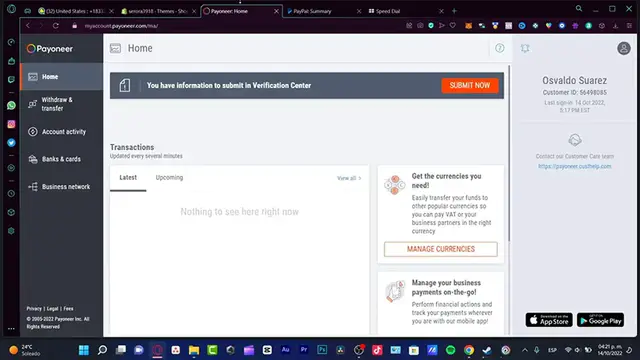
is just to create here, go into bank a card and what you guys want to do is to send withdraw
0:28
and transfer your Payoneer money from the section actually from Payoneer from withdraw
0:34
and transfer into a bank or LinkedIn card that you already have into Payoneer
0:39
And once you have your money available into your credit or debit card, which in my case
0:44
this is the bank that I have currently at, I can go back into my PayPal account, I can
0:50
go into my wallet and here into my wallet what I can do is to link a bank account or
0:56
a card in order to dispose of that money. But now inside PayPal, so that's like a very easy way to do this and you have to be dealing
1:04
with the second option because the second option is just a little bit more different
1:09
So the second option is to have your two accounts already opened and PayPal and Payoneer, both
1:15
of them already opened. And what I want to do here is to go into wallet and link a bank account
1:23
And here it's going to be asking us for a account number, your name, a writing number
1:30
and account number. And in order to get that information, we want to retrieve this information from Payoneer
1:37
So how you're going to get that is to go into the contact section, the payoneer.customhelp.com
1:43
which is actually available into any part of your Payoneer account. And what I'm going to do is once you click in there, it's going to be popping up this
1:51
application of, I mean, this website of support the home page. And what I need to do is to look for the same payments, withdrawal to bank
2:00
And in here, you can choose, let's say, withdrawal bank accounts, I'm going to choose the second option
2:07
Now that this has been successfully done, you can choose either one of those
2:11
In my case, I want to look for how do I withdraw funds to my bank account
2:16
So I want to look for the, didn't you find your answer and go into contact us
2:21
Now in here is going to be telling us the contact customer account
2:25
We want, we don't want to send a message. We want to go into the live chat because the live chat is going to be helping us just a
2:30
little bit more faster. And in here we have the chart working hours for Monday to Friday
2:36
I am still in time to make the requestment. So what I want to do is to go into send payments, I'm going to leave it like that
2:45
And here I want to delete, I'm having issues with the adding on a bank account and just
2:49
type something like, I just want to send my savings from PayPal into my Payoneer account
3:01
or in our case, like the other way. Right. So after that, just get into submit
3:06
And once that happened, it's going to be popping up the live chat support when you can now
3:10
be, someone's going to be helping us with the life assistance. So what's going to happen is that they are going to be just confirmed that we are just us
3:19
And after that, they're going to provide us this information. Just we having this information
3:24
Now we can have our bank account. We select the option that says, give it a nickname
3:29
We put the Payoneer account and now our money is now available into PayPal
3:34
So actually it's just as easy as to do that, but just try to be patient with this live
3:39
chat guys, because they're just, sometimes they take their time and might be a little
3:44
bit annoying, but it will be helping us to resolve our issues
3:48
So there you have it guys. I'm going to leave you a link down below in the description. So just in case you don't have a PayPal, neither a Payoneer account, you can create one of
3:56
those on your own and you can get just a few rewards just by having those accounts
4:00
So thank you so much for watching this video guys. Once again, don't forget to like and subscribe to the channel guys
4:04
And well, I will see you next time
#Business & Industrial
#Finance
#Banking
#Money Transfer & Wire Services