Up next in 10


How to Swap USDT to BNB in Trust Wallet (Step by Step)
Show More Show Less View Video Transcript
0:00
Hey everybody in this tutorial I'm going to show you how you can swap your USDT into VNV
0:04
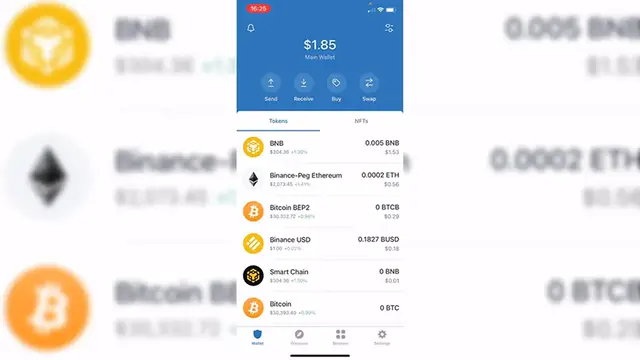
using our trust wallet. So as you can see already into the application the first thing you want to
0:09
do is to find your USDT tokens. If you don't see it on the list below of your list of tokens just
0:16
go ahead and click in here and you have to select the option that says USDT. Now last thing you want
0:23
to do is to enable your Theta so you can be so you'll be able to see the token now. So now that
0:30
you're available to make the swap for what you guys want to do is to go and scroll up and select
0:35
the option that says swap. Now as you are in here it says you pay and you get so if I select this
0:40
option that says you pay I want to select my Theta and it says you get so these are all the
0:47
customs tokens that I can receive if I want to pay and make the swap for. So now just in case
0:54
that you cannot make the conversion because sometimes there are a few tokens that cannot
0:57
be exchanged inside trust wallet so in this case we cannot use the USDT. I'm going to select VNV
1:04
I cannot see it right in here in the list so what I want to do is to cancel this and go back
1:10
key into done and go into the browser. Now once we are into the browser inside the trust wallet
1:17
we want to go into PancakeSwap finance slash swap so once we are in here it's going to be asking us
1:24
to connect our trust wallet so once we are in here let's go ahead and to connect and select more
1:30
then we want to select the option that says trust wallet so now after we make the confirmation
1:36
you're going to see that all your balance is now available into the PancakeSwap so what we want to
1:41
do is to select the first option and look for the USDT the Theta token okay so here it is my USDT
1:48
you should see your balance right in here and instead of cake you want to receive
1:52
Binance coin so after you put the amount that you want to receive here is going to be the total
1:58
price of the VNV and what you're going to get so after that the last thing you want to do is to hit
2:04
where it says convert in my case is in Suffix USDT balance because I don't have too much but you
2:09
guys just go ahead and hit into convert after that's going to be sending you a confirmation
2:14
that you need to accept and go back into your wallet from trust wallet and now you can see that
2:19
your USDT is now being converted into BNV and the last thing guys if you don't see the BNV token
2:26
in your assets just hit into this option that is right about in here and enable your BNV so you
2:32
can see it right into your assets as simple as that guys so there you have it don't forget to
2:37
like and subscribe to the channel guys if you want to see more about trust wallet thank you
2:41
for watching the video and I'll see you guys on the next one
#Investing
#Other