live_tv
Livestream Starting Soon
00
Hours
:
00
Minutes
:
00
Seconds
Up next in 10


HOW BITSO WORKS (Step by Step Tutorial) Bitso App Basic Tutorial 2024
Show More Show Less View Video Transcript
0:00
Hey there, if you want to stop paying on BATU or how to cancel a subscription you are actually in the right place
0:06
So first of all guys, I'm here into my BATU application and what I want to do here
0:11
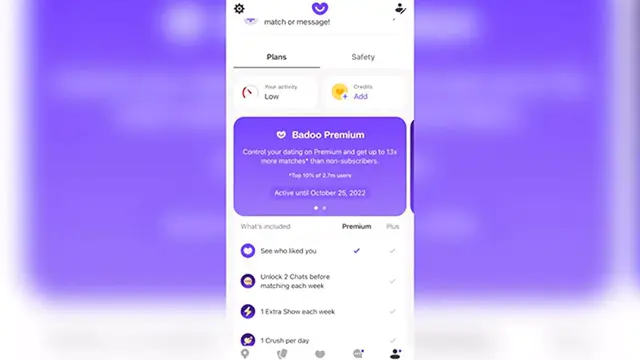
it's the well as you can see here have a BATU premium active until October 25. So in here, let's say I want to choose BATU premium
0:22
And I can operate that right? So if I want to compare the prices I want to choose this option
0:28
I can see the plus and the premium and if I want to upgrade
0:32
I want to choose this option I didn't have to be worried about the prices because this prices appear into MXN
0:38
And actually this is like very very low prices But in my case appears like too high but you have to worry about that
0:44
If I go into continue, it's gonna be sending me speaking about my cell phone
0:48
It's gonna be sending me to the App Store in order for making the transaction
0:53
So if I want to cancel at any time I need to go into settings Apple ID at least one day before each renewal date plan automatically renews until canceled
1:03
and then I can cancel the the subscription depending on what kind of
1:10
subscription or payment method that I use in order for the plus I need to go directly to them and make the
1:16
Cancellation I cannot cancel any kind of premium stuff inside the application. I need to do that outside
1:22
So in here as you can see the application Is gonna be connecting me right away into another payment method in my case in Apple ID in order for making the payment
1:32
So specifically speaking about my way to do this is to go directly into my subscriptions
1:40
And here into my subscriptions, I might see I might see here for example here
1:45
He appears tender, but let's say for example, this is like Badoo, right
1:49
I'm using better premium mode because I have a free trial mode
1:53
So that's the reason why it does not appears into subscription But I just need to click into subscriptions click into value and going to cancel that
2:01
So after that is gonna be no longer available Into my phone into my account so I can go back into Badoo
2:08
I can reload my page and I won't be having access to value premium anymore
2:13
Unless I want to renew that once again So in my case I can't renew that in here from subscriptions or I can go back into a do and
2:21
Select a premium mode and just click in here. It says upgrade. So they have you guys
2:26
Hopefully this was a pretty useful video for you. Just in case this does not work for you
2:31
You can always go into the help support center from the value payment
2:36
You can always go into the settings go into the help center and contact them so they can be helping you to
2:41
Cancel the subscription and hopefully you can get refund for what you pay so far
2:46
So thank you guys again for watching video. Don't forget to Like and subscribe and I will see you next time