live_tv
Livestream Starting Soon
00
Hours
:
00
Minutes
:
00
Seconds
Up next in 10


How to Link Ubisoft Account to Steam (Quick & Easy)
Show More Show Less View Video Transcript
0:00
Hey there, if you want to link your Ubisoft account with your Steam account, you are in the right place
0:05
Now, first of all guys, in order to continue, you need to have your Steam application already installed into your device, like your PC, your Windows, whatever
0:15
And then you need to have your Ubisoft account already opened into a browser
0:19
So, if you feel a little bit lazy today, I'm going to leave you a link down below in the description, so you can take both applications already opened
0:27
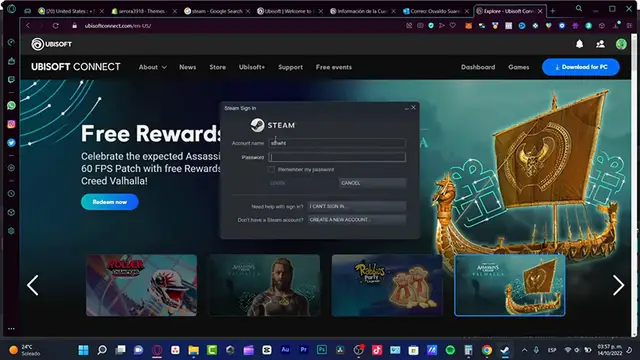
You just need to sign in, which that would be pretty, pretty easy. Right, so in this case, I'm already into Steam, so what I want to do now is to just make this a little bit minimized, just for a second
0:39
And in here, into the ubisoftconnect.com, the link that I'm going to leave you down below in the description, guys
0:44
You need to sign in, and after you sign in, you want to locate your account, which is actually in here
0:52
And I want to go into my account management. Alright, so I tried to see the settings here into my account, but it seems that there's a little bit of things that has been moved so far
1:04
So, what I want to do is to download here the Ubisoft Connect into my PC, in order to continue
1:10
So, now that I have already downloaded here my account, and I've already signed in, what I want to do is to log into this browser, which is in here, and go into my settings options
1:20
Right, okay, so now that we are in here, what you guys want to do is to find the account linking section, which is actually in here
1:28
I'm going to click in here, and now what I want to do is to remind me of account linking next time I launch a Steam game
1:36
So, what I want to do is to enable this option, just wait a few seconds, and then what I want to do is to restart my Ubisoft Connect
1:47
And once again, I want to restart my Steam account, and we are successfully done
1:53
So, as you can see, I have this application into my Steam, and now I have this into my Ubisoft Connect, which is actually really, really simple guys
2:01
So, there you have it guys, just in case you have any questions, you can leave that down below in the comment section
2:06
Don't forget to like and subscribe to the channel if you want to see more about this kind of stuff
2:10
Remember to reload the page of Steam and Ubisoft Connect, both of them you need to reload that in order to enable that
2:18
Vaculation between both applications, but if you have, let's say for example, an account using Xbox, you can just sign in using your Steam account
2:26
You can just sign in to Steam using your Xbox account, and to do that into Ubisoft as well, and it's going to be already linked so you don't have to do anything at all
2:34
So, thank you so much once again guys, and well, I will see you next time
2:40
Outro