Up next in 10


How to FIX ChatGPT Network Error (Step by Step Tutorial)
Show More Show Less View Video Transcript
0:00
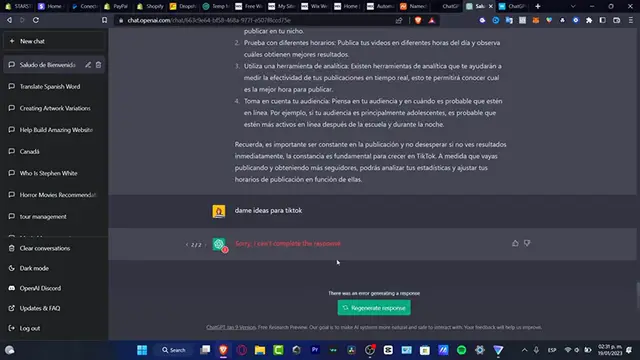
Hey everybody, just in case you have this quick issue, let's say sorry I can't complete the response or there was an error of your network
0:08
There might be two possible stuff and the very first issue that you might be having is that you have a VPN already connected
0:16
So what you want to do is to have this enabled, any kind of VPN in order to continue
0:21
Or before you want to go with the chat DPD, you want to have your VPN enabled before you want to start a conversation
0:31
Because if you try to enable this after you make a conversation, the IPs will be changing of your internet
0:38
And of course this one is just not going to be working at all
0:42
And the second option that I can give you guys, just in case this actually happens, you want to have a stable WiFi connection
0:48
Sometimes this might be happening for you, this happens even for the best of us, so you don't have to worry about that
0:54
What you want to do is just to try to connect once again, disable your VPN and then go into regenerate response
1:01
And I'm just going to wait a few seconds and see if this one is actually working
1:07
If this one still does not work, what I can try to suggest you is to choose the option that says stop generating
1:13
You want to go into the logout, and once you logout you want to try to log in once again
1:19
And I'm going to choose exactly my same account, like this I'm going to locate my actual chat support that I was creating, the conversation that I was creating
1:31
As you can see it says we're experiencing exceptionally high demands, this happens every time so you don't have to worry about that
1:36
Just wait until the chat DPD do their job, as you can see here is all my actual chats, just look out for one of them
1:45
And now you're good to go, you can go into regenerate response and then you're good to go
1:50
So with that being said guys, this is the very end of the video, hopefully this was very useful for you
1:54
Just in case you have any question or you have another solution, you can bring that down below in the comment section
1:59
So we can all help each other, thank you so much for watching the video guys
2:03
And I will see you on the next video, I'll see you soon
#VPN & Remote Access
#Software
#Email & Messaging
#Voice & Video Chat