Up next in 10


How to CREATE an HBO MAX ACCOUNT (2024) Register for HBO Max for the First Time
Show More Show Less View Video Transcript
0:00
So you want to have your HBO Max account for the very first time
0:03
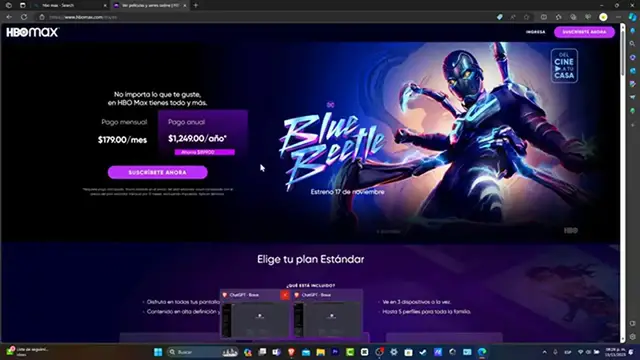
Let's see how we can do this the very first thing you want to do is to open your browser. Let's type
0:09
HBO max dot com After you choose that option is gonna be showing you something like this
0:17
So what you can do is to scroll all your way down before you can continue to change the language of your actual account
0:24
So in order to continue let's get into subscribe now the process actually
0:29
It's really simple The only thing you needed to do what you have is an actual Google account or a concrete email in order to continue
0:37
So it's gonna be asking you choose your HBO max experience You can choose the one month three months and 12 months in order to continue
0:46
You have to be afraid in here because this one appears into MXN currency
0:51
since this one is a 1779 MXN this one into dollars is equal to $10 per month
0:58
So actually it's not that bad you have access to all the devices three devices at a time
1:04
High-definition in 4k up to 30 downloads in five profiles which in which in this case it is actually the same than rather than three months and
1:15
Even 12 months. The only thing here is that you're actually gonna be saving up to five months up to five months
1:22
So that's totally up to you So in order to continue let's get in to choose the planet best suits for you
1:27
And now what you want to do is to create your account so let's type into our first last name our email address and
1:35
Confirm the same email address as well as an actual passcode Now remember that your passcode must be at least a characters and include a number or special character
1:44
Be sure you're gonna be choosing an actual passcode that you can remember for it for further signing in
1:50
Congratulations, your account has now been created So in order to activate your account you just needed to add a payment method in order to continue
1:59
So in order to add your payment method for security reasons What I can totally suggest you is to add a virtual credit card or debit card that is generated into your banked account
2:11
Application once you have filled the information below let's get into start a subscription
2:16
So there we have it You're ready to stream and your name sign on your support devices now to enjoy your favorite dreams
2:24
You will sign in with here's my actual email Here is your plan your payment method the next billing date really really important if you want to cancel it
2:35
Before you get taught you wanted to do this before this date and we have sent a verification email to the address above
2:42
Just type the button inside to verify your email address I'm gonna hit into let's go and now here's my full catalog for HBO max
2:51
So before I dived into all the catalog here into HBO I just want to make sure that I have verified my email
2:58
Using my Gmail account the same email that I used to sign into HBO
3:04
So as you can see, here's my email I wanted to validate this one. This one should be sending us directly once again into the HBO max
3:12
So as you can see now the brief occasion has now been completed and there you have it guys
3:16
I reload page and now I can play into HBO max with a verified account and nothing else
3:24
So with that being said we have not reached into the very end of the video So don't forget to like and subscribe to the channel if you wanted to see more great stuff
3:32
About how to get started with these streaming devices. Thank you once again, and hopefully we can see you next time