Up next in 10


How to Convert USDT to TRX on Trust Wallet (Step by Step)
Show More Show Less View Video Transcript
0:00
how to convert the Theta token into Trone using TrustWallet
0:06
Hey guys, welcome to this new video. And today's tutorial, we're going to see how we can convert the Theta token
0:12
That would be the USDT into the TRX. That would be Trone token and TrustWallet
0:18
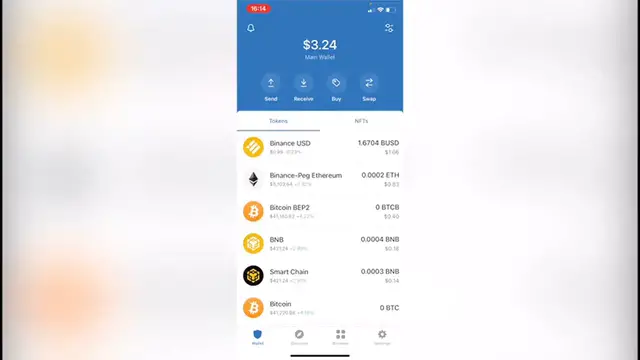
So as you can see, I'm already in here. And the first thing I want to do is to go, it says swap
0:23
And as you can see, have the, you pay and the you get. So where it says you pay, you want to select this one and you want
0:29
to look for the token that you want to convert in this case, that would be the USDT, the Theta, there are a few of them
0:36
And you want to select the one that you have already. Your money isn't. So in this case I have zero, but I'm going to select the first one
0:43
And then where it says you get, you want to go in here and look for TRX
0:48
Now, as you can see, we have no assets found because there are a few tokens that are not available to make this swap in TrustWallet
0:55
So what you want to do is to go back. I'm going to hit into down
1:00
So I'm back into my wallet and you want to go where it says browser
1:04
And now in here, it wants to enter the website, pancake swap dot finance slash swap
1:11
As you can see, I got it in here in my history. So I'm going to select this here. And now what you want to do is to click in here where it says connect wallet
1:19
And now we want to select the one that says TrustWallet. And now that we are in here, what you want to do is to select the first one again
1:26
So I can select the FIFA in this case, that would be this one. And where it says cake, I'm going to change this into TRX
1:34
That will be thrown. And there we have it. So the last thing you want to do is to select how many tokens you
1:41
want to send and make the swap for. In this case, I'm going to change to this for BMP
1:47
So you can see guys what's going to happen after I clicked into confirm
1:51
I'm going to make the confirmation swap. And after that, it's going to be sending us right away into TrustWallet
1:57
so we can make the confirmation. Now, in this case, it says that we don't have enough smart chain to
2:02
convert to the network fees, because in order to make this transaction, we
2:06
need a little bit more of a smart chain coin so we can pay for the network fees
2:11
As you can see, this one costs me around that three zeros, nine, one, one BNB
2:16
That would be 38 cents. So I don't have enough for that, but I'm going to show you the transaction
2:21
that I just made a few hours ago. In this case, if you already have the smart chain to make the network fee to
2:27
pay for the network fees, you just hit into confirm, and after you've done that, you want to exit the page and you want to go into your wallet and you're going to
2:35
see that the token is now added into your assets, but just in case you don't see
2:40
the assets just yet, you want to go into manage tokens, you want to select the
2:45
token that you want to watch. In this case, that would be Tron. And if this one is not enabled, you just hit into enable like this
2:52
Hit into Dawn and you scroll down and you're going to see that your token is
2:56
now on your assets and the swap has been done successfully. So there you have it guys
3:02
Don't forget to like the video and subscribe to this channel if it was useful for you, and if you want to see more about this app, thank you for watching
3:08
the video and I'll be seeing you guys on the next one
#Investing