Up next in 10

How to Convert SHIBA INU to USDT on KUCOIN (Step by step) Swap Tokens & SHIB Kucoin
Apr 2, 2024

How to Convert SHIBA INU to USDT on KUCOIN (Step by step) Swap Tokens & SHIB Kucoin
Show More Show Less View Video Transcript
0:00
how to convert shiba to usdt on kucoin
0:05
hey guys welcome to this new video in today's tutorial i'm going to show you how you can trade
0:10
your shiba coin for fifa coin that would be the usdt coin so i'm going to use kucoin so the first
0:17
thing you want to do is to go into kucoin you're going to see your dashboard and first of all you
0:22
want to focus here where it says your wallet and then we want to click where it says main account
0:28
where you are supposed to have your shiba tokens right so i'm going to select shiba and then you
0:34
have to select this one that says transfer we have to leave the direction like this
0:38
because we want to send from our main account into our trading account if you have your tokens
0:44
on another direction you select this one select the exact coin that you want to be sending and
0:50
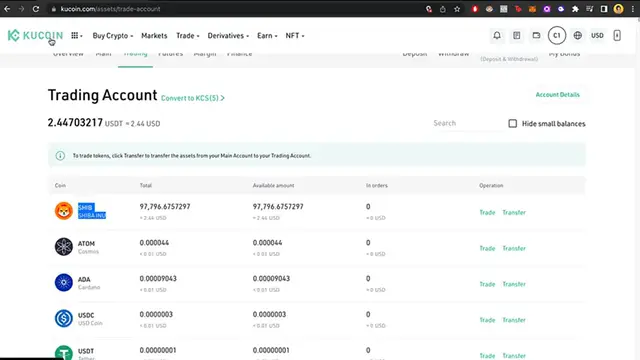
the exact amount and hit on confirm now once you finish it you want to go into trading
0:56
inside your wallet and you're going to see that all your shiba has been sent into your trading
1:01
account and that's exactly what we want so now that we have our shiba into our trading account
1:08
we want to select trade and as you can see there are two options that we can make the
1:14
transaction for so i want to select fifa because we want to make the transaction from shiba to usdt
1:21
so now we are going to be redirected into this specific trade tab so you're going to see the
1:27
market graphic the order book the market depth and the isolated margin and the order so we want
1:35
to focus down in here so we can make this a little bit more easier and if you want to make limits
1:41
you can select the exact limit you want to make you can put the minimum price but if you want to
1:47
make this a little bit more easier i strongly recommend that you select a market so we can
1:52
sell or buy in a specific token with the best market price so in this case i have shiba so we
2:00
want to sell our shiba and trade this shiba into usdt in this case i want to sell the 100% of all
2:08
my shiba and clicked on sell so there we have it you have placed the order successfully if i go
2:14
into order history you're going to see in here that the sale has been done completed so if i go
2:22
in here where it says assets you're going to see that i have now usdt so i'm going to select
2:28
my assets so you can see that in the trading one i no longer have shiba i have usdt so there you
2:37
have it guys it wasn't that hot just in case you have any questions you can leave it down below in
2:42
the comments thank you for watching the video don't forget to like and subscribe to this channel
2:46
if you want to see more about kucoin so that would be all for today's guys i'll see you on the next one
#Currencies & Foreign Exchange
#Money Transfer & Wire Services