Up next in 10


How to Convert HTML Website to Wordpress (2024) Easy Tutorial
Show More Show Less View Video Transcript
0:00
Hey guys, if you want to convert your HTML code into your actual WordPress, it's going
0:07
to be helping you. It's going to be really, really easy to do this. As you can see, I'm already using ChatDVD
0:12
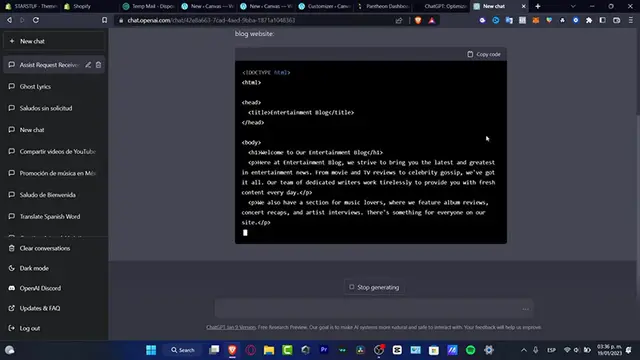
This is going to be an amazing tool for us to actually start working here into the blog
0:21
world or the internet blog. So as you can see, the computer actually generates something really, really easy
0:27
This is just an introduction for my actual blog. So what I want to do is to copy this code
0:32
If you already have a code, you can skip this part, but I just copied this code
0:36
I go back into my WordPress and here I'm going to go into new canvas like this
0:42
I'm going to create actually a new blog. I'm going to go and open this part
0:48
And what I want to do is to actually create something new
0:53
So I'm going to hit into save. I'm going to leave this like that. I'm going to go into the very first part of my actual stuff
1:01
I'm going to just exit here. And here I want to go into grid
1:06
So here into grid, I do have a new page that I can customize
1:12
So I can click in here. And what happens, guys, if I actually just paste the code
1:21
So if you can see, I just paste the actual code from the ChatDVD
1:25
This one has been already enabled the actual information and all the hyperlinks and all that
1:35
So I don't have to do absolutely anything. So I just need to, of course, copy this one, paste that in here and delete the heading
1:44
part like this. So as you can see, it's just a matter of copy and paste your code
1:50
You don't need to do exactly anything here because everything has been now set up correctly
1:54
in order to do that. Just in case this one does not work. What I can suggest to you is just to make sure that if you click into the plus button
2:02
you want to enable, of course, the block section. I'm going to go into code
2:07
You want to enable this one and you want to just copy and paste that and use once again
2:12
copy and paste your code and put that into your actual block
2:17
So with that being said, guys, we're through the very end of the video. So don't forget to like and subscribe to the channel if you want to see more amazing
2:24
results, amazing stuff that you can do here into WordPress. Don't forget that you have here all your blocks you can add, you can delete and you can go
2:34
nuts with all the patterns, with all the blocks and all the media you can add here into your store
2:39
So thank you once again for watching the video, guys. And well, I will see you on the next video
2:44
I'll see you soon