Up next in 10


How to Change Shopify Store Theme 2024 (Full Tutorial)
Show More Show Less View Video Transcript
0:00
what is up guys if you want to change your theme from Shopify you are in the
0:04
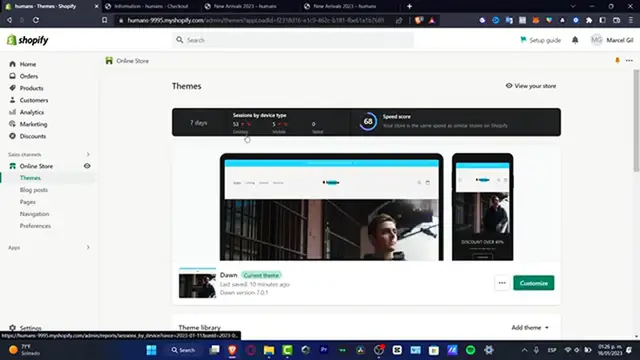
right place I'm gonna be showing you how we can do this so the first thing you want to do guys is to have your Shopify store and here I'm gonna go into the
0:11
online store so as you can see here's a theme library that I have here currently
0:16
working nice and easy so what I want to do is to change a few stuff so let's say
0:23
for example that I'm gonna be changing the actual theme so what I want to do
0:27
here is to go into the theme library and here I want to look for the a theme or
0:31
you can go into the popular free themes and in here you want to look for
0:35
something that is the most accurate for your actual store should be the tab into
0:41
let's say one back many many ways to use it I'm gonna hit into out and what's
0:47
gonna happen here is that the Shopify is gonna be adding the theme library in
0:51
here so what I can do is to edit this theme as well as this theme but if you
0:57
want to change from one theme into another what you want to do is to hit
1:01
into the customize and then you can go into the publish so this one is going to
1:05
be let's say making the merge between this one and the other one you don't
1:10
have to worry about the content because all the content you're going to be doing that outside the Shopify speaking about the brand speaking about your logo
1:18
speaking about your slogan all of that you can go into settings here into
1:22
settings locate the brand section that is in here and here I want to import all
1:29
my information about my store so no matter what kind of themes I use all of
1:35
this information is going to be added into the actual theme that I'm currently
1:40
using so I'm going to hit into the X mark I'm going to go into my themes and
1:45
and here into my actual themes I'm going to locate the origin I'm going to hit
1:49
into the three dots and here what you want to do is to go into the publish so
1:55
your customers will see this theme when they visit your online store hit into
1:58
publish there we go so the dawn is not going to be added in here and here is my
2:03
new actual current theme I'm going to hit into the customize and here I can
2:08
edit my few examples and there's actually how we can change from one
2:14
actual theme into another one so without being said guys thank you for
2:18
watching the video don't forget to Like and subscribe to the channel if you really want to see more amazing tools about this theme library of the Shopify
2:25
thank you once again for watching the video and I'll see you next time
#Online Goodies
#Skins, Themes & Wallpapers