live_tv
Livestream Starting Soon
00
Hours
:
00
Minutes
:
00
Seconds
Up next in 10


How to CANCEL SHOPIFY Subscription (Close Shopify Store 2024)
Show More Show Less View Video Transcript
0:00
what is up everybody, if you wanted to cancel your Shopify
0:04
account, if you want to cancel everything, I'm going to be showing you how we can do this
0:08
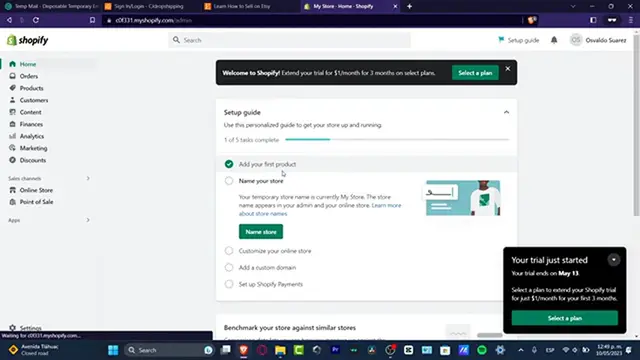
really really fast, the very first thing you want to do is to focus into your dashboard administrator
0:12
and once you are in here, what I want you to do is to make sure that
0:16
here into my settings, I want you to look out here for payments
0:20
and here into payments I don't want to have any credit card added, so
0:24
this one should not be taking any kind of money at the end of the day, of course into the billing section
0:28
the process is actually the same, so after that I'm going to get
0:32
now into plan and here as you can see we have the trial version
0:36
I can deactivate the trial version in here or I can go into the
0:40
X mark, look for my account and here I want you to
0:44
look out for manage account into the upper side, once we are here into Shopify account profile, you want to look out for security
0:52
and here into security I want to scroll all my way down
0:56
and make sure that all the devices are looked out so nobody can enter here once again into my Shopify this one
1:04
once it has been deactivated, so once I have successfully done that
1:08
inside here, focus into the general option, here into general I'm going to scroll once again all my way down and look
1:16
for my actual view of all my stores, I deactivate the trial
1:20
or cancel my actual plan and then later on this one should be popping us out of Shopify so we are
1:28
no longer going to be able to sign here into Shopify just in case you don't see that, you don't have to worry about that, you can always
1:36
open a new tab, let's go for deactivate Shopify and here it's going to be showing us a URL so
1:44
we can deactivate or pause your store if you wanted to do that
1:48
so I'm going to go here where it says pause and build my plan
1:52
or go here where it says before, you can see that I'm going to scroll all my way down, by cancel your subscription so I can go here
2:00
and there we go, so what is left to be done is now
2:04
to enter a passcode and wait a few months so this one should be deactivated but after that period of months this one should be
2:12
deleted permanently, deleted including your credit cards your payments and the billing and all of that element so you are no longer going to be
2:20
concerned about your account and all the information that you have just added before
2:24
with that being said guys I think we have not reached into the very end of the video so just in case you have any
2:28
questions you can leave it down below in the comment section, so thank you so much for watching the video once again guys
2:32
and well, I'll see you on the next video
#Business & Industrial
#Shopping