live_tv
Livestream Starting Soon
00
Hours
:
00
Minutes
:
00
Seconds
Up next in 10


How To Buy USDT on Trust Wallet (Step by Step)
Show More Show Less View Video Transcript
0:00
Welcome everybody into this new tutorial. Let's take a look at how we can buy the USDT token here into our trust wallet
0:07
So first of all guys what you guys need to have here into your assets is the Theta token
0:13
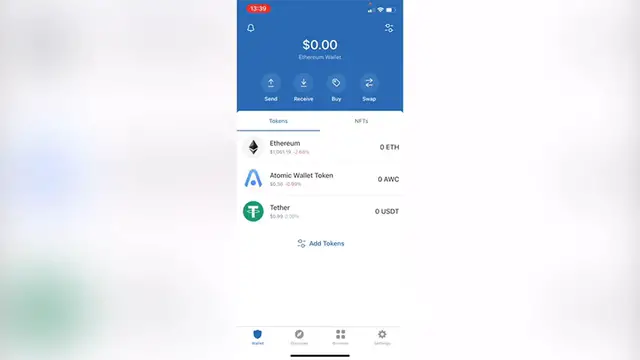
So as you can see having in here just in case you don't see it You can go back into a wallet and what I want to do is to click in here, which is add tokens
0:21
You can see right in here. I'm gonna click in there and then I want to search for the USDT
0:26
So as you can see the bunch of tokens that we can buy and what I want to do is to enable this token
0:32
So I can see it back into my assets So once I click in there, I want to select the option that says buy Theta
0:39
which is actually at the right when it says Theta I'm gonna go into buy and
0:43
I'm gonna delete this so I can see which is the minimum purchase of this token as you can see
0:49
It says 50 minimum purchase of dollars. So I'm gonna go ahead and select $50
0:55
And now it says Binance Connect so this is like the providers that we can use for
1:01
This USDT so we can have like a better advantage here. You can select the Binance Connect
1:07
You can get a little more of USDT I'm gonna go into next and now it's gonna be redirecting me into the Binance Connect here
1:14
I'm gonna accept all the cookies in here. So as you can see I can buy $50
1:20
This is my summary here and the last thing you want to do from this specific provider is to log into
1:25
Your Binance account. I'm gonna go into done just in case you want to select other
1:31
Provider let's say you want to go into simplex just hit into next It's gonna be redirecting us again into another checkout in this case. It's just simplex
1:39
We just need to provide you can either pay with a paper or with a credit or debit card and hit into next
1:46
So once you've done that you want to go into done I'm gonna go into done and
1:51
You can go into your wallet just to see that your tokens are not available into your account
1:56
Now just in case if you don't see it once again You can go into add tokens select the token that you were looking for and make sure you go into the settings your wallet and
2:08
Select your wallet that has already your money. Sometimes there are a few tokens that are not available into a specific
2:15
Chain here. So that might be the reason you won't see it yet So just in case you have any question guys, you can leave it down below in the comment section
2:23
Don't forget to Like and subscribe to this channel if you want to see more about the trust wallet application
2:28
Thank you for watching this video and I'll see you next time