Up next in 10


How To Add Amazon Affiliate Links To Facebook Page (2 Methods 2024)
Show More Show Less View Video Transcript
0:00
Hey there! If you want to link your Amazon affiliate link into your Facebook page, you are in the right place
0:06
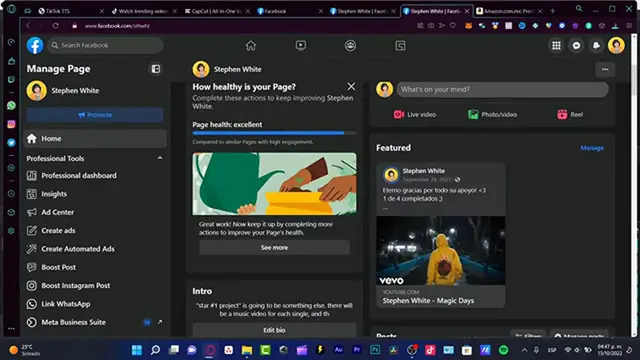
So, first of all, you need a Facebook page, which you can see I'm already into a Facebook page
0:11
So what I want to do here is to look for the item that I want to use for, or let's say that I want to send that into my specific page
0:19
Let's say for example that I want to, I don't know, maybe share this offer
0:23
So, what I want to do here is that, let's say I want to choose my item
0:28
And now that I have here my item here, it's going to be taking just a couple of seconds here
0:33
And let's say for example that I want to copy this image, I'm going to paste it as a feedback
0:41
Or I can just download the image and then I can add my image right in here, right
0:48
Now, what I'm going to do here is that I'm going to go back and here, let's say for example that I want to show this item, right
0:54
So you can see this share button. So here it is, my, so here's my URL
1:01
If you're not sure if this is an affiliate link, what I can totally suggest you guys is to click in here where it says share into Facebook
1:09
And as you can see, it's going to be popping up the facebook.com section
1:13
And now it's going to be connecting us into the Facebook page. But in my case, I just want to have the link, which is actually this one
1:22
The, so here's my ID of affiliate, my ID of, I want to choose this one right here
1:31
I'm going to copy. I'm going to paste it right in here
1:36
So after I make the post, it's going to be appearing the item and it's going to be appearing the link as well
1:43
So if I clicked into the link, it's going to be appearing here, my item
1:47
So it's actually really, really simple to put here into the newsfeed
1:51
Now, if you want to put in a specific, let's say a URL into your bio, just get into edit bio
1:57
And in here, you can just paste your stuff and you can save that
2:02
And you can see now it's going to be, how it's going to be looking. If you want to have just a long link, you can go back and here, which you can obtain a text
2:11
I'm going to choose long URL. As you can see, this one appears in Spanish, but this is for a full URL
2:19
So I can copy and I can paste that in here. So there you have it guys. Hopefully this was a very useful video for you
2:24
Don't forget to like and subscribe to this channel if you want to see more about this kind of Amazon stuff
2:29
Thank you so much again for watching this video guys. And well, I will see you next time
#Web Services
#Affiliate Programs
#Social Network Apps & Add-Ons
#Consumer Resources
#Video Sharing