0:00
Hello and welcome. In previous video we have seen how to work with Pycharm, how to install it and
0:06
how to work with Pycharm and why do we need a good python code editor. However, installing Pycharm
0:14
locally and working in it is super beneficial no doubt, but besides Pycharm, we can also use
0:22
another very good online tool which is made by Google none other than Google
0:30
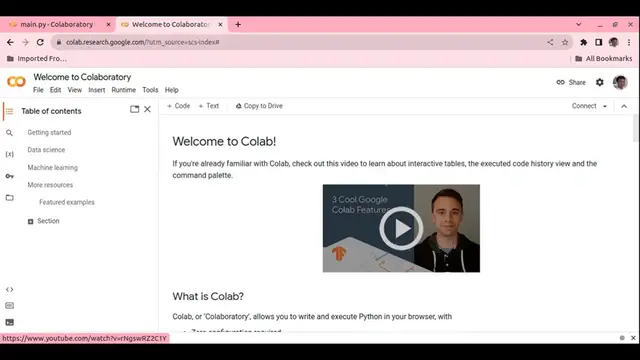
and it's called Google collab Google collaboratory that means Google has arranged to collaborate your all Python programs globally using your gmail
0:43
account so what do we we need to start Google collab is only a free gmail
0:51
account. Well, if you search Google Colab in Google, you will come to this page. However
1:00
to start a new page, you just go to file and use notebook, new notebook, right? That takes you to
1:09
this page and you can see that I have named it main.py. So, we can just keep
1:18
writing our code here like this code. Now what is Google Colab and how it can help us? First of all
1:35
Google Colab or Collaboratory is a free cloud-based platform that allows users to write and execute
1:41
Python code through the browser. It is particularly well-suited for machine learning, data ysis
1:47
and education purpose providing access to computer resources including GPUs and TPUs without the need for local setup so you don need any kind of local setup all you need is an internet connection and a browser and a Gmail account that
2:02
is all now what are the key features of Google Colab a lot of features let's say
2:08
free access to computing resources because you can access all the GPUs and
2:14
tools for their machine learning and data ysis. When we will learn machine learning and data ysis
2:20
we will see how Google Colab can help us. No setup required
2:24
You don't have to install anything. You just need a browser. Interactive coding environment
2:31
Google notebooks provide an interactive coding environment where users can write, execute, and visualize code
2:37
in a seamless manner. Easy sharing and collaboration is another great feature that
2:44
comes with Google Colab because Colab notebooks can be easily shared with others allowing for
2:49
collaboration and feedback on projects. I'll show you how you can just save this file to my
2:55
GitHub account and share with you in the description below. It also has pre-installed libraries. Colab
3:03
comes pre-installed with popular libraries including tensorflow, pytorch and numpy to name
3:10
of you making it convenient for machine learning and data ysis tasks finally storage on google
3:16
drive you can store this file in fact many more files that you are going to write on colab you
3:25
can save them and store them in google drive it provides easy access and management besides github
3:33
or any other depositories you are using, you can always store these files on google drive