
0:01
hey everyone it's Mike here from Filter
0:02
grade and today I want to break down a
0:04
super simple topic of how to start
0:06
shooting movies with your Nikon
0:13
D50 okay let's get into it start by
0:16
turning your camera on and then look for
0:18
the LV button for live Shooting mode
0:20
when you turn it on you may be in photo
0:23
shooting mode which is the top setting
0:25
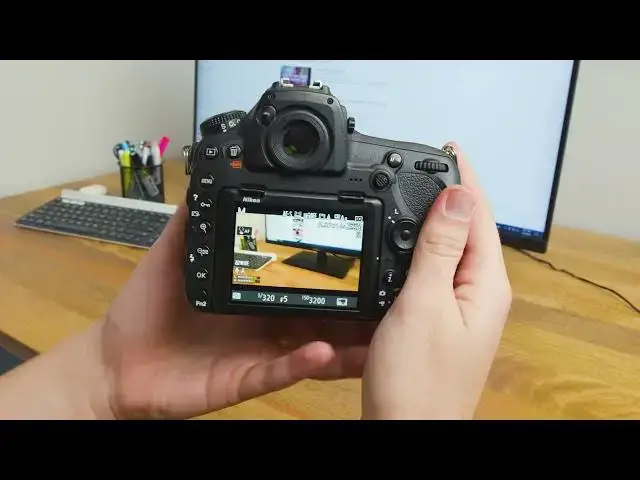
switch this up and now you're in movie
0:27
shooting mode you'll be able to tell
0:29
because this icon is here and you can
0:31
also see the settings of your project
0:32
right there once you're here you can
0:35
adjust a lot of settings from this
0:37
screen you have all of your exposure
0:39
settings at the bottom here shutter
0:41
speed uh aperture and ISO to adjust
0:45
these follow these steps for shutter
0:48
speed move the front tile for aperture
0:53
tile for ISO hold down the iso button up
0:56
here and then move the back
1:00
once you're happy with these you can
1:02
move on to the next step which is
1:04
focus we're going to go over the
1:06
different Focus modes now to access
1:08
these you click on the left here and you
1:11
hold the focus button the focus mode
1:13
button down once you hold it down you'll
1:16
see the icon light up yellow up here
1:18
this means you can change the settings
1:20
if you're an AFS that's for a stationary
1:23
subject if you're an AFF that's for a
1:26
moving object determine between the two
1:28
of them and then leave
1:30
it once you choose that the second set
1:33
of settings is for Focus area or AF area
1:36
modes for these you have four options
1:39
normal which means you get to select the
1:42
point based off of this little icon
1:44
right here if your AF is off you won't
1:47
be able to do it by touching the screen
1:49
you'll have to use the dial so turn this
1:51
on and now you can see I can change the
1:53
focus by just tapping somewhere on the
1:56
screen the next option is oops wrong way
2:01
the next option is AF wide for this it's
2:04
for Landscapes and other broad subject
2:07
points you can still tap around but it's
2:10
for much broader Focus as opposed to
2:13
section after that you have face
2:16
priority which is for subjects and
2:17
portraits and then the last setting is
2:20
subject tracker as you can see you have
2:23
a box right here tap somewhere and then
2:26
the focus will stay there the entire
2:28
video As you move around
2:30
the camera does its best to track it
2:33
it's not always super accurate though so
2:34
use this with discretion I typically
2:37
shoot in normal that way I have all the
2:40
control to just tap somewhere and it
2:42
will F and then I can change it as I
2:47
along the next settings we're going to
2:49
work on start with this I button right
2:51
here click that and then you'll see a
2:53
bunch of different options first you can
2:55
choose image area then you can choose
2:58
the frame size frame rate
3:00
we're going to skip quality because we
3:02
choose that in the frame size and frame
3:04
rate you can't adjust active delighting
3:07
when you're in live mode the microphone
3:10
the microphone sensitivity is another
3:12
option if you're recording
3:14
audio then you have an
3:17
attenuator you can turn that on or off
3:20
frequency response wind noise reduction
3:24
choose the destination of where your
3:26
footage will go change your monitor
3:31
multi selector power apture which I've
3:34
used multi selector exposure comp
3:38
highlight display and then headphone
3:42
volume you don't typically need all
3:45
these settings but it's good to know
3:46
where to get them in case you want to
3:48
change one of them click the I icon
3:50
again to turn it off now we're ready to
3:52
shoot to start recording click the red
4:02
once you're done tap it again and then
4:05
the recording will end to play it back
4:07
make sure you're in live mode and then
4:09
click the play button up here now you
4:11
can view your clips and see what you
4:13
like what you don't like and keep
4:17
shooting that should cover everything
4:19
there is to know about the basics of
4:21
shooting movies with your Nikon d850
4:23
there's definitely more we can go into
4:25
but I wanted to keep this tutorial
4:27
simple so it'd be easy for you to get
4:30
if we went over anything too quickly or
4:32
if it was kind of hard to understand
4:33
just leave a comment below we're happy
4:35
to help you out next week we're going to
4:37
be talking about how to shoot live mode
4:39
for photos with the same camera thanks
4:41
for watching and be sure to subscribe so
4:43
you can catch our next video right
4:46
away subscribe to the channel and thanks