Up next in 10



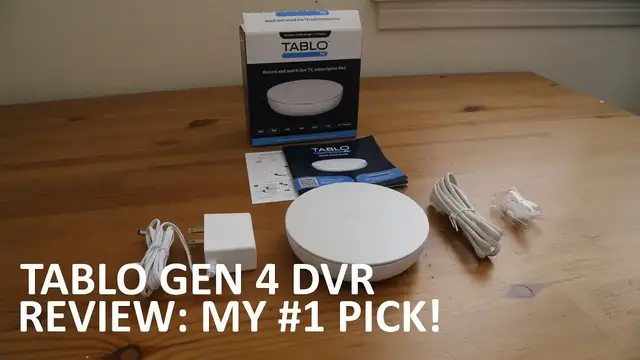
See why the Gen 4 Tablo DVR is my pick for the best DVR for most people.
Read my full review here:
https://www.disablemycable.com/blog/tablo-gen-4/
Watch my Tablo Gen 4 unboxing video here:
https://www.disablemycable.com/blog/mediasonic-homeworx-digital-converter-box/
If you want a DVR that doesn't require internet access, check out this one:
https://www.disablemycable.com/blog/mediasonic-homeworx-digital-converter-box/
Show More Show Less View Video Transcript
0:00
Hi, this is Brian from DisableMyCable.com, and today I wanted to give you my full review
0:05
of the Tableau fourth-generation DVR. Now this is a recorder that you use to
0:12
record live broadcast TV using an antenna. Now I've been a fan of Tableau for many
0:19
years and for a long time it was my number one pick for cord cutters who
0:25
wanted to record live TV. But then recently they got rid of their lifetime subscription for their
0:33
channel guide and switched to a monthly or annual fee for their subscription. And so to me, that went
0:40
against the whole reason for using broadcast TV, which is not having any fees. So I was so excited
0:48
when they came out with this new Tableau, which has no subscription fees. It has a 14-day channel
0:55
guide that is completely free after you purchase the product. So that's why this DVR is now my
1:05
number one suggested pick for recording live broadcast TV with some caveats. Now, I will say
1:13
right off the bat that this DVR is ATSC 1.0. It doesn't support next generation TV ATSC 3.0
1:25
Now, for most people, that's okay right now. There are some enthusiasts who, for them
1:31
it's a showstopper if it doesn't support 3.0 because they want the cutting edge features in their TV viewing. But for most people, I think this is fine
1:43
To me, the picture quality is great. I mean, it's not 4K because it's not next generation
1:48
But to me, the current standard is fine. And I think most people will find this product to be fine
1:53
And also, I wanted to say that this is not a paid promotion for this product
1:59
I purchased the Tableau fourth generation DVR, this one right here, at full price on my own
2:07
So I didn't even get this product for free. And I do that because that's the only way to keep me completely objective about my reviews
2:15
So let's get on to the setup process. Now the Tableau fourth generation can be used with either Ethernet or Wi connected to your network It does require an Internet connection to use If you need a DVR that does not require internet I put a link to that one in my description So I chose to use
2:38
an iPhone and Wi-Fi to set up my product, my DVR. Now the setup process is very
2:45
similar to setting up other Wi-Fi connected devices using your phone. If
2:49
you've ever set up a Ring camera using your phone, the process is very similar
2:55
Basically, you have to temporarily log into that device's Wi-Fi network, then finish the setup process
3:03
The app guides you through all of this, and I found it to be very easy to use, and I didn't have any problems
3:11
After setting up Wi-Fi, it went through a firmware update process, which did take some time
3:16
So basically, I just left it and came back later and it was done. After that, it guides you through the antenna connection process
3:23
and it has actually a pretty cool map in there which tells you which direction to point your
3:28
antenna and it even includes a compass on the iPhone app so you can use your iPhone to point
3:36
it in the proper direction. After that, I did a channel scan which did take a little while but
3:42
again, I just left it and came back later and after that, I was ready to go. So the first thing
3:48
I tested was the iPhone app itself and I found it to be very straightforward. The channel guide is
3:54
pretty much what you'd expect. It shows the station icon and channel number and you just click that if
4:02
you want to watch the station or click the TV show if you want to record that show or record every
4:09
episode of that show. So it's very easy to use. I didn't have to look up how to do anything. It was
4:14
just very intuitive and everything went smoothly. So let's talk about the Roku app then. It's just
4:22
as easy to use as the iPhone app. Rewinding, pausing, and fast forwarding live TV works on
4:29
the Roku app. The other thing the Roku app has is that cool Netflix style grid of upcoming movies
4:38
and TV shows that you can filter by genre. So for example, you can see all of the science fiction
4:44
movies coming in the next two weeks, or all the rom-coms coming in the next two weeks
4:51
I think that's a lot easier than going to the channel guide and kind of scrolling and
4:56
trying to scroll into the future and seeing all the shows that are coming in the next two weeks This feature is a great feature that Tableau products have had and I so glad this new generation 4 Tableau
5:08
also has it. So unfortunately there is no web app to view your recordings or view
5:16
live TV on the Tableau gen 4 at this time. I would imagine there will be and
5:21
maybe by the time you watch this video in the coming months or years that will
5:26
be out but as far as when the product launched there was no web app for viewing your Tableau
5:35
recordings or live TV in a browser on your computer. So let's talk about storage. The
5:41
Tableau Gen 4 comes with 128 gigabytes of onboard flash memory which equates to about
5:49
50 hours of stored video. Now I think that's really great that it has that because it lets
5:55
you just get started recording right away out of the box without having to
5:58
look for a USB hard drive. Of course if you want to get more storage you can
6:03
attach your own USB hard drive. Actually for testing purposes I just use this
6:09
USB stick which I know doesn't work with a lot of other DVRs but this worked
6:13
when I tried to record a TV show to it. So Tableau traditionally has been very
6:20
compatible with a lot of USB storage devices so having it work with a stick
6:25
is just a very welcome feature that a lot of other DVRs don't have. So let's talk about ATSC 3.0
6:32
compatibility. The Tableau Gen 4 is only compatible with ATSC 1.0, which is the current
6:41
TV standard. Now, I think that'll be okay for most people. There are some video enthusiasts out there
6:49
who are really adamant about 3.0 and not having 3.0 is a showstopper for them
6:58
But like I said, I think for most people, this will be fine. And the current ATSC 3.0 standard is kind of still in flux
7:06
especially the DRM portion. So for now, if you're looking for a DVR now
7:11
I would just go with this one. I wouldn't wait for 3.0. Something we don't hear about in a lot of reviews
7:17
is customer support. But if you go on a lot of the forums for these other DVRs, you'll find a lot of
7:24
people complaining about a total lack of customer support for those units. Now
7:29
luckily that not the case with Tableau They actually have very good customer support If you go to their support page you find their phone number and operating hours right on that page And if you call you
7:42
get a human being who can help you with your problem. That is not the case with so many other
7:48
DVRs, and they just basically leave you to your own devices after you buy the product. So Tableau
7:54
support is great. This division just works on DVRs. It's not kind of like a side project. So
8:03
this is a high priority for them and they support it as if it was. Now let's talk about people who
8:10
already own an older Tableau product. I personally own the Tableau Dual Light and I have a lifetime
8:17
subscription. So for many people who already own a Tableau, it might not make any sense to upgrade
8:24
to this Tableau, especially if you have the lifetime subscription, because the main benefit
8:29
of this Tableau is the free subscription. And if you're already not paying for the subscription
8:35
there's not a lot of great reasons to switch to this one. And if you have a four tuner DVR
8:44
you really don't want to get this one because this only has two tuners. You'll either want to
8:48
keep what you have or wait until the four tuner version comes out in the future. There are also
8:53
some other features like remote viewing that the new Tableau doesn't have. So if you like to view
8:59
your recordings when you're out of the house remotely, the old Tableaus have that. Some of
9:05
them do, but this new one does not. So you basically want to stick with your old one there
9:09
On the other hand, if you are paying a monthly or annual fee for the channel guide, you'll really
9:16
want to look at the new Tableau with its free two-week channel guide. That will save you money
9:23
in the long term. And you should also consider the great customer support from Tableau and the
9:28
great user interface, which is really simple, clean, and easy to use, and the compatibility
9:36
with a wide range of USB hard drives. So for those reasons, Tableau Gen 4 is my top pick currently for the best DVR for most people
9:49
For my full review, check out my blog, disablemycable.com, where I have an article where I go into depth
9:57
on the features of Tableau Gen 4. Please like and subscribe to my videos if you found it helpful
10:05
Thanks a lot
#Hobbies & Leisure