0:00
After 15 years of trusting sheer water
0:03
computers on hundreds of deep technical
0:05
wreck dives, I've recently added the new
0:08
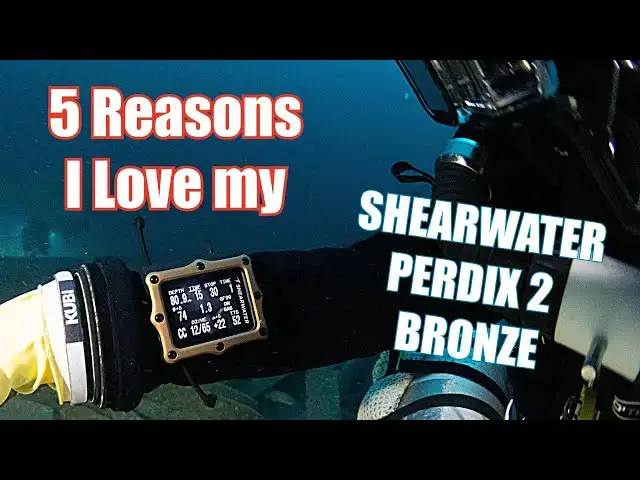
Perix 2 bronze journey edition to my kit
0:12
and it's now my offboard CCR backup of
0:14
choice. It's a really important computer
0:17
to me as it's the one that I use to
0:19
control my decompression. Now, there's a
0:21
reason she water has become the computer
0:23
of choice for almost all technical
0:25
divers and integrated into a whole load
0:28
of rebreathers. Simple fact is their
0:31
reliability, their capability, their
0:34
performance at depth is unmatched.
0:37
And that's why this isn't my first sheer
0:39
water. It's the latest in a long line of
0:41
them that have kept me safe on a whole
0:43
load of deep dives. In this video, I'm
0:45
going to talk to you about my five
0:48
favorite things that I love about sheer
0:50
water computers. But first of all, I
0:52
want to talk about the difference
0:54
between the Perdict 2 bronze journey
0:56
edition and the Perdex, the original
0:59
Perdict that I've been using for the
1:01
last 8 years, I think. Now, some of
1:02
these are cosmetic, and let's be honest,
1:05
the Perdict 2 Journey Edition does look
1:08
a whole lot better than the original
1:11
Now, although that's nice, it's not
1:13
really what I want to focus on. What I
1:15
want to talk about is the things that
1:18
make a difference to me as a diver. And
1:20
the most important one is the
1:22
improvement to the screen. Simply, it's
1:25
noticeably brighter and noticeably
1:27
clearer than my Perex one. Now, that's
1:29
not to say that the original Perex
1:31
didn't have a great screen because it
1:33
did and it does. It's just that it's
1:35
been taken to the next level by the
1:37
Perix 2. I think that's a really
1:40
important thing because on any dive
1:42
you're going to want to get information
1:44
from a screen quickly and the brighter
1:47
and clear it is it is the less likely
1:49
you are to get it wrong. You're going to
1:51
take the information in quicker and for
1:53
people like myself who are doing long
1:55
deep dives particularly if you're under
1:57
pressure when stuff is happening that's
1:59
something that is really important and
2:01
something that I value a lot. The
2:03
Journey Edition has also got improved
2:05
battery life, and frankly, who doesn't
2:07
like that? It claims that it's got up to
2:10
60 hours, which is an awful lot of
2:12
diving, even when you do them as long as
2:14
I do. Another interesting thing is the
2:17
air integration, and that's one of those
2:19
things that people absolutely love. So,
2:22
the Perix 2 Journey Edition will allow
2:25
up to four transmitters to connect, and
2:28
that's something that I never had on my
2:30
original. I'll be honest, it's not
2:31
something that I'm particularly going to
2:33
use, but obviously there's a whole load
2:35
of people that will. The other thing
2:37
that's not on the original is the
2:39
vibration alerts, which on the Perix 2
2:42
are programmable. They're obviously a
2:45
great way of making divers aware that
2:47
there's something in their computer that
2:48
they need to look at, and they're not
2:50
quite as intrusive as audio alarms,
2:52
which can sometimes upset other divers.
2:55
So, vibration alerts, a really nice
2:57
touch and another great feature. The
3:00
last one that I want to mention is the
3:02
addition of a threeaxis tilted compass.
3:05
Does that make a huge difference? Well,
3:07
yeah. It just means it's going to be
3:08
more accurate and that's got to be a
3:10
good thing. So, if you're going to use a
3:12
compass, you want it to be accurate. So,
3:14
well done sheer water for moving that
3:16
forward. Overall, then the Perix 2
3:19
Bronze Journey Edition feels like a real
3:21
improvement and an upgrade to my
3:23
original Perex and that's why it's my
3:26
new offboard computer of choice. Having
3:28
said that, there are a whole load of
3:31
things that have remained the same, and
3:33
that's great because they're really
3:35
important features. There's a ton of
3:37
things that I could talk about, but what
3:39
I particularly want to do is talk
3:41
through five things I really like about
3:44
the sheer water, and they're things that
3:45
aren't necessarily always appreciated or
3:48
understood by everybody. So, what I'm
3:51
going to do is run through them now.
3:53
Hopefully, you'll find something of
3:54
value to you. And what I would say is if
3:56
you think there's a feature that I've
3:58
missed and I should have talked about,
3:59
then uh stick it in the comments. I'd be
4:01
really interested to hear what you like
4:03
about them. The first feature that I'm
4:06
going to cover is something that you can
4:08
do before you get in the water. And that
4:10
is dive planning. So you put all the
4:12
information that is relevant to the dive
4:15
into the sheer water and then you can
4:18
tell it to run a dive plan and it will
4:19
give you it will give you one. and it
4:21
will give you your stops, your stop
4:22
depths, uh any if you're doing open
4:24
circuit gas changes, all that kind of
4:26
stuff. And if you want to, you can
4:28
transfer that onto a dive slate and take
4:31
it in the water with you as a backup.
4:33
You can also run what if scenarios, you
4:36
know, what if this gas isn't available?
4:38
What if I change to that gas? What if I
4:39
do a bit longer or a bit deeper or
4:41
whatever it is? And you can do all of
4:43
this on the surface before you get into
4:45
water. So, that's a fantastic feature.
4:49
Well done, Sheer Water. The next one is
4:52
probably not quite as useful, but
4:54
definitely really interesting and it's
4:57
not something I think that necessarily
4:59
people are aware of. So, what it is is
5:01
that the sheer water will show you the
5:03
exact breakdown of decompression stops
5:06
that you need to do. You can see exactly
5:08
how long you are going to be at each
5:10
depth all the way back up until you get
5:13
to the surface. So, you know, that's
5:15
kind of interesting, even if not quite
5:18
as directly useful as the previous one.
5:22
Number three, though, is something that
5:24
is really important and really useful,
5:27
which is that with your sheer water, you
5:29
can change your breathing gases
5:31
underwater on the fly. So before you go
5:34
in the water, you can have five closed
5:36
circuit gases programmed and five open
5:39
circuit gases programmed. But that
5:42
doesn't really cover the scenario that
5:44
say another diver has a different
5:46
breathing gas to one of the five that
5:48
you put in and for whatever reason you
5:50
need to use their breathing gas. So what
5:53
you need to be able to do is change this
5:55
underwater and then your computer to
5:57
modify your dive plan, modify your stops
6:00
and all those kind of things. And that
6:02
is exactly what the sheer water allows
6:04
you to do. So you can sit there, you can
6:07
change your gas that you've got
6:08
programmed in and then say this is what
6:10
I'm breathing now and the sheer water
6:12
will take that and run with it. So that
6:14
is obviously super super useful. Right
6:18
on to number four then. And that is uh
6:21
gradient factors. I think most people
6:24
know that gradient factors are a way of
6:27
modifying the conservatism of the dive.
6:30
So, if you want to stay underwater and
6:33
do more decompression stops, you have a
6:35
conservative set of gradient factors. If
6:37
you want to get out the water quicker,
6:39
then you have a less conservative set of
6:41
gradient factors. Now, before you get in
6:44
the water, you will obviously program
6:45
whatever you want into the computer, and
6:48
then you're doing the dive. But let's
6:50
say something happens on the dive and
6:52
you decide you want to either be more
6:53
conservative or you want to be less
6:55
conservative. Well, the great thing is
6:57
that the sheer water allows you to
6:59
adjust the gradient factor whilst you're
7:02
actually down there. And therefore,
7:04
let's say for instance, you have bailed
7:06
out and you are concerned that you might
7:09
not have enough uh breathing gas to do
7:11
your full stops and you're willing to
7:14
accept a greater risk of decompression
7:17
illness um to mitigate the risk of
7:19
running out of diving gas. Then what you
7:22
can do is you can change the gradient
7:24
factor high from say let's say you had
7:27
it at 70 or 80. You could change it to
7:29
90 or 95 and that would get you out of
7:32
the water quickly while still or quicker
7:35
while still you know giving you an
7:37
element of uh mitigation or you know
7:40
risk control over the risk of getting
7:42
decompression illness. And the last one
7:44
is the one that you'll see me doing on
7:46
pretty much every dive, which is to
7:49
change the P2 underwater so that it can
7:52
match the P2 on my rebreather. And I use
7:55
that to accelerate my decompression.
7:58
It's another awesome feature of the
8:00
sheer water. And the great thing about
8:04
it is that the sheer water will just do
8:06
everything on the fly. So it will
8:08
calculate your decompression profile. It
8:10
will also calculate all the other stuff
8:12
that you need such as CNS and it just
8:16
presents it to you absolutely
8:18
seamlessly. So that is another super
8:21
useful feature. And I've now told you
8:24
the five things that I particularly
8:25
love, but there's a whole load of other
8:27
things and I'd be really interested to
8:29
hear from you how important those are to
8:31
you. So for instance, one thing that's
8:33
really cool is the configurable middle
8:36
row. So different people like to put on
8:38
different things on there depending on
8:40
what's relevant for their sort of
8:42
diving. Some people like to see gradient
8:44
factor 99 or the delta or whatever else
8:49
it is. But that's a that's another
8:51
fantastic feature. Other people really
8:53
like the rate of ascent indicator.
8:55
That's the yellow or red just to the
8:58
right of the current depth. There's also
9:00
that lovely thing. If you go slightly
9:02
higher than your decompression stop, it
9:04
will give you either a red or a yellow
9:07
indicator that you need to go back down
9:09
again. Another thing I think that needs
9:11
to be talked about is the app. So, you
9:13
can upload your dives from your sheer
9:16
water onto an app on your phone. It will
9:18
sync with the cloud desktop. It's a
9:20
great way of keeping your dive logs and
9:21
also allows you to interrogate them and
9:23
see all the information in there. So,
9:25
another fantastic feature. And I've not
9:28
even touched on open circuit modes.
9:30
Haven't talked about recreational mode.
9:32
Haven't talked about the technical mode.
9:34
Both of which are extremely strong and
9:36
extremely capable in their own right,
9:38
but not really something that I use very
9:40
much of. So, if you've got a favorite
9:43
feature about the sheer water, any of
9:45
the sheer water computers that you like,
9:47
then please stick it in the comments.
9:48
I'd love to hear what they are. But I
9:51
hope you've enjoyed my favorite features
9:53
of the sheer water. I mean, the simple
9:55
fact is all the sheer water range of
9:57
dive computers are really good and
9:59
strong in their own ways. But the
10:01
Journey Edition, the Perdict 2 Bronze
10:03
Journey Edition has taken that to a next
10:06
level. It's now my new offboard dive
10:08
computer of choice. You're going to be
10:10
seeing a lot more of it on my videos. If
10:12
you've enjoyed this one and you want to
10:15
watch some of my other ones, I've got a
10:16
whole load more about different types of
10:18
technical diving equipment, some tips
10:20
and tricks that work for me. Otherwise,
10:23
if you could leave us a like, drop us a
10:25
comment, use the hype system, whatever
10:27
it is, that would be absolutely
10:29
brilliant. Otherwise, I'm Dom Robinson,
10:31
Deep Wreck Diver. Hope you've enjoyed
10:34
this video, and I'll see you on the next