Up next in 10

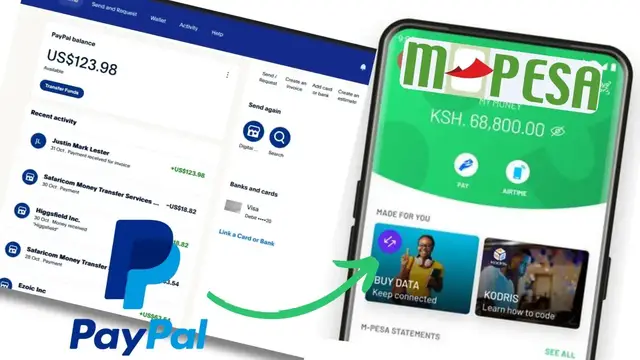
Latest Method: How To Withdraw Money From PayPal Account To Mpesa – This video walks you through the newest and easiest way to transfer money from your PayPal account directly to your Mpesa wallet. Learn the updated process, required steps, and how to complete the withdrawal fast and securely.
#PayPal #Mpesa #PayPalToMpesa #PayPalWithdrawal #MpesaTips #MobileMoney #Kenya #MoneyTransfer #PayPalGuide
Show More Show Less View Video Transcript
0:00
In this video, I'm going to show you how
0:02
In this video, I'm going to show you how
0:02
In this video, I'm going to show you how you can withdraw funds from your PayPal
0:04
you can withdraw funds from your PayPal
0:04
you can withdraw funds from your PayPal account direct to your Empa wallet. If
0:07
account direct to your Empa wallet. If
0:07
account direct to your Empa wallet. If you find this video helpful, I'll kindly
0:09
you find this video helpful, I'll kindly
0:09
you find this video helpful, I'll kindly request that you support me by liking
0:11
request that you support me by liking
0:11
request that you support me by liking the video and also by subscribing to
0:12
the video and also by subscribing to
0:12
the video and also by subscribing to this channel. All right. So, you can see
0:15
this channel. All right. So, you can see
0:15
this channel. All right. So, you can see here I'm logged into my PayPal account.
0:18
here I'm logged into my PayPal account.
0:18
here I'm logged into my PayPal account. But as you can see, there is no direct
0:21
But as you can see, there is no direct
0:21
But as you can see, there is no direct way I can withdraw this to Empa.
0:24
way I can withdraw this to Empa.
0:24
way I can withdraw this to Empa. However, you can see under my reason
0:26
However, you can see under my reason
0:26
However, you can see under my reason activities, I have done some
0:27
activities, I have done some
0:27
activities, I have done some transactions. And as you can see, I was
0:29
transactions. And as you can see, I was
0:30
transactions. And as you can see, I was able to withdraw funds to my Empessa
0:32
able to withdraw funds to my Empessa
0:32
able to withdraw funds to my Empessa using my Safar SIM card. If I go to
0:35
using my Safar SIM card. If I go to
0:35
using my Safar SIM card. If I go to PayPal app and log into my account, you
0:37
PayPal app and log into my account, you
0:37
PayPal app and log into my account, you can see funds were withdrawn to my Safar
0:40
can see funds were withdrawn to my Safar
0:40
can see funds were withdrawn to my Safar line to Empessa. But I didn't withdraw
0:42
line to Empessa. But I didn't withdraw
0:42
line to Empessa. But I didn't withdraw direct using this PayPal app. If you go
0:45
direct using this PayPal app. If you go
0:45
direct using this PayPal app. If you go ahead and search for any option to
0:47
ahead and search for any option to
0:47
ahead and search for any option to withdraw funds, you realize that there
0:49
withdraw funds, you realize that there
0:49
withdraw funds, you realize that there is no option that allows you to withdraw
0:51
is no option that allows you to withdraw
0:51
is no option that allows you to withdraw these funds direct to your Empessa
0:53
these funds direct to your Empessa
0:54
these funds direct to your Empessa wallet. So to be able to withdraw your
0:56
wallet. So to be able to withdraw your
0:56
wallet. So to be able to withdraw your funds for Empessa, just go ahead and log
0:58
funds for Empessa, just go ahead and log
0:58
funds for Empessa, just go ahead and log out of PayPal and then you'll need to go
1:02
out of PayPal and then you'll need to go
1:02
out of PayPal and then you'll need to go ahead and download the Empessa app. As
1:04
ahead and download the Empessa app. As
1:04
ahead and download the Empessa app. As you can see, this is my Empessa app
1:06
you can see, this is my Empessa app
1:06
you can see, this is my Empessa app here. So if you go to your Empessa app,
1:08
here. So if you go to your Empessa app,
1:08
here. So if you go to your Empessa app, just go ahead and login using your PIN
1:11
just go ahead and login using your PIN
1:11
just go ahead and login using your PIN and then scroll down to global payment.
1:14
and then scroll down to global payment.
1:14
and then scroll down to global payment. So if you go under global payments here,
1:17
So if you go under global payments here,
1:17
So if you go under global payments here, you should be able to see this PayPal
1:19
you should be able to see this PayPal
1:19
you should be able to see this PayPal option. Now this will help you to
1:21
option. Now this will help you to
1:22
option. Now this will help you to withdraw funds direct from your PayPal
1:24
withdraw funds direct from your PayPal
1:24
withdraw funds direct from your PayPal account to Empessa. If you go ahead and
1:26
account to Empessa. If you go ahead and
1:26
account to Empessa. If you go ahead and tap on it, this will give you an option
1:29
tap on it, this will give you an option
1:29
tap on it, this will give you an option to link your PayPal to Empa wallet and
1:32
to link your PayPal to Empa wallet and
1:32
to link your PayPal to Empa wallet and then go ahead and log into your PayPal
1:34
then go ahead and log into your PayPal
1:34
then go ahead and log into your PayPal account through your Empessa app using
1:37
account through your Empessa app using
1:37
account through your Empessa app using your Empessa PIN. And here now if you
1:39
your Empessa PIN. And here now if you
1:39
your Empessa PIN. And here now if you check on balance, you can see the same
1:41
check on balance, you can see the same
1:42
check on balance, you can see the same amount I had on PayPal account is now
1:45
amount I had on PayPal account is now
1:45
amount I had on PayPal account is now reflecting here. So you can see the
1:47
reflecting here. So you can see the
1:47
reflecting here. So you can see the conversion rate here. And here you'll
1:49
conversion rate here. And here you'll
1:49
conversion rate here. And here you'll also be able to see my previous
1:51
also be able to see my previous
1:51
also be able to see my previous withdrawal history. And to withdraw your
1:53
withdrawal history. And to withdraw your
1:53
withdrawal history. And to withdraw your funds, just go ahead and tap on withdraw
1:55
funds, just go ahead and tap on withdraw
1:55
funds, just go ahead and tap on withdraw to Empessa. I'll have to enter the
1:57
to Empessa. I'll have to enter the
1:58
to Empessa. I'll have to enter the amount. You can withdraw all your funds.
1:59
amount. You can withdraw all your funds.
2:00
amount. You can withdraw all your funds. So I have here $123.98.
2:04
So I have here $123.98.
2:04
So I have here $123.98. I'll just withdraw the whole amount
2:08
I'll just withdraw the whole amount
2:08
I'll just withdraw the whole amount like that and then proceed to continue.
2:13
like that and then proceed to continue.
2:13
like that and then proceed to continue. And you can see the current exchange
2:14
And you can see the current exchange
2:14
And you can see the current exchange rate 1 US is 125.13 Kenyan shillings. So
2:19
rate 1 US is 125.13 Kenyan shillings. So
2:19
rate 1 US is 125.13 Kenyan shillings. So I'll be able to withdraw this 15,513.
2:24
I'll be able to withdraw this 15,513.
2:24
I'll be able to withdraw this 15,513. So we'll go ahead and tap on withdraw.
2:26
So we'll go ahead and tap on withdraw.
2:26
So we'll go ahead and tap on withdraw. Then enter your EMPA pin and then
2:31
Then enter your EMPA pin and then
2:31
Then enter your EMPA pin and then you can see the withdrawal request has
2:33
you can see the withdrawal request has
2:33
you can see the withdrawal request has been successful and you can see now my
2:36
been successful and you can see now my
2:36
been successful and you can see now my empa message has been received. You'll
2:39
empa message has been received. You'll
2:39
empa message has been received. You'll also receive a confirmation message of
2:41
also receive a confirmation message of
2:42
also receive a confirmation message of this. So if I go ahead and tap on done,
2:45
this. So if I go ahead and tap on done,
2:45
this. So if I go ahead and tap on done, I'll be redirected to the PayPal account
2:47
I'll be redirected to the PayPal account
2:48
I'll be redirected to the PayPal account where now you'll see it is under the
2:50
where now you'll see it is under the
2:50
where now you'll see it is under the history and the balance now is zero. So
2:53
history and the balance now is zero. So
2:53
history and the balance now is zero. So that's how you can withdraw your funds
2:56
that's how you can withdraw your funds
2:56
that's how you can withdraw your funds direct to your Empessa wallet using your
2:59
direct to your Empessa wallet using your
2:59
direct to your Empessa wallet using your Empessa app. If you have any other
3:01
Empessa app. If you have any other
3:01
Empessa app. If you have any other question, kindly let me know in the
3:03
question, kindly let me know in the
3:03
question, kindly let me know in the comment section. Otherwise, thanks for
3:05
comment section. Otherwise, thanks for
3:05
comment section. Otherwise, thanks for watching and let's meet in the next
3:06
watching and let's meet in the next
3:06
watching and let's meet in the next video.
#Finance