Up next in 10



Learn how to calculate cost of azure resources using Azure Pricing Calculator.
Show More Show Less View Video Transcript
0:00
In this video we are going to learn how to use Azure pricing calculator to
0:07
estimate your cost of Azure resources. So let's get started. Go to Google and
0:15
search Azure pricing calculator and then you will come to this pricing
0:23
calculator page here I would just click on that when you go here first time as
0:31
you can see from pricing calculator page there's a here tab called products right
0:38
you can have products here you have example scenarios scenarios and then you
0:43
have save estimates and FAQs so if you already know what kind of resources you
0:49
want to buy you can just start typing here or you can browse using these
0:57
categories right here so if you have a compute you want to compute you can go
1:00
to computer you can look at okay I can look at the product calculate pricing
1:04
for virtual machines I can do skill sets I can do as your functions contain
1:09
containers and so on so forth if you're looking for database services for
1:14
example here you can say as you cosmos DB as you see called database and so on
1:18
so forth. So let's say let's go back to the home page here let's say let's start
1:26
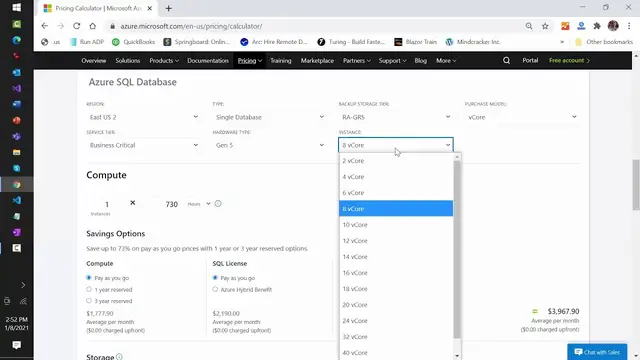
with Azure SQL database I going to calculate pricing for Azure SQL database so you see here you can click on view This will take me to the page where I can start putting different parameters for
1:40
my resource and it's going to show me the estimate here for the for the
1:47
resource. So here as you can see in region I can say US East you can select
1:52
based on whatever reason you want. I would go for US East too obviously you're
1:56
gonna select region you want to the type you can have either a lax tip pool or
2:01
single database I do select single database if you need more details on
2:06
this parameters what they mean there is a detail documents on that if you search
2:11
as your or Google for as you see called database pricing right you will go and
2:17
learn more there I'm not going to go into details here my purpose is just to
2:22
show you how to use this calculator right here you can have different tiers
2:26
obviously backup tiers, backup depending on the tier is gonna you know price is
2:30
gonna up and down same thing with V core model or DTU model in number of
2:35
instances hardware what kind of hardware you want one thing you want to be
2:42
careful here service tier for example business critical so recently we were
2:46
we were purchasing for our C sharp corner website where we need business
2:51
critical so you select that based on these the pricing changes a lot so you
2:56
You have to be careful with that and make sure you select the one that fits your needs
3:04
You can have Gen 5 M series and so on and so forth Instance is also very important for us we needed a 16 core v core so you can see the prices reflect a lot based on these selections and it a v core model
3:17
right so more you increase here more this price is going to increase. So we were here and now look
3:25
at this below that it says compute so 70 here you can see one instance run each instance is going to
3:33
to run 730 hours that's pretty standard and then this is the one very important option here it's
3:42
called saving options right so for depending on your need you can have a pay as you go model or
3:49
you can even reserve this instance for one year or three years for us we know c sharp corner we
3:57
are taking our sequel for long term so we said okay we're going to reserve this for three years
4:02
And as you can see, the savings are tremendous if you know that you are going to need these resources for
4:10
So you want to do the reserve instance pricing calculate. Another thing is you can also do monthly and upfront cost
4:16
That doesn't affect much, but you can look at all these options here
4:22
In SQL case, you know, you can either say pay as you go or you can bring as your hybrid benefit
4:32
You can take advantage of that and as you can see the pricing changes a lot, right
4:39
So from almost to because now you using your own SQL license here
4:49
Below that you can also you know say how much storage you need for that say you know we
4:55
needed 256 GB and it's going to change the pricing from here
5:05
You can also say backup and then how long you want to retain that backup, right
5:12
What the size of backup is, you can have all these options. You can have weekly backup, you can have monthly, yearly and so on and so forth
5:18
So depending on obviously who is calculating this, they have to know the database requirement
5:24
but point I'm making is that on this page you can calculate all the prices of all the
5:29
resources you need, right? In Azure. You can also have support. pretty standard you can have developer support standard support and professional direct obviously
5:39
this is the high-end one if you want standard you can see as $100 per month all that once you know
5:45
okay based on that it's gonna cost $1,700 64 $1,764 now you can just export this or you can save it or
5:55
you can share with somebody so I'll just say export so now you will see I have an excel here
6:02
here, this should have all my options selected here and then how much is going to cost
6:09
So that said, thank you for watching this, until next episode, see you
#Business Services
#Software
#Web Services
#Online Communities