Up next in 10



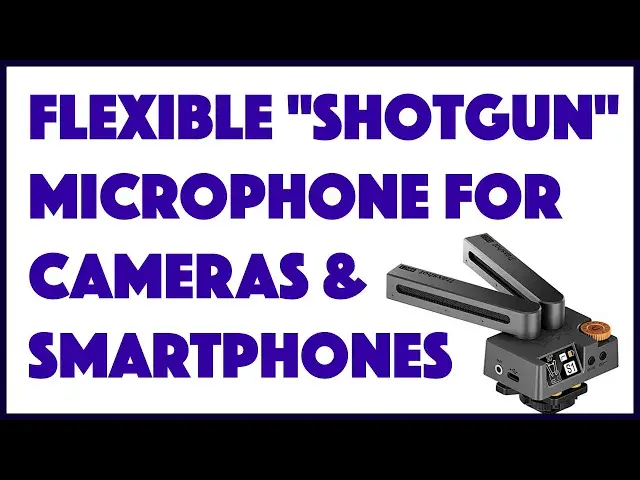
Tired of having sharp, HD video but muddy or faint audio on your recordings, vlog posts, or TikTok content? The Comica Traxshot Super Cardioid "Shotgun" Microphone is how you fix it. Compatible with Android and iPhone smartphones, it also works with computers, camcorders, and DSLR cameras too. Tech expert Dave Taylor of https://www.AskDaveTaylor.com/ tries out the Comica Traxshot and finds that it has some interesting modes and options and for some users is going to prove a great addition to their kit.
Check it on Amazon: https://amzn.to/3t80eqG
Show More Show Less View Video Transcript
0:00
Improve your audio capture with this cool cardioid mic
0:03
Let's check it out. Dave Taylor here, and I'm checking out this
0:14
This is the Comica Trackshot Super Cardioid shotgun microphone. And as you can immediately see, it's actually two microphones
0:23
And this gives you a lot of flexibility. So you can have them both pointing in the same direction
0:28
and then it works in mono mode, which is great for having it on your DSLR or your smartphone mount or even on your computer and using that for audio
0:39
But where it gets really interesting is you can actually spread it out 30 degrees or you can do 90 degrees if you have a big group in front of you or what a lot of people like is bidirectional
0:52
So if I have this on top of my camera, I'm using one microphone to get the person that's in front of you
0:58
the camera, but I'm also capturing the comments of the camera person, too, which is obviously
1:04
very beneficial. Now, let me tell you, this works obviously with smartphones, DSLRs, computers
1:10
There's a lot you can plug this into to improve your audio sound. Four modes, I already
1:14
demonstrated those, but there's also a little screen on the back. Let me turn this on
1:19
and there's a little tiny screen that shows you which mode you're in and let you adjust the
1:26
gain. This orange dial lets you adjust gain. And then what you want to do is you want to match the
1:32
mode to the orientation of the microphones you're using, and that gives you the best result. And then
1:39
you are ready to rock and roll. Now, it comes with a hot shoe mount, but it also has a tripod
1:46
mount. So there's very flexible. There's a lot of different ways you can use this. I'll be doing
1:51
a demo in just a second where I'm tapping into my Google Pixel 4A
1:56
And I'm going to put the whole thing on a tripod and demonstrate different ways that the microphone works
2:01
Basic idea, though, is that on the left-hand side, there's an out
2:06
So you pick the matching cable that is included. This is the smartphone one I would plug this into my smartphone And obviously if you have a smartphone that doesn have a 3 millimeter adapter I mean millimeter jack you going to have to get an adapter
2:21
You're on your own for that, but they're pretty inexpensive. But here, now I am ready to get much better audio quality than I would with the built-in microphone on the phone
2:31
Now, if I'm only six inches away from the phone, not a big deal
2:35
But if I'm 10 feet away, it is a big deal. So before I tell you any more about it, let's just switch to a couple of demos
2:42
So I'm pretty far away from the phone right now, but as I walk closer, you'll hear the audio will pick up well
2:49
And even as I stand here, the audio quality is pretty solid
2:53
Now, let me do the same thing with the built-in microphone in the pixel 4A
2:58
So I'm the same distance away, but this time we're just using the built-in microphone
3:03
and you can definitely hear a difference. So the question is, I'll put this up to you, which will
3:08
one do you think sounds better? Since I am my own cameraman, I have it in bidirectional mode
3:14
and I'm just going to walk around so you can hear what the sound is as I surround or go around
3:22
the microphone. So now I'm about, I don't know, 10 feet away, and you can hear, if I was
3:28
behind, you would have heard the original sound, or maybe those birds twittering, and then here
3:33
I am in front, and it's picking up sound really well. Now, let me walk around to the back again
3:38
and you can hear that there's not a significant drop-off in audio quality, which is terrific
3:46
I hope you found those demos interesting. Here's how I had it all set up. So you can see, here's the Pixel 4A on the stand
3:53
and then on top of it using the hot shoe mount is the Comica microphone
3:58
And of course, from the back, I can see what's going on, and then I can also look at the little screen on the microphone
4:05
and make sure that it's in the right mode and everything's working. correctly. Now, if I had a cameraman, that would be even easier, but I don't. So I'm doing it myself
4:15
Anyway, give me just another second, and I'll pull it off of here. Okay, so now I have it all
4:20
disassembled And now you can see again here how this is set up I started the tour but let finish it So there the audio jack and then there a USBC for charging On the back is the display and then adjacent to the display is the mode button
4:38
And then there's also a power button, which doubles as a low-cut filter
4:42
On the right-hand side is an audio out, so you can use it to monitor what the microphone is picking up
4:48
And that's really, really helpful. If you have a camera person, they can have earbuds, headphones, whatever
4:53
whatever, and they can dial that gain to be just so for what the environment is and how loud
4:59
or soft people are. That's really beneficial. Now, I've told you all the basics about this
5:04
but let me give you a couple of specs, too. So it's 20 to 20,000 Hertz frequency response
5:09
600-oam output impedance, maximum sound pressure level of greater than 100 decibels, and sound noise
5:16
of 60 decibels. It also weighs 5 ounces, and obviously it is a rechargeable unit that will run
5:23
for about three hours on a full charge. And I found that I've been using it for various projects and experiments and never had any issue
5:32
And it does have a battery display right there on that little tiny screen. So it's not like you're going to be surprised that it ran out of battery
5:39
So pay attention. Now, it comes with a nice traveling carry case
5:43
And let me open it up and show you what else is included because this is important
5:48
So it comes with little windmuffs for the microphones. So if you're in a noisy environment, you can put these over the mics and that will actually
5:58
cut down on wind noise. Probably should have done that in my demo, but I wanted you to hear that that's just straight
6:04
off the mic what it sounds like. Now, it also comes with another little tiny wire and this one's for cameras, DSLRs, similar
6:14
And the difference between them is obviously gray versus black, but they're both labeled
6:19
So as long as you don't lose those labels, then you're good to go
6:23
and you'll know which one's which. And finally, it also comes with the USBC charging cable if you need it
6:29
But the whole thing just sits neatly in its case. You close it all up, put everything in there
6:34
and you are ready to rock and roll So I guess the question is what do I think of it And the answer is in some settings it really terrific If you going to be five to ten feet away from your camera and your microphone
6:49
and you really want good audio sound, then, and of course, why wouldn't you want that, right
6:54
Then it is a really nice option to having a wired microphone. Right now, I have a wired microphone
7:00
clip to my shirt. That limits my mobility quite a bit. Having a shotgun-style mic like this
7:07
gives me a lot more flexibility if I was doing yoga or gymnastics or dance or something like that. I really don't want a wire. But it also does have some limitations as you heard. So I would say that for a vlogger or something, this is really cool. And in particular, this mode where you have bidirectional, this is a really cool idea. And this could be really great if you have, for example, videos that you produce for a TikTok or whatever
7:37
and you want to have comments from your camera person at the same time that you're on camera
7:42
then something like this is really fun and you're going to hear both people nice and loud and clear
7:47
So that's a good thing. Now, it is a tiny bit spendy
7:51
This is not another one of these $19 devices, but Comica makes really good professional level gear
7:58
I would say this is a really nice design. It's all metal
8:02
There's no plastic involved here. It has a really solid feel, and it feels like it's going to last for
8:07
quite a long time. This is not something that you're going to have to replace in three months
8:12
Which leads to the question, how much does it cost? All right, this is the Comica
8:18
Trackshot Supercardioid shotgun microphone, and it's $179 at Amazon.com. Is that worth it for you
8:26
Well, it depends on your use case, but it very well might be. So I say, check it out. And with that
8:33
I'll catch you in my next video
#TV & Video
#Online Video
#Audio Equipment
#Science