Up next in 10



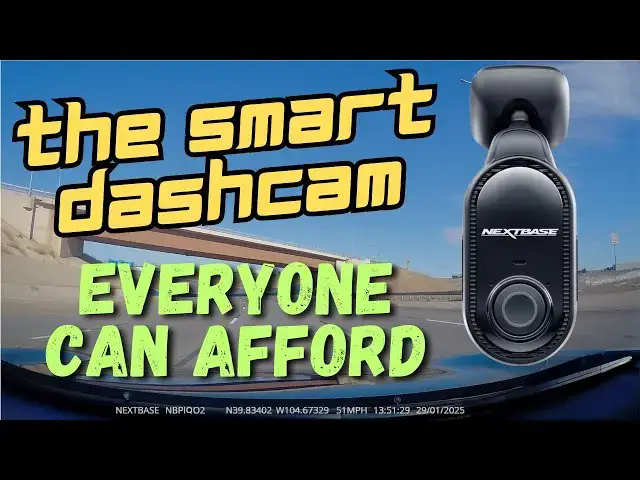
You might be the best and safest driver in the world but that doesn't prevent you from getting into accidents, unfortunately. What if the other driver then falsely claims it's your fault? That why dashcams have become so popular. Car writer and tech expert Dave Taylor checked out the Nextbase Piqo 2K Smart Dashcam by sticking it to his windshield and driving around Colorado. Turns out that the Piqo 2K unit does a great job and is quite easy to work with and can be used as an install-and-forget device if you prefer. Review includes extensive video footage examples and a tour of the companion Nextbase smartphone app too.
Check it out at: https://nextbase.sjv.io/WyNMNM
or on Amazon: https://amzn.to/40ZPKh3
Visit Dave's Q&A Web site at: https://www.AskDaveTaylor.com/
#nextbase #dashcam #piqo2k #askdavetaylor
Show More Show Less View Video Transcript
0:00
this Dash Cam's really small but does it
0:02
work well let's check it
0:04
[Music]
0:10
out Dave Taylor here and you're driving
0:14
and someone hits you and then they say
0:17
it's your fault what's your recourse
0:20
that's where these devices come in this
0:23
is the next Bas Pico 2k smart dash cam
0:28
and the idea is that you stick it on
0:30
your windshield and then it just records
0:33
everything that it sees in the front of
0:35
your vehicle as long as you're driving
0:38
so you can go back an hour later and
0:41
review footage and say you know they
0:44
said I hit them but look at this video
0:47
footage that shows that I was in my Lane
0:49
I was driving the limit and everything
0:52
and they came out from some other lane
0:54
and whacked into me so I am not at fault
0:57
here this is their fault so dash cams
1:00
have become very popular because of just
1:03
that reason and this is a really
1:05
interesting device it's really designed
1:07
to be minimally expensive and super easy
1:10
to work with and for the most part it
1:12
definitely succeeds so the footage it's
1:15
capturing I guess that's the camera on
1:17
this side the footage it's capturing is
1:20
2K so it's a
1:22
1440p Quad HD 30 Fram per second sensor
1:27
and it is recording video footage as
1:30
long as you're driving and so you're
1:32
thinking well what happens when the
1:33
memory card fills up so then it
1:36
overwrites the oldest footage so if you
1:39
leave this in for a month and you say oh
1:41
I really want to see what happened three
1:42
weeks ago you might be in trouble so you
1:46
can actually download the content and we
1:50
can look at it in fact I have a demo
1:51
coming up in just a minute or so but let
1:53
me tell you a little bit more about it
1:55
so it's frontf facing only sometimes you
1:58
get into an Uber or a lip and they'll
2:00
have a rear-facing camera too so it
2:03
records both directions so if there's
2:06
some craziness that happens while
2:07
they're driving or while you're driving
2:10
then you have that on footage too but
2:12
this this is front-facing only which is
2:15
probably the primary purpose for a dash
2:17
cam has 145° field of view and built-in
2:21
GPS one of the things I really like and
2:24
you can see even just in this tiny bit
2:25
of footage is that it actually includes
2:28
the location of the footage so you can
2:31
always go back on a map and find exactly
2:33
where it
2:34
was additional features on this device
2:37
are smart parking though that has a g
2:41
sensor so if someone hits your car while
2:43
you're parked it will actually record
2:45
the video now there's a couple of
2:48
caveats there number one if they hit the
2:51
back of your car well this is only
2:52
pointing frontward so it's not going to
2:54
capture anything of value um and it
2:57
needs a special update or addition
3:00
for you to be able to use it in parking
3:02
mode everything else Works without
3:04
having to get additional Hardware so
3:06
this is fairly self-contained it does
3:08
have an emergency SOS feature which is
3:11
also cool with a very modest
3:13
subscription that gives you cloud
3:15
storage for your footage that also gives
3:17
you an actual SOS where you can actually
3:20
connect to Emergency Services but this
3:23
has a simple light version where it's
3:26
voice activated so you can say nexie
3:28
start witness mode
3:30
and it will actually lock the video that
3:32
it's recording cuz that also includes
3:34
audio and it will notify the person that
3:37
you've set up in the software itself
3:39
that you're in an emergency situation so
3:43
kind of an interesting idea they also
3:45
have autolock Collision footage so if
3:47
you have this running and you get into
3:50
an accident the sensors will detect
3:52
that's what's happened and it'll
3:54
automatically lock that footage to make
3:56
sure that it can't be overwritten and
3:58
that can be really helpful
4:00
and then there's a guardian mode so if
4:02
you're like me and you're a parent and
4:04
you have had teenagers who's like hey
4:06
can I borrow the car you can set this so
4:09
that it actually has limit and location
4:13
um limitations and then it will actually
4:16
save and lock the footage if they go
4:19
beyond that so then you can come back
4:22
and review the footage and say so looks
4:24
like on the highway you were going 35 M
4:27
hour over the limit let's have a talk
4:29
about that hopefully you don't have to
4:31
do that but all these interesting
4:33
additional features but of course 99% of
4:36
what you're going to do is basically
4:39
install it and forget it so it's just
4:41
going to sit there it does need power so
4:44
it does come with a cord and the cord
4:48
the connection to the dash cam can go
4:51
down and you just have a wire running
4:52
down which is how I did it or you can
4:55
actually do it up and then you can
4:57
actually tuck the wire along maybe the
5:00
visor or something like that so there's
5:02
actually install kits you can get to
5:04
make it work even better and one of the
5:07
things I really like about this is It's
5:10
USBC on the other end of the wire so if
5:13
you have a modern car with a USBC Outlet
5:16
you can just plug it in and boom you're
5:18
going if not if it's an older car you
5:20
might have a 12volt cigarette plug and
5:22
it comes with one of those and that's an
5:25
adapter and what's nice is there's two
5:27
USBC connections so you can plug this in
5:31
and you can still plug your phone in or
5:34
whatever else you might need to charge
5:35
or power up like a radar detector so
5:39
they've thought all that through and it
5:41
does include and you can see here a 32
5:45
gig micro SD card which might sound big
5:48
but that's about 2 hours of footage cuz
5:51
it records in two versions of the actual
5:54
video so let me just I'm going we're
5:56
going to start moving into some demos so
5:58
here's some footage in the lower
6:01
resolution
6:03
recording and then this is the same
6:05
footage in the higher resolution
6:07
recording so it records one minute
6:10
chunks which is adjustable in settings
6:12
the company tells me but it records by
6:15
default in one minute chunks in both
6:18
formats so that's part of why that 32
6:22
gig only gives you about two hours of
6:24
footage but seriously enough talking
6:27
let's look at some footage and what I'm
6:29
going to do here is I'm going to Speed
6:30
it way up and you're going to see me
6:33
drive to Denver International Airport
6:36
and then on the drive back I'm going to
6:39
just jump straight to letting you hear
6:41
the audio pickup so you can get that
6:44
footage and then we'll switch to some
6:47
night footage so you can see how it does
6:49
with its night sensor when it's a dark
6:51
environment
6:57
[Music]
7:13
I'm on
7:14
E470 coming out of Denver airport so
7:18
it's fairly quiet this time of day and
7:20
you can see the beautiful Rocky
7:22
Mountains in the distance and there's a
7:25
lot of snow on the mountains but not so
7:27
much snow around here because because we
7:29
get a lot of sunshine and that tends to
7:31
melt things pretty quickly
7:34
[Music]
8:02
there's no question the most important
8:04
thing a dash cam does is record video
8:07
and I think it actually did a really
8:08
good job this is a budget device with
8:11
not a lot of bells and whistles and it
8:13
did a good job I could zoom in and I
8:15
could see license plates and such and I
8:18
certainly have a sense of what that
8:20
drive experience was like now I want to
8:23
also show you the app because it pairs
8:25
with a smartphone app and because it's
8:28
USBC I don't have to go into the car to
8:31
turn it on so we can try it so I just
8:34
happen to have a USBC plug so I'm going
8:36
to get that going and one of the things
8:39
worth mentioning other than that cheery
8:42
sound is you see this ring here so this
8:45
ring will give you feedback and that's
8:48
facing you when you're driving so it's
8:50
going to be blue or red and it can Flash
8:55
and some people have said that's very
8:57
distracting some people have actually
8:59
put it a sticker or a piece of tape over
9:01
it so they don't see it when they're
9:02
driving at night I think that's probably
9:05
something that the company can just
9:06
adjust with their software in the next
9:08
rev and the software overall this is not
9:11
the greatest software for a dash cam
9:14
that I've ever seen but you know it's
9:16
not an easy problem either so let me get
9:19
this recording going and we should be
9:23
able to connect to the
9:26
device and there we go connected we will
9:30
look at the setup View and so it's going
9:33
to connect via Wi-Fi and of course
9:35
normally I'd be doing this in my car and
9:37
this is something you would do so you
9:39
can adjust the angle of it and
9:41
everything so that it's pointing exactly
9:43
the right way so we want to connect to
9:45
its own network and it's really amazing
9:48
that these little devices can create
9:49
their own Wi-Fi networks nowadays and
9:53
let going to turn it upside down so that
9:55
we can see my ceiling rather than just
9:57
see the black of the um
10:01
tablecloth come on you can do
10:04
it there we go so now you can see as I
10:08
move this there's a second or two delay
10:11
maybe we can do it like this so it's a
10:15
little more
10:18
interesting uh it's upside down but
10:21
that's okay cuz at least you can see
10:24
that now we're getting live video from
10:26
the device and now we can go back and
10:28
look at things like dash cam settings
10:31
and this is how you're going to change
10:33
and update and modify it because it has
10:36
no display screen there's really no
10:39
functionality on the device itself other
10:42
than that little light up circle is
10:44
actually a button so it gives you a tiny
10:46
bit of control but you can see I can get
10:49
into video settings and I have it for
10:51
1440p at 30 frames per second it's also
10:54
recording audio and we can get to setup
10:59
here here and I can turn on or off
11:01
things like smart parking again if I
11:03
don't have the accessories so that it
11:05
has power even when my car is parked
11:08
then turning that on is not going to
11:09
magically make it work and then dash cam
11:12
information gives you some firmware
11:14
which is important to upgrade the
11:16
firmware and that's pretty much what you
11:20
get from the app now I can go to the
11:24
library and it will show me what videos
11:27
are there um if I sync it or I can go to
11:30
downloads and I can see what's what I
11:34
have downloaded obviously I haven't
11:35
downloaded any videos yet let's go back
11:37
to library and synchronize files so it
11:41
should actually get thumbnails from all
11:44
the files that are on the device which
11:46
at this point is two hours worth of
11:48
content now one thing some people have
11:51
said is that if you have a lot of
11:54
content on here that the app won't show
11:57
you all of the footage so I will tell
11:59
you that my strategy has been to take
12:03
the card out put it in this little
12:05
adapter and then I can just put this SD
12:08
card directly into my computer and
12:11
that's how I've pulled off the footage
12:12
that you saw earlier so it's a tiny bit
12:16
tedious but really not that big a deal
12:18
and I feel like it's easier than going
12:20
through all of this with the app on the
12:23
phone so we're starting to see some
12:25
footage you can see that I have some
12:27
protected video and then um we have here
12:31
for the second of February it looks like
12:34
there's some setup information and then
12:36
let's just pick this one because it's
12:40
there and from the 1 of February here's
12:43
this footage and you know this is as
12:46
fast as the connection can run I'm
12:48
literally 4 in away and I'm on this
12:52
wi-fi so you can see that it shows me
12:55
the speed and on the bottom it actually
12:57
shows me the speed and on the top in
13:00
tiny tiny print is the GPS location and
13:04
this is night view so pretty cool
13:07
actually um and if I want to I can now
13:10
download this I can look at the location
13:12
on a map so there are a number of things
13:15
I can do and then we go to more on the
13:17
bottom here I will just show you there's
13:20
yet more things you can set up so I'm
13:23
going to stop the demo there in the
13:25
interest of this not being an hourong
13:27
video
13:29
but suffice to say for its primary
13:33
function which is stick it on the
13:35
windshield and then ignore it and forget
13:37
about it and just let it record it does
13:40
a really good job I'm actually pretty
13:42
darn impressed particularly at the price
13:44
point it's very affordable it's easy to
13:47
do and install and because it's USBC on
13:50
both ends of that wire it gives you a
13:52
lot of flexibility don't have USBC then
13:55
we have that 12vt cigarette lighter
13:57
adapter no switch
13:59
and it comes with a 32 gig memory card
14:02
and I can just pop it out of the side
14:04
here It's Tricky so it's that that's a
14:08
Micro SD also known as a TF
14:12
card and so now the device is
14:15
complaining but that's fine so this is
14:16
32 gig you can get much much bigger
14:20
cards that you could use instead if you
14:23
do that double check the specs that it
14:25
requires cuz devices that stream video
14:28
onto memory
14:29
need really fast memory so that they
14:31
don't lose any data but that's really
14:34
everything I got for you I will say that
14:37
that optional subscription it's $3.99 a
14:40
month and that gets you 180 days of
14:42
cloud storage so you know that gives you
14:45
the ability to say oh well let's go back
14:47
two months and look at some of that it
14:49
also gives you a full emergency SOS
14:52
feature and it gives you an additional
14:54
two years of warranty I think this comes
14:57
with a one-year warranty I'm not sure
14:59
why they've added that rather than just
15:01
give everyone a three-year warranty but
15:03
hey that's how they chose to do it so
15:05
that's really everything I got for you I
15:08
actually like this a lot my biggest
15:11
complaint I'm going to unplug
15:14
it um my biggest complaint with this is
15:18
that it only comes with this extremely
15:21
strong Adhesive Mount and I actually
15:23
mounted it on a loner car and then had a
15:26
bit of a struggle to get it back off now
15:29
that's probably part of its design so it
15:31
is good that you when you put it on your
15:33
car on your windshield and here's what
15:35
it looks like on my windshield then it's
15:38
not going to just fall off cuz it's a
15:39
hot day or something but a lot of
15:42
companies also include a suction cup and
15:45
the ability to leave this on and take
15:48
this off for example if I'm parking in a
15:50
really dicey neighborhood I don't
15:52
necessarily want any Electronics visible
15:55
through the window but this is not
15:57
something you can take back off so that
16:00
might be something they have in a a more
16:02
expensive version of one of their dash
16:04
cams but that's everything I got for you
16:06
I think that for its primary
16:09
functionality it is a very good solution
16:12
and that 2K video is pretty darn crisp
16:15
and it's good at night it's not
16:17
fantastic there are better Solutions out
16:19
there but they're more expensive so
16:21
there's your tradeoff anyway that's what
16:23
I got I hope you found this to be of
16:25
help and value and I am going to ask for
16:28
you you to subscribe to my channel click
16:31
or tap on that subscribe button hit that
16:33
Bell icon for notifications give me a
16:35
thumbs up if you found this of value and
16:38
if you think I should have done or
16:39
tested or demoed something I didn't
16:41
leave that in the comments so that my
16:43
next dash cam review will be even better
16:47
woot all right this is the next base
16:52
Pico 2k smart dash cam and it is
16:57
$129.99 at amazon.com so for the cost of
17:02
what dinner for three nowadays you can
17:04
get this install it plug it into your
17:08
car and then forget about it and if you
17:10
ever get into an accident or have any
17:12
sort of issue you can be confident that
17:15
you're going to be able to pop the card
17:16
or use the app and get that footage and
17:19
have proof that what you say is actually
17:22
what happened and that can be an
17:24
invaluable invaluable thing so that's
17:28
what I got hope to catch you in my next
17:30
video
17:36
[Music]
#Motor Vehicles (By Type)
#Vehicle Shopping