Up next in 10



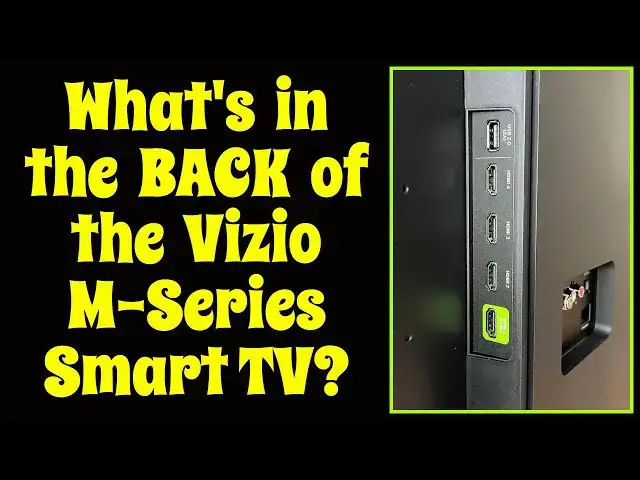
Head into the local showroom and you'll get to see all the beautiful screens of modern flat panel TV systems, but the back? You don't get to see that until you unbox your new television at home. Tech expert Dave Taylor set up a massive new Vizio M-Series MQ7 Quauntum 70-inch 4K UHD Smart TV on his dining room table so he could show and explain every single port and plug on the back. He even talks about how a TV of this size is mounted on the wall and how wall mounts are measured. The screen of the Vizio? Beautiful. But the back? You'll want to watch so you can learn just what ports are included - and what aren't - on the latest generation M-Series units!
Check the MQ7 series out at: https://www.vizio.com/en/tv/m-series/M70Q7-J03
Then check out Dave's Q&A Web site at: https://www.AskDaveTaylor.com/
#vizio #smarttv #4ktv #askdavetaylor
Show More Show Less View Video Transcript
0:00
What's on the back of this beautiful TV? Let's check it out
0:04
Dave Taylor here and I'm checking out my new Vizio TV
0:15
This is the Vizio M-Series MQ7 Quantum 70-inch 4K Smart TV. It's pretty sweet. As you can see, it's huge
0:26
It's an Ultra HD at 3840x2160 at 120Hz with Dolby Vision, HDR 10+
0:34
Quantum color with dimming zones, built-in Bluetooth. There's lots and lots of amazing features on this TV
0:42
But what I wanted to check out before I mounted it on my wall
0:46
was what's on the back of this TV. This is something that you never get to really look at when you go to a showroom
0:52
because they're either mounted on the wall or they're in a box
0:56
So, it's really important to understand what connectivity options you have on the new TV you're poised to buy
1:04
So, let's turn it around and have a look. Well, here's the back of the television
1:08
Now, first thing I want to say is that this Vizio does come with a voice remote
1:13
but that's not on the back of the TV, so we're just going to put it down. Now, there's not a lot going on. It's not super exciting
1:20
I have to admit, it's not really designed for you to ever look at this other than for connectivity
1:25
But, let me give you a quick tour and explain some of the things going on
1:29
First off, power goes over there. The way Vizio has it designed is power is on one side
1:35
and all of the connectivity is on the other side. You can see here, it's a combination of these
1:40
and there's a strip of connectors on the side. So, what are they
1:46
Well, starting at the top left, that's the coaxial antenna connection. That's your input for cable boxes and maybe old school RF tuners
1:55
I'm going to say an RF tuner is not going to give you a great picture on a 70-inch 4K TV
2:01
but if that's what you got, that's what you got. Then we have audio out, left and right channels
2:06
and then what most people use for their audio connection is optical
2:10
This is a variant of optical called SPDIF, and that stands for Sony Philips Digital Interconnect Format
2:17
and it works great for things like 5.1, 7.1, surround, DTS, all of that's supported by this TV
2:24
Finally, on the lower corner you can see there's an Ethernet connection
2:28
Why would you want Ethernet on your television? Because it's a smart TV, so you can hook it up via Wi-Fi
2:34
and then you can get to all your favorite streaming channels and networks and everything through Wi-Fi in your house
2:40
or office, or I don't know, restaurant or something. But really, if you really need the best possible bandwidth, Ethernet's the way to go
2:48
because it's going to give you higher throughput. However, I would say before you worry about wiring your TV for an Ethernet connection
2:55
try your Wi-Fi and see how it goes. I find that it works perfectly well even with 4K Netflix streaming
3:02
So, that's one set of connections, but the more interesting ones are on the left side
3:08
This strip of connections, as you can see, there are four HDMI connections and one USB 2.0 connection
3:16
So, the HDMI connections are HDMI 2.1, which means they can handle 4K at 60 Hz
3:23
which means they look really good. But there are only four of them
3:27
so one of the things you need to figure out when you're buying a new TV is how many connections do you need
3:32
I can tell you we have an Apple TV, we have a video game system
3:37
we have a 4K Blu-ray player, and we have our Xfinity cable box
3:48
So, we have four HDMI coming into the TV. If I brought one more device into the mix
3:54
I wouldn't have a connection for it, and I'd have to figure out a different way to do it. So, you might have more, you might have less
4:00
Some TVs have more HDMI connections, some only have one or two
4:04
So, that's something you really want to know. And then there's that USB
4:08
That USB is really cool, because you can take a flash drive with a bunch of movies on it
4:14
and just plug it in, and then through the TV menu system
4:18
you can actually watch one of those movies. But you can also connect things like a camera
4:23
or a video camera, or a phone, and then you should be able to access the photos and movies right on your TV
4:31
How cool would that be to be at the park and use your fancy camera to take pictures
4:36
and then watch them on this massive screen and share them with everybody
4:41
Obviously, way better than everyone crowding around, looking over your shoulder at your phone, right
4:46
Really, really nice. Now, the only other thing I want to mention while we're looking at the back of the TV
4:51
is that TVs have wall-mount standard measurement systems. And this one, the wall-mount screws are this
4:59
this, and then those two over there. And then, for reasons I can't explain
5:04
they're always measured in millimeters. So, this is a 400 millimeter by 200 millimeter wall-mount
5:11
So, you also need to take into account the weight, but those are the two numbers you really need
5:17
So, for this particular TV, this television is at 69.5 inch diagonal
5:23
61 by 35 by 3 inches thick. 3 inches thick. I don't know how they do that, it's magic
5:29
But, it's 55 pounds, right? So, this is a 55 pound TV
5:34
and that's how you're going to mount it on the wall. So, you want to make sure you have all that compatibility
5:39
before you put it on the wall and you wake up the next morning
5:43
your TV's falling off and half the wall's torn off with it. That would be very bad
5:47
Hopefully, that won't happen to you. So, that's the tour of the back of this particular Vizio TV
5:53
Different TVs have different connections, different styles, different designs. They generally try not to have connections
5:59
that come straight out because obviously, if this comes out and then goes down
6:04
then I have a problem if I want to have this wall mounted because that forces it to be a certain distance
6:09
So, this one, generally speaking, I find that I use just the optical
6:14
and then I use all the connectors on the side. That's how it works. The power's on the other side
6:19
That's easy. Different vendors are going to design it differently. Again, that might be something you need to look at
6:24
before you purchase a television. And so, finally, let me just tell you again
6:30
the particular TV we're looking at. But before we do that, I'm going to ask if you could subscribe to my channel
6:35
Really appreciate when you do that. Just a click or tap on that subscribe button
6:39
How easy is that, right? Really appreciate you connecting. Give me some feedback on this, too
6:43
Tell me what you found interesting and what you wish I would have talked about a little more
6:47
Okay, this is the back of the Vizio M-Series MQ7 Quantum 70-inch 4K Smart TV
6:57
and you'll find it for $1,099.99 at Vizio.com and at Vizio retailers
7:04
They're everywhere. So, it shouldn't be hard for you to find one of these. I'm really excited to get this on my wall
7:09
It's a gorgeous television. It's really going to be a great upgrade
7:13
So, that's all I got. I hope to catch you in my next video. ♪♪♪��
#TV & Video
#Consumer Electronics
#TV & Video Equipment
#Media Streaming Devices