Up next in 10



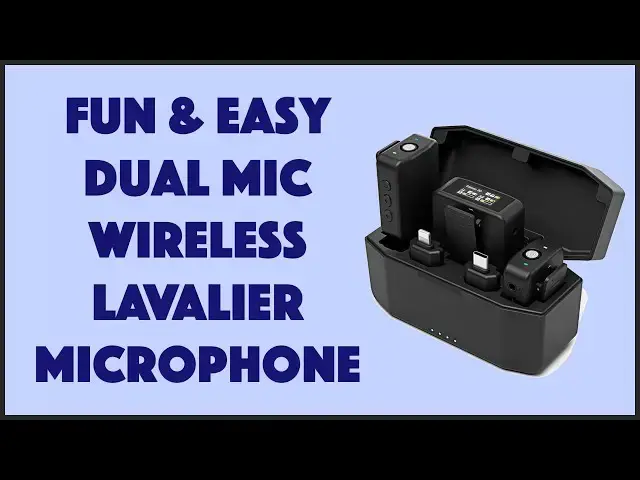
Wired microphones for video and vloggers is so 1990s. Instead, tech expert and videographer Dave Taylor evaluates the VeGue W2 Wireless Lavalier Microphone Kit with 100m range and 8 hour battery life. The results speak for themselves - literally! - in this detailed review with multiple demos. If you're recording yourself, it's definitely an option to check out.
Check it out at: https://amzn.to/46glVsJ
Visit Dave's Q&A Web site at: https://www.AskDaveTaylor.com/
#vegue #microphone #wireless #iphonemic #gopromic #askdavetaylor
Show More Show Less View Video Transcript
0:00
This is a really cool wireless microphone setup
0:03
Let's check it out. Dave Taylor here, and I'm checking out this
0:13
Let me open it up. This is the Vegway W2 Wireless Lavalier microphone kit, and it's really cool
0:20
The unit in the center is the receiver, and as you can see, it has a full color display screen to show you what's going on
0:30
And then I'll leave that out. There are two wireless clip-on microphones
0:35
and they are incredibly light and super easy to work with. They turn on automatically when you pull them out of the case
0:43
and it is a charging case. So we'll get to the battery life in a minute
0:47
but let me just say that these are 2.4 gigahertz microphones, and it has a 100 meter or 328-foot range
0:56
That is a lot of range. If you're 100 feet away or 150
0:59
feet away from your camera, you're mighty small unless it's zoomed way in. So this gives you a huge
1:06
amount of flexibility. And that can be so nice. So one of the ways you might use this is you might
1:12
be sitting in a car and have the camera shooting through the windshield. Now, if you were just using
1:19
the microphone on the camera, that's not going to work very well. But with something like this
1:24
that is no problem at all. I have two demos. I'll show you because I plugged it in two different
1:29
devices and it worked great in both cases but let me give you just a little bit more about it so like
1:35
i said there's two microphones and let me give you some close-ups so on the microphone side there is a
1:41
3.5 millimeter jack that lets you monitor the audio it's picking up that's a good way to make sure it's
1:47
working there's also USBC for charging but of course on the bottom there are those four pins that
1:54
actually let it charge from the battery unit so you can just go ahead and put it in
1:59
into that battery charging case and it'll just charge automatically. And then finally on the left side, there's power and volume up and volume down
2:08
And that's really handy. So if you leave it and it's disconnected after five minutes, it's going to power down anyway
2:15
but nice to have that control. And then the one that's probably more interesting is the receiver
2:21
because the receiver's doing a little bit more work. And it has two ways that it can interface with the actual device that you're recording on
2:29
one of which is the 3.5 millimeter on the side, and there's two different wires, I'll show you that in a second
2:36
that let you plug into different kinds of devices, and then on the bottom, again, is that USBC
2:41
but let me show you this, is there are two different USBC adapters that neatly plug into the bottom of the unit
2:51
and then can plug into your smartphone with a lightning connector or your smartphone with a USBC connector
2:58
Now I have an iPhone 15 Pro which means finally instead of the lightning connector they had for a mighty long time it just a regular old normal USBC So that was my first test So I decided I would
3:12
plug this in like that. So, and then plug that into the bottom of my phone. If it'll go in
3:19
there we go. And so now I was ready to record. So let's jump outside and let me give you both of the
3:26
demos I did. Hey there. So I'm recording this with my iPhone 15 Pro and the wireless microphone. So the receiver is plugged into the
3:35
bottom of the phone via that USBc adapter and the transmitter of course is
3:40
actually on my shirt and you can see I'm about 50 feet away and the video is
3:47
really clean and crisp pretty nice camera and the audio as you can hear is also
3:53
really good. Now let's do the exact same thing with my actual HD video camera
3:59
using a different kind of connector and see if we get the same microphone quality
4:04
Alright, so this time I'm using my fancy Sony HD cam, and again using the same microphone and the same receiver
4:13
and video quality is obviously going to be clean in 4K, but it's also giving me a really nice audio quality
4:19
which gives me huge freedom to move around. Now, let's jump back inside
4:25
Now, one of those demos I was using this adapter, But the other one, I used a cable
4:31
So let me show you what else comes in the box, because there's a lot
4:35
So this is a cell phone cable for cell phones that can take 3.5 millimeter input
4:41
I didn't have a lot of success with this, but every single phone I have also has either USBC or lightning
4:49
And both of these worked much more reliably. Now, for my camera demo, I actually use this cable
4:56
So this is labeled camera. And similarly, it's that 3.5 millimeter on both ends
5:03
Not exactly sure the difference between those two cables, but my recommendation in all of these sort of situations
5:09
is to test an experiment before you're in a situation where it's critical that you get everything right
5:15
So do a little experimentation to make sure you understand the connections
5:20
That also comes with this USBC to USBA charging cable, pretty helpful
5:26
and it comes with two of these little micro, covers these little socks. There's a ton of different industry names for them, but basically it's to cut down wind noise. So if you're outdoors and it's in a windy environment, you can literally just clip this on top and now it'll still pick up your voice, but it's a little bit more immune to having the noise from the wind going across the microphone. So there's two of those. And then finally, the only other thing in the box is there is also this portable carry
5:59
case and I suppose you could put this in the case but I thinking this is probably more useful just to have for all of your cables and all of the things that don fit in the charging case Now speaking of the charging case let talk about battery life
6:14
So I already told you that it is 100 meter or 328 foot range
6:21
And each of these units, let's see, I'm on mute right now
6:24
I can turn that off. Each of these units run six to eight hours on a charge
6:29
So you can pull them out of the charging unit and you can just go for
6:34
or two, three hour shooting session, no problem. You don't think about it
6:37
It's going to work great. When you put everything back in, it will charge up again
6:43
Now, in this case, it's charging all three devices. And since it wasn't depleted very much, it's not going to take much time to get it back to full charge
6:53
But if they were down to zero and I had just completely run out of juice, then it takes 1.3 hours to go from zero to a full 100% charge
7:04
And with the case, remember it's eight hours per unit. With the case, you can get a total of 16 hours without having to charge anything external
7:12
And when you are ready to charge the case, put everything in and then plug that in via USBC to a convenient charging spot
7:20
And then everything will charge up. And if you put it in overnight, the next morning, you're ready to go with 16 hours of recording time
7:28
Now, if you're capturing 16 hours of footage, I'm impressed. That must be an extraordinary
7:34
hard thing to do in a single day, but it's got plenty of battery life. Now, the transmitting units
7:40
also feature environmental noise cancellation technology. So ostensibly, if you're in a noisy
7:46
environment, it'll be able to pick up your voice. I didn't test that very much. So if that's really
7:52
critical, that's something you'll want to test pretty quickly to make sure it works the way you want
7:57
And then, as I said, the receiver has this color screen that lets you access a variety of functions
8:04
So let's zoom in and let me show you how that works. Here's the main receiving unit and you can see the primary display gives you a lot of information
8:12
including the signal that each of the left and right microphones are seeing
8:17
To access settings, you swipe up and then you can go left or right to choose different settings
8:26
And then go up again. And now you can go left or right to change the setting
8:32
I find 50% is plenty and then swipe down to get back to where you were
8:38
And so let's see audio channel stereo. And then you're back here and you're good to go
8:45
Now one other thing to note is that the power button, if you give it a short push
8:52
it actually locks the display, which you can see that tiny padlock has shown up
8:57
And what that means is that it is no longer susceptible to touch
9:02
So if you're worried that while it's sitting there, you might accidentally do something
9:06
this is how you disable that. Because of the design the microphone is compatible with a wide range of devices You can use it with a camera a DSLR a smartphone a tablet You can use USBC or lightning connectors or 3 millimeter
9:23
You can plug it into your computer and get it to work with that. You can even use it with something like a GoPro
9:28
So basically, whatever it is you're trying to capture your video with, you can use this device
9:34
And that's really great because it gives you a lot of flexibility. And there's really, there's not much else I can tell you
9:42
The demos are really what this is all about. And you heard in both demos that the audio was very clean
9:48
even though I was pretty far away from the camera at the time. So that's what I really like about wireless, lavalier microphones
9:55
is it just gives you flexibility. If you're giving a presentation, you can just walk around
10:00
and not worry about whether it's going to capture your voice or not. And things like that make it so nice
10:06
If you're doing a cooking vlog, if you want to do sports and you want to show someone your cool bike stunt or something, trying to hurt yourself
10:14
You know, this is a way that you can keep the microphone on you, even as you go off that jump, even though you're like 40 or 50 feet away from your camera
10:23
And then you can just in edit, you can like zoom in and tighten and do whatever effect you want, knowing you have really good quality audio
10:30
So lots to like here. Definitely one that's worth checking out. Now, let's talk about the price
10:36
But before we get to the price, I'm going to ask if you could subscribe to my channel
10:41
Click or tap on that subscribe button. We're connected. Awesome. And if you found this to be a useful and helpful video, I always appreciate that
10:48
Thumbs up or like. All right. This whole setup is the Vague
10:55
I'm not exactly sure how to pronounce their company name. So we'll call it Vague. W2 Wireless Lavalier microphone kit
11:02
And it's 16999 currently as I record. this on a discount down to 14448 at Amazon.com. And remember it's two independent microphones
11:14
so it's also perfect for interviews, or if you want to have one sitting right by the camera
11:20
and the other one clipped to the person that's your subject, then, you know, you can always go
11:25
and like get both of those sounds mixed together. So really very cool. Lots to like here
11:31
This might well be one of my new go-to wireless microphones. Kind of got a lot, but I really like the convenience
11:39
I like that when you pull it out of the case, it's already ready to go. So there's really almost no hassle
11:45
And I like that it's compatible with everything, including my brand new iPhone 15 Pro
11:51
So lots to check out. That's all I got. I hope to catch you in my next video
#Camera & Photo Equipment
#Science
#Other