Up next in 10



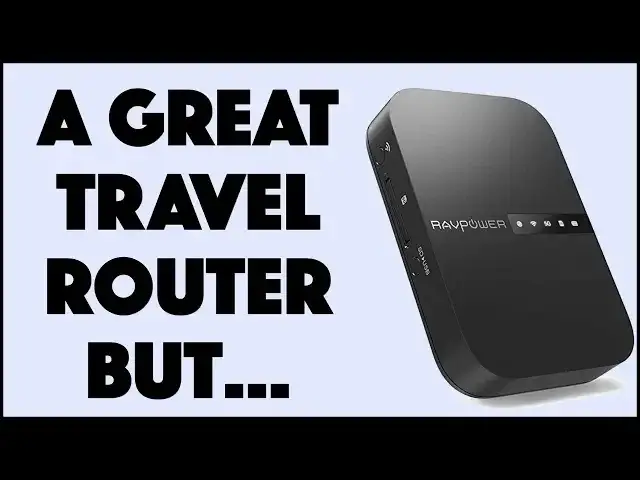
There are a lot of features about the RAVPower AC750 TravelRouter that should make it a no-brainer addition to your travel kit. If you're a road warrior and constantly connect multiple devices to public wifi, it's even better. And it works as a media sharing device. Well, sort of. Or not much at all.
Tech expert Dave Taylor of https://www.AskDaveTaylor.com/ shares the great features and the pretty poorly designed features of the RAVPower AC750 TravelRouter and concludes that if you want a smart way to access Wi-Fi on the road, it's great. If you want a wireless file sharing device, however, this might not be for you. With detailed demos...
Check it on Amazon if you want: https://amzn.to/2Dzw0FX
Show More Show Less View Video Transcript
0:00
Is this everything you need to turn your hotel room into a tech center
0:03
Let's have a look. Dave Taylor here and I spend a lot of time in hotel rooms
0:16
which means I'm constantly having to deal with hotel Wi-Fi. Now, some hotels are pretty cool about it and you can connect as many devices as you want
0:24
but other hotels, and I'm looking at you Las Vegas, other hotels think that you should pay per device, which is kind of whack
0:33
But the problem is, is that most of the devices that we travel with
0:37
don't have the ability to really help out very much. Now, I travel with at least one phone and a laptop and a tablet and sometimes other devices
0:46
I don't want to pay 10, 20, 30, 40 bucks a night for Wi-Fi connectivity
0:52
Get real guys. So if you're in a hotel and that's what they're doing, not a lot of options, right
0:59
But there are. This is a really cool option. This is the RavPower AC750 travel router
1:06
So at its most basic, the coolest feature of this is that you connect this to your smartphone
1:14
You use their app. So then through your app, you actually connect this to, for example, hotel Wi-Fi
1:22
And then this, excuse me, becomes a Wi-Fi router. So I have this set up where I have the RavFileHub app running on my iPhone
1:33
and I've hooked it up to here. I've connected this to my Wi-Fi network
1:38
And then I have also connected this Android phone to the RavPower router too
1:44
So I have two devices using one Wi-Fi connection. That's pretty sweet
1:50
Now, here's the thing is that this has no idea about the connectivity here in my house
1:57
in a hotel, at a conference center, whatever. So once I have this set up to pair with this, then connectivity is super fast
2:05
This thing shows up, I tap a button, boom, I'm online. Now, you could do that with your laptop
2:10
You can do that with your laptops, plural, your tablets, whatever devices you have
2:15
Everything then connects to this and this then connects to the internet
2:20
Pretty smart, actually, pretty cool. But this does more than that. So it is also a media sharing devices or device and it has its own battery
2:31
So you can see it's not plugged into anything, but it has a 6,700 milliamp hour battery
2:36
And that gives me the ability to run and use this for many hours at a shot
2:41
When I'm ready to charge, I pop open the side connector and there is a micro USB
2:48
There is a regular USB 3. You can charge other devices with this
2:53
That's pretty cool. And there's actually an ethernet plug. So if you want to use this as a really high speed router, you can actually use this
2:59
with an ethernet connection. Now, there are some hotels that offer that in the room
3:04
So if you can do that, it'll be faster to use this as your Wi-Fi router
3:09
most likely, than to use what they have in the hotel. So let's talk about specs
3:14
So if you're using this as the travel router, let me turn it right side up
3:19
then you're going to get roughly about 300 megabits per second at 2.4 gigahertz
3:26
and 433 megabits per second at 5 gigahertz. So that's lower than the spec, but it's still pretty screaming compared to generic Wi-Fi
3:37
If you're sharing it with a bunch of people. Now, this isn't going to do any miracles
3:41
If this then connects to the internet via a slow connection, it can't speed things up
3:46
It just makes life so much easier. But where this gets really cool, it also lets you share media
3:53
So I have plugged in a SD card, an SD card, I should say
3:58
And it means that anyone who accesses this device also can access the files on that SD card
4:06
That's pretty cool. You can also plug something into, I showed you on the end, that USB connector
4:11
You can plug in a flash drive and everyone who has the app and is connected to the RAV power
4:18
can also see the files on that. So this makes it a really nice way if you need to share data
4:23
if you're at a presentation and you want to just give 10 people copies of the data
4:27
that would be one way you could do that, though they, of course, would all have to download the app
4:31
Now, I have to be candid. This app is super confusing. I actually would say that I'll show you real quick how it works
4:40
But this real sweet spot is as a travel router. It's so small, so light
4:46
And it's just it solves so many problems for us travelers that want to actually have things work smoothly on multiple devices
4:54
But I told you I'd do this. So here's what I'm going to do. Let me go ahead and record my screen
5:00
And so by default, what you can see here is you can see this showing me file management
5:06
You see all those icons on the lower portion that say videos and photos and music
5:10
As far as I can tell, none of them actually do anything. So for example, if I go into photos, it's empty, right
5:17
But look on the bottom. If I go to my iPhone, it can show me the photos on my iPhone
5:23
OK, maybe there's a way to actually copy those up to this
5:28
to the SD card or to the hard drive, but it's not going to be super fast
5:33
This is not what I would use this for. But if we go to the SD card, which I can do by tapping on file management
5:41
So now actually, no, that's not right. Let's tap on SD card
5:45
No, the SD card icon. There's going to be a way to do this. Let's see
5:48
That looks like that accomplished something. And you can see I have 1.8 gig on the SD card
5:56
And now I don't know what happened. Now it looks like I have zero on my hard disk
6:03
which doesn't make sense because. So this is great. You know why this is great is because this is a live demo
6:11
of exactly what makes this so confusing. So let's try going here
6:16
See that folder is empty. The file hub is empty. I don't know
6:20
Maybe I just reformatted my SD card. This should not be so darn hard
6:25
It should be actually super easy for you to be able to get this to work
6:29
So let's unplug my SD card. Pull it out. Put it back in
6:35
And let's see what happens. I'm assuming I can get it to click in
6:39
But, you know, this is the issue I have with this is I've been using
6:43
this application for days and days and days, trying out different configurations
6:47
And you wouldn't think so because it's so puzzling to try to figure out
6:51
how it's thinking about things. So here's what I'm going to do. Oh, look, the card has returned
6:56
So that's reassuring. So now let's see if I can get to the cards content
7:00
So again, file management. Ah, look, file management. And it's showing me everything that's on the SD card
7:08
That is pretty cool, right? So then I can look at the photos that are on the SD card remotely
7:14
And this is just one of I could have a half dozen devices connected to the RAV power. Cool
7:19
And let's check this out. If I go to video and I go to a video, then, well, some of them work
7:26
Some of them don't. But this should be playing. But all we're getting is the audio
7:31
So a little disappointing. Let's try this one. Maybe this one will work. And let's see
7:40
Well, it often, you know, when you have a streaming video, it can take a little while to sort of load the content
7:48
Maybe go back here and try press play. And got nothing for you
7:58
So we will try. There's one more video. We'll try doing maybe this
8:06
And this is a dot MOV. And so I don't know. You probably can't hear, but there's audio
8:15
It's very low. I'll turn that volume up. But there's no video
8:21
So, you know, let me just be really candid with you. As I said, is that the strong point of this product is not its file management system
8:32
If it was up to me, I would recommend to them that they just
8:36
junk it and start over with a whole new app. But you know what
8:40
If that's not what you're looking for, and you just think of the file sharing
8:44
as this additional feature that might or might not be of value to you
8:47
as a travel router, it's really pretty cool. And I think this is the kind of thing where it's nice and small
8:54
and it has a relatively small number of functions. So it's not super complicated
8:59
And that actually can be something that can work well for a lot of people
9:03
Now, I will say specs wise, and I'm going to go ahead and stop the recording
9:08
So specs wise, this can actually theoretically upload somewhere between 12 and 18 megabytes per second onto either the SD card
9:19
or the USB or whatever you plug into that USB. Which is not too bad
9:25
If my average photo is two or three megabytes, that means I'm doing two or three photos per second
9:31
I just can't figure out how to do it. So maybe you have more patience and maybe you are willing to try to figure out
9:38
how do you copy 400 photos from your phone onto the device that's plugged into this
9:44
so that other people can share it. There's probably a way to do that. And probably there's someone watching this video right now saying
9:50
dude, seriously, it's not that hard. I say it is hard. I say it's a very complicated piece of software that doesn't need to be that complicated
9:59
So let me just say also, you can have up to five people sharing this
10:03
and you can limit permissions for different people. You can set up guest accounts, lots of cool things
10:08
And by the way, seven ounces, seven ounces. That makes this pretty cool
10:13
So it's really kind of a mixed review. Um, I really like all of the Wi-Fi and router settings for this
10:21
And I really dislike the way the software works. So, you know, now you have sort of the pros and cons of this device
10:29
It's actually pretty darn inexpensive. So if you're just looking for a router and you can ignore the other features
10:34
or you're willing to mess around and try to figure out how to make them work, this can be a great solution for you
10:39
Now, before I get to the actual price, let me ask if you can go ahead and click on subscribe
10:44
I appreciate that. Oh, and just super fast before we get there
10:48
Let me just say that there are basically ports and such on two sides
10:53
One side is you've already seen USB three micro USB and an ethernet plug
10:58
And then on the other side, there's a button that lets you switch it between 2.4 and five gigahertz and the SD card slot
11:06
No micro SD, just regular SD card. And then there's a button that says SD to USB
11:12
which one would like to think means if you put an SD card in here from, say, your camera
11:18
and you have a hard drive or flash drive plugged into the USB
11:22
pushing that button will copy all of this data to there. That is what you would think would occur
11:28
I have not tested it because I'm kind of afraid of losing data. But let's just give them the benefit of the doubt that that works
11:34
And that's cool. So this is the RavPower AC 750 travel router
11:41
And it is actually very, very reasonably priced at fifty nine ninety nine at Amazon.com
11:47
And here's the thing to think about, too, is that, you know, from a hardware perspective, this is a great piece of hardware
11:54
in terms of the software. That's something they can fix and download and make available
11:59
And you can just one day restart your app and boom, it totally makes more sense
12:03
And it's a more logical layout. So, you know, if you're looking for something that has the functionality here
12:09
and you're kind of hoping you can figure out the whole file sharing thing, that might be something that by the time you're watching this video
12:14
they might have redone it. Who knows? So worth checking out, worth maybe looking at some reviews from different sources
12:21
and maybe checking with the manufacturer to find out what their plans are in terms of their software
12:26
So I think this is a keeper. I really like the fact that it gives me the ability to create my own Wi-Fi network
12:33
anywhere I am and limit what my devices are and that only I can get to it
12:38
It's pretty cool. So this is Dave Taylor, kind of a mixed review, but hey, gotta say I'm definitely honest, right
12:46
Cool. Leave me comments. Give me some feedback on how this all worked for you because I'm really interested in that
12:51
And with that, I'll catch you in my next video. Bye
#Consumer Electronics
#Mobile & Wireless
#Media Streaming Devices