0:00
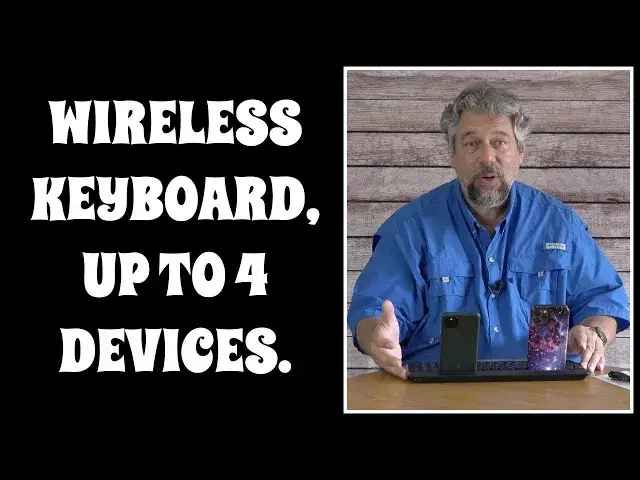
A backlit wireless keyboard you can connect to four different devices
0:04
Let's check it out. Dave Taylor here and I'm checking out this
0:15
This is cool. This is the Senda Rechargeable Backlit 4-Device Bluetooth Keyboard
0:21
And you can't tell yet, I'll show you in just a second, but it has seven different backlit
0:26
colors which is cool. More importantly, it can connect to up to four Bluetooth devices simultaneously
0:33
So for testing purposes, I've connected it to an Apple iPhone 12 and to a Google Pixel
0:39
5a and literally switching between them is as easy as holding down the function key and
0:45
pushing 1 for my iPhone and pushing function 2 to switch back to the Google Pixel
0:56
Now here's what's really fun. Let me show you this. This will work
1:01
It's not really designed to hold things in this direction. Let's see if we can get this to happen
1:07
So now watch what happens. So when I go to the Pixel, then there's no keyboard
1:15
But if I switch to the iPhone, the iPhone will see the keyboard, remove the on-screen
1:22
keyboard and then the Pixel will show the on-screen keyboard. So function 1 and that hopefully just occurred, right
1:32
Pretty cool. Now I can type as much as I want and it shows up
1:39
And if I switch keyboards or switch devices, I should say, then this is a sample on the
1:48
other device. That's all there is to it. Super easy. Now obviously it's designed that you have them facing you
1:56
That would make a whole lot more sense. And you'll notice that this slot in the top, let me show you, this is actually a substantial slot
2:05
This slot is 12.7 inches long by about 0.65 inches wide. It is big enough that you can put an iPad or other tablet in here
2:16
Or as I'm showing, you can actually have two phones or a phone and a tablet, whatever it
2:21
is you want to do. So you can do all that. Super easy
2:26
It's all really easy to work with. The keyboard itself, I'll give you a close up
2:30
It's a QWERTY, standard QWERTY layout and seven backlit colors, three brightness levels
2:37
Let's start with the four different connections. You can see on the top right that there's Bluetooth 1, 2, 3 and 4
2:45
That gets you the four devices, but there's also four indicator lights just above it
2:50
And they are function lock, caps lock, number lock and low battery
2:55
So you can, for example, function lock and then use the function keys as you desire for
3:02
the particular device that you're using. But let's go into a dark room and I'll talk you through some of the other stuff it can
3:08
do as we look at all these different colors. Hopefully this is going to look good, but let's go ahead and I'm going to actually change
3:16
the color. And that you just do by doing function, enter. There are seven different colors
3:28
And then you can change the brightness with function shift
3:40
It's pretty cool and it looks really cool in the dark. The keys themselves are actually scissor switch keys and they're dustproof and sweatproof
3:49
I don't typically sweat onto my keyboard, but you might. It's good to know
3:54
And they have a nice travel, so they actually feel like you're doing something
4:00
That's what I really dislike about onscreen keyboards is that it's just, you're tapping
4:04
on a surface of glass. Whereas with this, there's actually something going on and there's even the tiny little
4:10
dashes so you can orient your fingers for those of you that are touch typists
4:15
So lots to like, there's an on off switch, which obviously you'll want to just go ahead
4:20
and turn off when you're not using the keyboard to maximize your battery life, which brings
4:25
us to the battery. It's a 1600 milliamp hour battery. You recharge it with USB-C. It comes with a USB-C charging cable
4:33
And once it's fully charged, then you got about six months of use before you have to
4:37
worry about charging it again. And if you're running low on battery, yes, there's an indicator light that will show
4:43
you low battery and you'll say, whoops, and you'll plug it in and give it a half an hour
4:47
or an hour and you'll be good to go for a couple more months. So super easy to work with
4:52
So really the only thing left to talk about here is the actual price and they got a pretty
4:57
killer bargain going on right now. But I want to actually ask you if you'd subscribe to my channel first, go ahead and click or
5:04
tap on that subscribe button and we're connected. Really appreciate that. Give me a thumbs up if you found this to be a useful and interesting review
5:13
And finally, I will put my phones down. I will show this to you again
5:18
This is the Senda rechargeable backlit four device Bluetooth keyboard and it's $42.99
5:26
But on Amazon, as I recorded this video, it was down to $30.59
5:32
That's a substantial bargain. $30 for this on amazon.com. Definitely one to check out
5:39
I hope you found this interesting. I'm going to go back to typing in my novel on one or both of my phones as a security
5:45
mechanism, write every other paragraph. I'm not sure that would work. Anyway, I'll catch you in my next video