Up next in 10



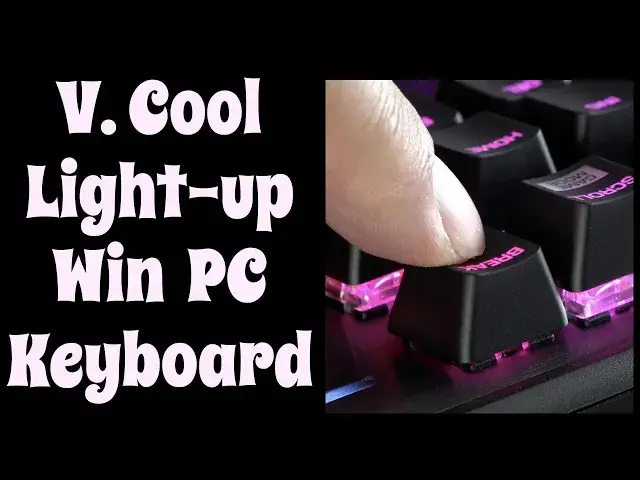
Your keyboard probably stinks and you've forced yourself to get used to it. But is that any way to live in the technological age? Tech expert Dave Taylor checks out the Roccat "PYRO" Keyboard and finds that it's a way better alternative, from its AIMO lighting to anti-ghosting, volume wheel to deep mechanical switches. It's a great typing experience and it looks fantastic.
Check it out at https://www.Roccat.com/
Check out Dave's Q&A support site at https://www.AskDaveTaylor.com/
#roccat #aimo #keyboard #review
Show More Show Less View Video Transcript
0:00
This PC keyboard is on fire. Let's check it out. ♪♪��
0:11
Dave Taylor here and I'm checking out this. This is the ROCCAT Pyro keyboard and there's a lot to like about this
0:18
It works with any computer but it's really kind of designed for the Windows world
0:22
with Windows keys on it and everything. What is most striking off the bat is that it has color changing
0:29
It actually uses the AIMO light engine and that means you get 16.8 million colors
0:35
and even as I'm sitting here looking at it, it is shifting through colors
0:39
So let's jump into a darker environment and you'll see what I'm talking about. ♪♪��
0:53
There's no way that's not cool, right? So, way more fun than your existing keyboard that came with your PC
0:59
And if you're a gamer, then there's a lot you'll like about this too. But honestly, any computer where you're tired of these crummy little chiclet keys
1:07
or like membrane keyboards and stuff, yuck. On-screen typing, no thank you. Way better than all of that
1:15
Now, it features mechanical switches and there's a pretty big play here
1:21
You can see this from an angle. This is a 2mm actuation, so there's a nice feel
1:27
If you've been trained on older keyboards, this is going to feel just like that
1:32
One of my favorite features is it has a volume wheel that you can use to adjust your volume
1:38
What a great design. It's brushed aluminum under here. It has anti-ghosting features
1:44
As I said, it uses the AIMO lighting engine, so it gives you tons of colors
1:49
I actually just like sitting here watching all the colors cycle. It's very cool
1:53
Now, it also has what ROCAT calls their EasyShift, which gives you the ability, using this key, to assign or to get to second functions on specific keys
2:05
which is really helpful if you're a gamer and there's specific things you want
2:09
Now, this is just the keyboard, but if you really want a palm rest
2:14
it includes the palm rest that you just click in. I'm not a big fan of those, but some people like them, so it is included
2:21
and it's easy enough to go ahead and add it. And the cable, this is a hard-wired USB 3 cable
2:29
and it is 1.8 meters, or about 6 feet, with, let me unplug it here
2:35
a USB 3 plug on the end. When I plugged it into my little Dell tiny little PC
2:43
I found that it automatically recognized what keyboard it was and configured everything properly
2:48
Pretty handy. In terms of dimensions, it is 44 centimeters by 15 centimeters by 3.6 centimeters and 1100 grams
2:58
And you're like, okay, well, I don't speak metric. All right, for those of you that don't speak metric, it is 17 inches by 6 inches by 1.4 inches and 2.4 pounds
3:12
And on the back are little feet that you can fold back if you want it to just be flat
3:18
or I actually much prefer to have the little feet up, and then that gives you a much better angle, and it also gives you a more comfortable typing experience
3:29
So, again, there's lots to like about this. This is a really cool keyboard, even without all the colors
3:36
but the fact that it just keeps cycling through colors the whole time is pretty darn sweet
3:41
Also, worth knowing, two-year warranty. So this thing, you can like beat it up and type like a lunatic, do your next novel, finish your PhD thesis, whatever it is
3:53
and you will actually have this thing still in great shape afterwards
3:57
Definitely good to know. Oops, I think because my computer closed, then the keyboard is no longer powered
4:04
so let's open this, and that should open, turn this on. In any case, before I get to the price, which is the only thing left to talk about
4:13
let me go ahead and ask if you could subscribe to my channel, just a click or a tap on that red subscribe button, really appreciate when you do that
4:20
Give me some feedback. What else would you have liked to see? This is a keyboard, so there's not a whole lot I can show you
4:26
but what else would you have liked to have seen about this? All right, this is the Rokat Pyro keyboard, and it is $99.99 at Rokat.com
4:39
Definitely one worth checking out if you have a desktop PC for sure
4:43
This is a really great addition. I will, however, note quickly that there are no additional USB plugs on the keyboard for a mouse or anything
4:52
That's something people always like to know, but otherwise, this is a great upgrade, and I don't care
4:57
I would use this in the dark just to enjoy the lighting. That's all I got. I guess I do have to get back to my great American novel
5:04
so I'll hope to catch you in my next video.
#Laptops & Notebooks
#Consumer Electronics
#Science