Up next in 10



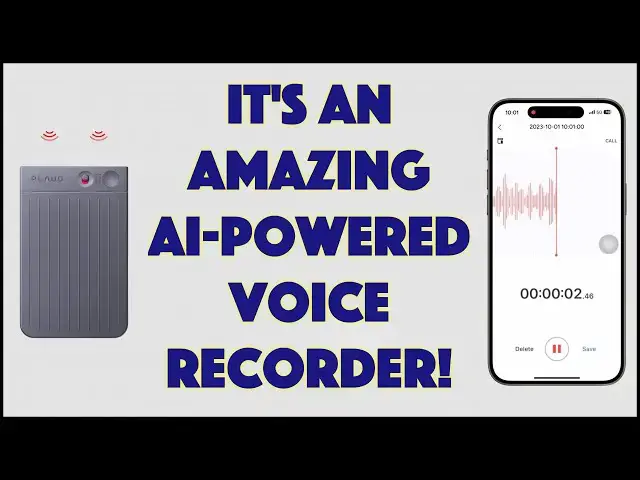
Imagine being able to easily record every client session, phone call, or meeting you attend, then being able to generate a transcript with the push of a button and an AI-powered summary with just one tap. That's the promise of the PLAUD Note ChatGPT-Powred AI Voice Recorder, and, as tech expert Dave Taylor demonstrates, it works beautifully and makes recording, transcribing, and summarizing a breeze. Prepare to be amazed.
Check it out at: https://www.PLAUD.AI/
Visit Dave's Q&A Web site at: https://www.AskDaveTaylor.com/
#plaud #voicerecorder #transcripts #chatgpt #airecording #aitranscript #plaudnote #askdavetaylor
Show More Show Less View Video Transcript
0:00
This isn't a credit card. This is an AI powered voice recorder. Let's check it out
0:12
Dave Taylor here, and I spent a lot of time in meetings. Now, some of the meetings are still on Zoom
0:18
but a lot of meetings are in person. In fact, just the other day, I was at a big conference area
0:24
and we were all sitting around talking about AI and its applications in marketing. Now, it just
0:29
just so happened that I had this device with me. This is the plowed, chat GPT-powered AI voice recorder
0:38
And it looks like a flat thing, but keep in mind, it is ridiculously thin and incredibly light
0:45
In fact, it's 3.4 inches by 2.1 inches by 0.12 inches thick
0:51
and it's 30 grams. Now, the company conveniently supplied me with what they call their MagSafe case
0:59
which also just makes it a good travel case. So it works like this
1:03
And I went into the meeting, I explained to everyone what I was going to do
1:08
and then I put the device in the middle of the table and let it just record everything
1:13
That's its primary function, and it did a remarkable job, but not only did it record everything
1:20
but then I could use the plowed software. It's an app on your phone
1:25
and it actually created a transcript, and then summarize the transcript using chat GPT technology from OpenAI
1:35
and then even gave me a mind map. So I want to show you all of this because it was really amazing
1:40
But let me start out by saying that this device has three primary functions
1:45
Record, transcribe, and summarize. Now, if you've been in even a 15-minute meeting
1:52
you know that it can get pretty easy for you to lose your focus
1:56
or for people to wander off and have tangential conversations, and then you're left at the end with
2:02
what was the point of that? What were the key takeaways? So having your little AI pal in something this small is a game changer
2:11
Imagine this with a lecture at college or something, right? Where you just put this up on the podium
2:16
Of course, you ask the professor permission first, and then this records the whole lecture and then summarizes it for you
2:24
So you really get the key ideas. remarkable now it has another secret superpower because it is mag safe so I can put
2:34
it on the back of a mag safe phone like this iPhone 15 pro don't have mag safe
2:39
they include a mag safe ring you can put on your phone and then they have
2:44
something is really remarkable they have vibration sensors so it can be used
2:49
to record your phone calls both you what you're saying and what the other party
2:54
is saying too and Then, of course, you can get the transcript and you can summarize those phone calls
3:00
Really cool. But of course, for me, my primary use case was what they call ambient sound
3:07
And that's what I used it in this situation. So let me give you this quick close up because there are very, very few buttons
3:13
but there the slider up and down that lets you choose between those dual pickup engines So ambient sound is down and vibration sensor is up
3:24
And then there's the on-off. And that's super easy. So if I want to start recording a call, all I have to do is push the button and it's now recording
3:33
Not a call, I should say. If I want to record a meeting and now it's running and that's going great
3:39
So nothing else I have to do. And not only that, but notice
3:43
that my phone app has picked up that event and it's now also you're seeing it
3:49
recording here and it includes this actually has 64 gigabyte which gives you
3:56
480 hours of storage and you can have the battery works for 30 hours of
4:03
continuous recording and 60 days of standby so eventually you're going to have to
4:07
charge it welcome back to how you do that in just a second and your AI open
4:13
subscription, which you get the first year free as part of the device, gives you 600 minutes per month of
4:20
transcription service. So that, you think, 600 across 30 days, but hopefully you're not having
4:27
meetings every single day. So 600 minutes of meetings a month is plenty, if you ask me. So all of that's
4:33
happening and it's recording as I go. So what I'm going to do is I'm going to push the button
4:39
And that will stop the recording. It should stop it. Let's see
4:43
There we go. So now it's stopped. And so now it's on my phone. But I still need to download the audio. So that's done. Let me go here. And then it actually, I guess here it was connected and the app was centered or was in the front. So it actually was working just great. When I did my meeting, I did have to download the audio from the device onto my phone. And they have the slow
5:13
copy or you can actually connect to this via Wi-Fi rather than Bluetooth, which gives it a much bigger bandwidth
5:20
And then it downloaded 30 minutes of audio recording in I would say maybe about 15 seconds
5:26
It was pretty lightning fast. And there's already the transcript here. And then I can already summarize it
5:33
So let's see. Let's see what we got to do here. I have to choose transcript
5:39
And then when I choose to have it transcribed, I pick the language
5:43
I tell it what it is that I was doing and it let's just call that class or lecture note and then start transcription
5:51
So now you can see transcribing in progress. And so I actually asked the plowed people what's actually happening behind the scenes here
6:00
And here's what happens is that the audio is copied into the app
6:03
The app then encrypts the audio and uploads it to Google Cloud and then it anonymizes that data and sends it to open AI for the Transcuit
6:13
the transcript and summary, and then that data comes back and then Plaud actually pairs it back with your data
6:20
So OpenAI gets the audio files, but it has no idea what they are
6:25
So it transcribes them and gives that transcription back and we're done
6:30
And you can see I already had this transcription And now since I have the transcription I can choose summary and it give me a summary And this was just what I was talking about for those couple of minutes
6:42
And then I can even do a mind map. So that's pretty cool
6:45
But what I want to show you is I want to go to this other meeting that I attended
6:51
So this one was 30 minutes long, and you can see there's a lot of transcription
6:57
And not only that, but remember, it's audio. So, I don't really have that entire meeting on my phone now
7:18
And I have a transcript of it that I can search. And I have a summary
7:22
And we can even not just do that summary, but again, I can do a mind map
7:28
And then I can share this with my colleagues. So in a lot of ways, this is a real game changer for those of us that have to go to meetings
7:36
or have one-on-one client sessions or anything. And this is so small and so discreet that it's really a very non-threatening device to put on the table
7:47
And the benefits you get from this are enormous. It's really cool
7:52
That transcription is pretty remarkably fast. And honestly, with really long meetings, it's mostly constrained by how fast the data can be sent back and forth
8:03
And then the fact that it can summarize it is just a glorious thing
8:09
So lots to like here. It's a really remarkable product. And they just went through a round of crowdfunding and raised like $5.5 million
8:18
People are very excited about this device. And understandably, I mean, if you think about all that this can do
8:25
do, we've had audio recorders for meetings that were long. It's a little hard to get this out of the case
8:33
Let's see if I can get that. There we go. So we've had audio recorders that were big, chunky things that you couldn't avoid noticing
8:41
Or people just didn't record meetings because what do you want the recording for? Who's ever going to listen
8:45
But getting a transcript that you can search, getting a summary that you can send to people that couldn't attend, game changing
8:53
Now, one of the questions you should have asked. when you looked at this and you saw how thin it is was
8:59
hmm, how do you charge it? And the answer is there's a little charging
9:03
a magnetic charging thing on the back, and then they have a customized cable
9:08
that has that matching piece. So you just connect the two and now plug it into a USBA port on your computer
9:16
or on a wall charger, like a phone charger or something, and it takes about two hours from completely dead
9:22
to completely charged. And this is pretty common. You see this a lot with smart watches because they don't want to have it exposed
9:31
They obviously don't have the thickness to have like a USBA or USBC connector
9:36
So that magnetic charge works super well. Now, the risk there is if you lose this cable, then this is less useful
9:46
But that's an acceptable problem to have. I will also note that there comes with an adapter If you don have USBA on any of your devices it has a USBA to USBC adapter And as I already mentioned there is that MagSafe adapter if you want to use it on the back of your phone or something
10:05
So all in all, a really, really cool device. I'm very impressed with this
10:10
And the fact that it gave us that transcript and that summary from our meeting was game-changing
10:16
And the irony was that it was a meeting about AI. and no one had ever heard of something like this
10:21
So props to them, very cool stuff. Now, we do need to talk about the price
10:27
because it's a little spendy, but for the functionality you get, I think it's spot on and absolutely worth it
10:33
if you go to meetings or you have a lot of client meetings or you attend a lot of lectures
10:39
So this is the plowed chat GPT-powered AI voice recorder and it comes in black or silver
10:49
or starlight. What a nice name for a color. Starlight. And it is $249, but they're currently discounting it down
10:59
since it's still launch. They're discounting it down to $159 at plod.a.I. And if you want to get that
11:08
MagSafe case, this is also very affordable at $15. I'm sorry, $19. So $19 if you want the magsafe case
11:17
so you can put it on the back of your phone, because without it, it ain't MagSafe
11:21
so that doesn't work. But when you put it in here, then not only do you have something
11:25
that protects your little voice recorder, but it then does give you that capability
11:31
for you to use it as a MagSafe phone recorder too. All in all, remarkable technology
11:37
a great use of AI. It might seem like a fairly narrow focus for a product
11:43
but it works really well. And you don't want to leave your phone
11:47
in the middle of a conference table, but you can certainly leave this in the middle of a
11:51
conference table, or you can leave it on a lecture podium or something and then get whatever you need
11:56
And if you're thinking, well, what if I record the entire day and all the lectures and everything
12:01
The answer is, fine, that's cool, because ChatGBTGBT will yze that transcript and tell you
12:07
here's the summary of the things you need to know. So even if you record a couple of hours of text or speaking, I should say, then it's still going to do the heavy lifting
12:16
to help you actually navigate through that information, which is way better than not having any device at all
12:22
So really appreciate the chance to test this out. I invite you to subscribe to my channel
12:28
Go ahead and click on that bell icon too to get notifications. Give me feedback, thumbs up
12:33
And of course, I always appreciate comments. And I do have a connection with the company
12:37
So if you do have questions about the technology or their safety or privacy or anything
12:43
hit me up and I'll help you try to find an answer. So that's everything. I'm going to go back to my recording, which means I'll have to catch you in my next video
#Business Services
#Consumer Electronics
#Software
#Email & Messaging
#Voice & Video Chat
#Intelligent Personal Assistants
#Teleconferencing