live_tv
Livestream Starting Soon
00
Hours
:
00
Minutes
:
00
Seconds
Up next in 10



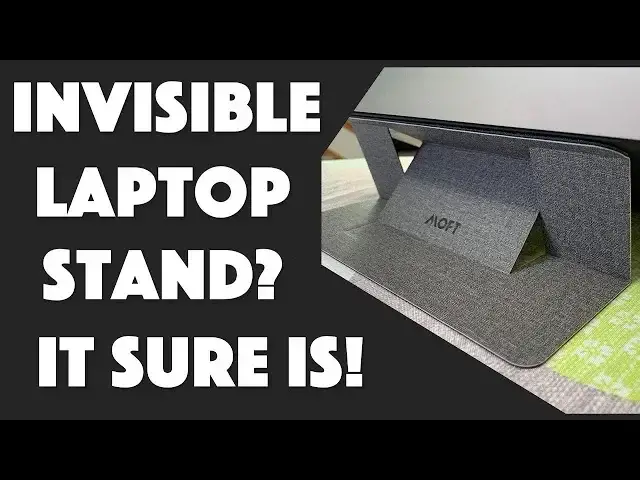
Wouldn't it be nice to have a laptop stand that weighs nothing and takes up zero space when you're not using it? A stand that can work with the heaviest laptops but is almost invisible when not in use? Enter the MOFT Invisible Laptop Stand, now live on Kickstarter.
Tech expert Dave Taylor of https://www.AskDaveTaylor.com/ got one at CES 2019 and installs and tests it out in this video review. It's not the most obvious thing to figure out, but once you do get the secret ninja origami moves to unfold it, it's quite a slick piece of design and a steal at the price.
Kickstarter link: https://www.kickstarter.com/projects/1780235500/moft-worlds-first-invisible-laptop-stand
Show More Show Less View Video Transcript
0:00
Can this make your laptop more ergonomic
0:02
Let's have a look. Dave Taylor here and working on my laptop
0:13
And here's the thing. Laptops generally aren't super ergonomic. What this means is that it's not uncommon to get neck aches, shoulder aches, have your wrists or arms or hands hurt
0:24
My hand hurts a little bit right now. But we all just sort of suffer through because getting a laptop stand
0:29
a pain it's big it's clumsy it's hard to travel with but not with this one this is
0:36
the moffed invisible laptop stand and as you can see it's pretty thin
0:41
Moft by the way stands for mobile office for travelers so now you know what the
0:46
acronym is so let me pull it out and I'll show you what it is then we'll put it on
0:51
this HP laptop and we'll see how it works so the whole idea is actually
0:55
remarkably simple it is this and It is a sort of a complicated cutout
1:02
You can see when I bend it. We'll see that much more once it's actually on the laptop
1:07
And then there's an adhesive portion here. And then part of the adhesive portion, there's magnets that keeps that to the actual unit itself
1:17
And the idea is we're going to stick it on the bottom of the laptop. And then with some little origami super moves, we're going to be able to actually adjust it to two different heights
1:27
15 degrees. And what I mean by that is, the angle is going to be 15 degrees or 25 degrees depending on your preference and the whole thing is
1:36
ridiculously light it's 2.3 ounces you can see it is adding basically nothing to the size weight
1:42
dimensions of your laptop super easy to forget you have it on but the way they designed it it
1:48
actually can hold up to 18 pounds now if you're carrying an 18 pound laptop i really really feel
1:54
for you find a lighter one good gracious that's a lot of weight for a laptop i know you you're
2:00
laptop's probably like two and a half pounds three pounds that's pretty typical now it can
2:04
work with up to a 15.6 inch laptop so it's going to work with MacBook pros and things like that
2:09
this is not quite that big this is a little bit smaller this HP laptop and you know what
2:15
enough talk let's go ahead and fingers crossed I do it right let's go ahead and put this on
2:20
so it's pretty easy because you can see on the top hopefully there's like a T-shaped
2:25
adhesive so we're going to take that off and then just put that on
2:29
the laptop Now one thing I did notice is that if you looking at your Mac laptops Macs are nice because the whole bottom is actually just a sheet of metal aluminum whatever the heck they use But a lot of the PC laptops that I have and have looked at have actually cooling vents here
2:49
Now, that's going to get in the way of this. So you do want to have a close look at exactly how your laptop is designed before you buy one
2:59
You can move it down or move it into a different location. but I think it's going to be more stable
3:04
than closer it is to your hinge. So on this particular unit
3:09
now that I'm poised to actually put the actual stand on it
3:13
you can see that I have, there's a couple of mystery holes here and here
3:17
I don't really know what those are for, but other than that, there's a long sticker here
3:21
with a whole lot of logos telling me everything I ever wanted to know
3:25
about every component in this laptop. But there's no vents, there's no cooling things
3:30
There's nothing that's going to actually affect the performance of the laptop, which is pretty important
3:35
So now, let's double check that the hinge is on the end, I think it is, which is this end
3:40
We don't want to end up putting it on the wrong side and having the laptop tilting in the wrong direction
3:45
And now I've taken the adhesive cover off, so this should just, let's make sure it's nice and centered
3:53
Now I won't, whoops, won't be able to read, sadly, that sticker full of logos
3:58
But you know what? I've never read it before. So it doesn't matter. And I'm just going to make sure it's centered in terms of the hinge and done
4:07
That's it. That's the install. This is like even easier than putting on a screen protector
4:12
And now with this installed, we should have, there's the tall orientation
4:17
And then let's see, there's, how do you do this? The shorter one. Maybe the shorter one is like that
4:23
So let's give both of these a whirl with the actual laptop oriented correctly
4:28
So we'll start with this. and that is a nice stable position
4:35
Let's see. It is definitely a very different orientation. I mean, if you look at it from the side
4:41
you can see that's a pretty radically different position versus my original setup here
4:46
This is the 25 degree angle. And then this is something that you will get much better at
4:52
as you have it for a while. Then let's see. Well, that is the 0%
4:56
That's not going to do anything. Let's see. Well, let's see. How do you get that second position
5:07
Let's see. This is not what you see in their very spiffy Kickstarter demo because on Kickstarter of course they have people that have spent time figuring out all the secret origami moves Let see What does this do
5:24
Aha. So that gives me the different angle. So I might not have positioned it perfectly because when I let go, that happens
5:32
So this might be something where I need to move the entire unit back a little bit
5:38
here we go so well interesting I got it into the 25 degree position but I don't have it in the 15
5:46
degree position so let me look here and so hmm this is oh maybe it's like this ah ha that's it so we're good
6:00
and now I just have that issue of balance so here's one of the other nice things about the
6:06
Moft invisible laptop stand is that they say you can take it off and you can put it on again
6:13
So I'm going to do that. I'm going to take it off. And it's pretty strong adhesive, as you would hope
6:20
But hopefully this will work. Let's see. Okay, the good news is it's come off
6:29
It is still super sticky and it has left no residue at all on my laptop
6:33
So I'm just going to simply move the whole unit. closer to the hinge. So we'll do that. Let's see, well, that's not quite exactly parallel with the hinge
6:44
which I suspect is important. So let's try one more time. So this is the excitement of doing live demos, as you never really know what's going to happen
6:54
But I think we got it this time. So now, first off, pull this out
7:00
We interrupt this video to show you how it actually works, because we've had a little more time to experiment with this
7:06
And now I understand. The mechanism is actually quite easy. So here's the deal
7:10
You fold it out with the sides in. So that gives you something like this, right
7:17
So there's your first angle. And then all you do is you take the center part and pull it forward
7:23
And that gives you your second angle. That's it. So you want it lower. So you have the center part out forward
7:29
And if you want it higher, you just pull the center part in. And when you're ready to roll, you just fold the whole thing up and you're done
7:35
That's it. Now, back to the regular video. That gives us our shorter angle
7:40
So that's much better. So we have much less drama going on here
7:45
And I can see where you know in the course of maybe even 30 minutes you going to get the hang of it and you going to be able to just you know be able to go well let me see There we go I ready to roll You know so super easy And most importantly look at what happens when I not using it
8:02
It is literally invisible. So it's a pretty cool idea. I'm not sure that I like that particular angle for my laptop
8:10
So I'm not sure. I'll give it a shot for a week or two. But if you are someone who's looking for some ergonomic shaking up to be able to change
8:19
the position of your laptop. laptop be able to change your posture have your wrists feel a bit better this could
8:25
be a really great solution again it's the moffed invisible laptop stand and it comes
8:30
in gold rose gold silver or gray this I would be quite confident is gray which
8:38
is a nice I don't know executive color now before I tell you the price and slightly
8:43
complicated because it's Kickstarter campaign let me ask if you can subscribe to
8:46
my channel really appreciate when you subscribe to my channel and if
8:50
you are using a laptop stand leave a comment and let me know what you're using and whether it's
8:54
a pain to carry it around or whether you have something very very small and highly portable like the
8:59
moft okay now the moft invisible laptop stand let me show it to you this way it is going to retail at
9:07
twenty four dollars but right now while their kick starter campaign is still live you could pick one up for
9:13
nineteen dollars and that's a pretty darn good deal this is a really nice piece of engineering
9:18
even if I didn't make it look super nice and smooth, that's just me not having any experience with it
9:23
I suspect your experience will be very similar for that first 30 minutes
9:27
and then by the second or third day, you'll be like, you know, oh yeah, I'm ready to roll, you know
9:32
and you just have it all set up and it won't even be an issue. Clearly that is not how to do it
9:38
I think the trick is to decide whether these need to go in or out
9:42
See, because once you do that, then it gets into a very stable position. So anyway
9:48
There you have it. This is the Moft and Visible Laptop stand available right now on Kickstarter
9:53
I have a link in the description. If you want to check out the Kickstarter campaign, you can pick it up for $19 while it's still on Kickstarter
10:00
or it's going to end up being $24 when it hits the retail channels. So, this is Dave Taylor
10:05
I need to get back to my work, which means I will catch you in my next video
#Computer Hardware
#Laptops & Notebooks
#Gadgets & Portable Electronics
#Virtual Reality Devices