Up next in 10



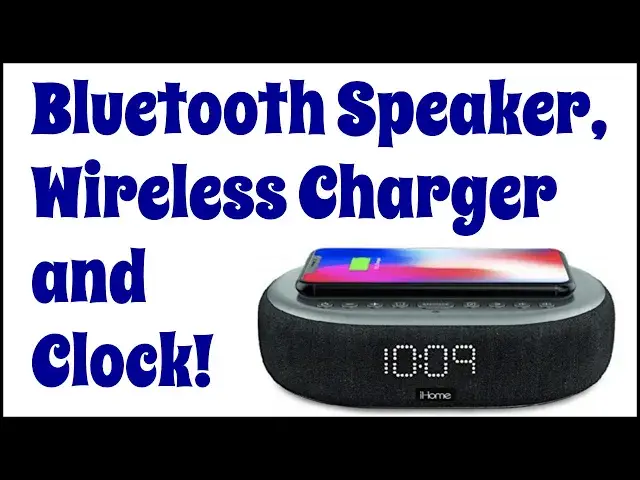
Instead of just having a wireless charging pad, why not have a combination 10W Qi charger, Bluetooth speaker and speakerphone, with clock? That's the feature set of the iHome TimeBoost iBTW41 Bluetooth Speaker & Charger from iHome and it's a good combination. Tech expert Dave Taylor checks it out and finds that while it's overall a solid option, there are a couple of limitations and issues you'll want to know about before you make a purchase decision...
Check it out at: https://www.Walmart.com/
Check out Dave's Q&A Web site at: https://www.AskDaveTaylor.com/
#iHome #timeboost #charger #speakerphone #bluetooth #speaker #askdavetaylor
Show More Show Less View Video Transcript
0:00
This deserves a spot at your bedside table. Let's check it out
0:11
Leave Taylor here and I'm checking out this. This is the iHome time boost
0:17
IBTW41 now don't worry about the name It's just a really great clock charger and Bluetooth speaker
0:24
Combo that is really perfect to have at your bedside table or maybe on a desk
0:29
So you can have it where if you need to charge something you just put it on there and you're charging
0:34
There's a USB plug in the back for a second charge or a second device easy enough
0:40
And it gives you all this functionality with time and there's dimmers and there's two alarms
0:46
There's lots of cool stuff. In fact, it is a 6 watt Bluetooth speaker and it actually
0:54
Sounds okay I mean It's a little dinky speaker But it also means that if your phone's connected via Bluetooth it works as a speaker phone and that can be a really great
1:04
Additional benefit for a lot of audience and if you have it hooked up as a speaker phone when a call comes in
1:11
You'll get audio caller ID so you can decide if you want to take the call or not
1:16
That's pretty smart engineering. So it's a 10 watt Qi charging pad, too
1:22
So it's higher a lot of the Qi charging pads are stuck at 5 watts still that was the original power
1:27
But this is more powerful, which means if you put your phone on here or any other wireless charge device
1:34
Then it will charge faster. That's a good thing now on the back
1:39
Let me give you a close-up on the back. You can see that there's the button to set time
1:43
we'll get to that in a second and USB a Power for the little power adapter
1:51
There is a switch that lets you decide if you want to go into daylight saving time
1:56
Automatically or not and there's the Bluetooth pairing button now on the front
2:02
You have the time and you can adjust the brightness. I can put it on
2:09
Three two one. I think there's off there's automatic one automatic two
2:18
Full auto, so let me put it on auto for a second. You'll see that it is
2:24
Fairly bright, but if I covered the light sensor it gets dimmer
2:29
Which is exactly what you want to have happen at night if you have this in your bedroom
2:33
You don't want it blazing out that light and if you do you can change the setting to do just that
2:39
So I really like that you have that sort of dimming system and you can choose which one you prefer
2:44
Now there are a lot of buttons along the top So this is another close-up from the left. You can see there's power on and off
2:51
There's plus or minus that works for tracks in some contexts and lets you adjust the time again
2:57
I'll come back to that in a second and alarm one snooze alarm to pause play and volume up and down so
3:07
Why do I keep referring to this time set because it's kind of old-school
3:12
It's kind of really old school in a weird sort of way
3:15
I think I home maybe took one shortcut too many here because you push the button and then you literally just push plus or
3:23
Minus until the time on the display matches the actual time that seems really
3:29
1950s for a device that's also Simultaneously pairing by a Bluetooth to a smartphone
3:36
So it don't really understand why they can't get the time once you've paired it and have it automatically be in sync
3:43
Previous iHomes had a physical connector and then you could just plug it in and it would grab the time from that which was really
3:50
Nice, but of course the lightning connector licensing is a nightmare I totally understand why they didn't want to deal with that and there are rumors in the wind that
4:00
Eventually all of these little connectors on these Apple devices are going to be
4:04
USB-c now the nice thing is that'll then be standardized across Apple and Android, but we're not there yet. So
4:12
We are sort of in this funny limbo state for a while. I get it. I like the wireless charging
4:18
It doesn't get much easier than just dropping a device on top of this, which is great
4:22
But the time set is definitely clunky. Now. The good news is if I unplug it there is
4:29
Hallelujah a battery backup and it comes with that battery so just make sure you pull out the little plastic thing and when I plug it back in I
4:37
Have not lost the time. How handy is that? See still knows what time it is
4:43
Devices that can't do that man. That is like not even 1950s technology. That's like
4:48
1940s technology and they all need to get with the program This is a bare minimum of functionality. But having said that it's pretty sweet. So let's turn it on
4:58
Looking for Bluetooth signal and I'm gonna go ahead and pair it with my
5:04
Apple iPhone 13 Pro and then we're gonna jump into some music. Let's see if we can get this to work
5:15
And this is a pretty chill tracks, let's move forward a bit And it's not great sound it gets pretty loud as you can hear
5:26
But it's very highs Oriented from an audiophile perspective. There's barely mid-range
5:33
There's no bass But is it gonna be good enough for like an audiobook for your little one when they're trying to get to sleep
5:40
Or for a phone call or yeah listening to music if you're just trying to get some sounds to help you get to sleep yourself
5:47
Yeah, that's fine. You know, are you gonna want to listen to the latest album this way
5:51
Probably not but that's not really its purpose. This is just a really nice
5:56
small simple easy to work with sort of bedside Bluetooth speaker and charging system and that's really all they ever thought it would be and that's all they ever designed it to be
6:08
So let me give you some quick dimensions. It's 7.5 inches by 5.2 inches by 2 inches tall
6:15
It's 2.2 pounds. It's really light It's easy to work with the charging block has a nice long cable so you can run that behind your whatever
6:26
Side-table or your desk and have it plug in on the floor and you're good to go
6:30
You'll have the time if you lose power, it doesn't lose the time you can charge devices
6:36
You can plug a second device into the back simple straightforward Really actually a pretty nice addition to most anybody's side table or desk or kitchen table or something like that
6:47
So all this left to talk about is the price and before we get to the price
6:51
I'm gonna ask if you could subscribe to my channel a tap or a click on that subscribe button and we're connected
6:58
Also, leave me a comment. Give me some feedback. What else should I have shown about this
7:02
What else are you curious about that? I didn't cover I mean we could talk about the little battery in the bottom, but honestly, it's included. It's probably gonna last for years
7:10
Not that big a deal So the price this whoops. This is the iHome time boost
7:19
IBTW 41 and it's $79.99 at walmart.com it is a really nice speaker speakerphone and clock and
7:29
Wireless charger put all those things together in a nice sleek little package
7:34
I think you got a winner definitely one to check out. So I got now catch you in my next video
#Clocks