Up next in 10



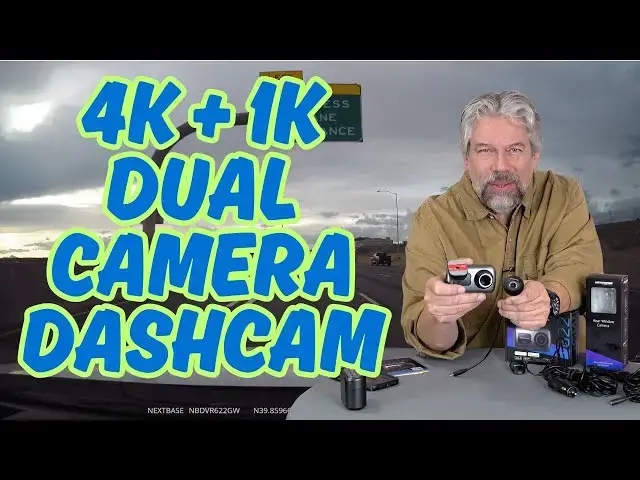
Once you get the Nextbase 622GW 4K GPS Dashcam set up, you'll have crystal clear video footage of everything that happens both in front and behind your car while you're driving, whether it's to the local market or across the country. The front camera features a 4K HD capture system with GPS - up to 120fps! - while the tiny rear camera records in full HD. Tech expert and car writer Dave Taylor hooked up the Nextbase 622GW + Nextbase rear dashcam and took it for a drive... The results: Great dashcam footage, but, as with so many dashcams, the app isn't the best experience.
Check it out at https://nextbase.sjv.io/N9Xny2
or on Amazon:
622GW front dashcam: https://amzn.to/3YvcHXU
Nextbase rear dashcam: https://amzn.to/43f0r05
Visit Dave's Q&A Web site at: https://www.AskDaveTaylor.com/
#nextbase #dashcam #4kdashcam #reardashcam #askdavetaylor
Disclaimer: The above links are affiliate links, meaning I earn a modest commission when you make a purchase. Thank you for the support!
Show More Show Less View Video Transcript
0:00
this dash cam lets you record front and
0:02
rearfacing footage let's check it
0:05
[Music]
0:11
out dave Taylor here and I drive a lot
0:14
in the last week I think I've averaged
0:16
about 2 or 3 hours per day behind the
0:19
wheel some of it on one of the busiest
0:22
and honestly most dangerous highways in
0:24
the state of Colorado the speed limit 75
0:28
people routinely pass you weaving in and
0:31
out at 90 miles an hour or faster it's
0:34
pretty bonkers if something were to
0:36
happen then having some sort of proof of
0:40
an incident an accident someone being
0:43
violent or aggressive on the road would
0:45
be invaluable one of the many reasons
0:48
it's really great to get a dash cam and
0:52
put it in your car so what I'm looking
0:54
at today is this this is the Nextbase
1:00
622GW 4K GPS dash cam and they also sent
1:05
me their rear-facing camera too isn't
1:08
that great just a little ball and you
1:10
just basically stick it on your back
1:12
window or if you have a hatchback like
1:14
me on the back hatch and you're going to
1:17
say "Uh how do you do that?" It's super
1:19
easy it is this little device and it has
1:22
adhesive so you basically adhere it to
1:27
the window and then you just simply use
1:31
the magnet so that the rear camera is
1:34
pointing in the right direction and then
1:35
it's pretty easy to adjust it to get it
1:38
just right now I will admit rearfacing
1:42
cameras if you look in the rear view
1:43
mirror you're going to see it but I
1:46
imagine that is something that's helping
1:48
protect me so I like it i had mine
1:50
mounted smack dab in the center of my
1:53
rear window you could put it on a side
1:55
and angle it i think if you were really
1:58
trying to minimize that of
2:00
invasiveness it does require a pretty
2:03
hefty wire to go from the rear camera
2:06
and you can see here there's a little
2:07
plug here so the rear camera has a wired
2:11
connection to the front camera and it
2:15
does include an install tool you can use
2:18
tape you can just run it along the top
2:22
if you want or you can just run it down
2:25
maybe between the seats or something i
2:27
just let the wire lay there cuz I was
2:29
testing if I was to use this a lot I'd
2:32
probably get a professional install for
2:35
front and back camera but even if you
2:38
just want to have the wires hanging it's
2:40
not a big deal and then this one this
2:43
part adheres to the window and then this
2:46
actually is magnetic so once this is on
2:49
the window
2:50
this just goes like that and then you
2:53
plug in the rear camera on the side and
2:56
then there's power here and that's this
3:00
wire and as you can see it has a 12vt
3:02
adapter so there's a fair bit of wiring
3:06
to get it all set up and everything but
3:08
it's pretty easy and this is a nice big
3:11
screen so it makes it really easy for
3:13
you to adjust things not only that but
3:16
once you hook up the rear camera it
3:18
shows what the rear camera is seeing so
3:21
you can also use this to adjust that
3:23
rear camera probably that's easiest to
3:26
do with two people so you can be looking
3:28
at the screen and saying "No tilt it a
3:31
little down to the left." Nope I mean
3:33
the right there you go ah now the
3:35
horizon is level so some point I imagine
3:39
these programs or these devices will
3:41
just have automatic horizon detection
3:43
and they'll just adjust it as needed but
3:46
for now yeah I got a little bit of
3:48
fiddling to do luckily it pairs with
3:52
their okay my next base connect app i
3:56
will say it's one of the nicest looking
3:58
app icons I've seen for a while so I
4:00
give them credit for that but enough
4:03
talking there's more to talk about but I
4:05
know you want to see demos so let's jump
4:08
into some demo footage starting with a
4:11
forward view and at a certain point I'm
4:13
going to slow it down so you can hear
4:15
what it records with
4:18
[Music]
4:24
audio whoa whoa whoa let's slow this
4:27
down just in case you're curious this is
4:30
what the voice recording sounds like
4:33
inside my car when I'm driving about 75
4:36
miles an hour on the highway so there's
4:39
a fair amount of road noise my car is
4:42
not the quietest one on the highway but
4:45
this gives you a good demo now let's
4:47
speed up again
4:49
[Music]
5:09
as with all of these devices nighttime
5:12
is harder it does have a special sensor
5:14
for low light and it also has another
5:17
one for extreme weather so if you're
5:20
driving through fog or driving through a
5:22
misty or cloudy conditions it supposedly
5:25
is able to actually get a clearer
5:27
impression or clearer image i didn't
5:30
have a chance to test that so I can't
5:32
verify it but the night vision was
5:34
pretty good the rear-facing night vision
5:37
because it's such a wide 140° field of
5:40
view I didn't feel that was quite so
5:42
good but it's still helpful to be able
5:44
to see yeah everyone was stopped and
5:47
then that car just hit me so it's
5:49
exactly why you have a dash cam give you
5:52
some more specs and then we'll look at
5:54
the app just a little bit because the
5:56
app's also an important part of the
5:57
experience so this camera this one is 4K
6:02
at 30 frames per second or you can set
6:05
it to 1440p at 60 frames per second or
6:09
really fun 1080p you can do it at 120
6:13
frames per second so if for some reason
6:16
you are feeling like you need to capture
6:18
an enormous amount of data because
6:20
things are happening really really
6:21
quickly you can go to you know 120
6:24
frames per second which is basically
6:26
going to be like slow motion so I don't
6:29
know if you're in a demolition derby
6:31
maybe that would be useful not sure
6:33
otherwise when that would be helpful
6:35
important to note 4K by default and this
6:38
is 1K this is 1080p at 30 frames per
6:43
second so this does not have as fancy a
6:46
sensor but honestly I feel like that's
6:48
entirely sufficient for the job that
6:50
it's doing they do support something
6:53
known as what three words which is just
6:56
a way of saying that um anywhere you are
6:59
on earth instead of having to specify
7:01
latitude and longitude which is
7:03
complicated you can actually use the
7:06
what three words system to have three
7:09
English words that uniquely identify
7:12
your location also super helpful if you
7:15
get into an accident because it can
7:16
generate the what three words for your
7:18
current location as part of its SOS in
7:21
fact it does have something that is an
7:25
emergency SOS feature but let's see so
7:28
image
7:29
stabilization night vision extreme
7:31
weather fog built-in Alexa not really
7:34
sure why I would need it built into my
7:38
dash cam but you can set it up which is
7:40
nice uh has a parking mode sensor and
7:43
they say it will be able to run for 2
7:46
and 1/2 weeks when it's just been used
7:48
for a while because it has its internal
7:50
onboard battery you won't see anything
7:53
but there's a G-Shock sensor that should
7:55
then turn on the cameras for recording
7:57
and then turn itself off again so
8:00
includes a 64 gig micro SD card and let
8:03
me just pop it out and show you because
8:06
like so many of these it is this super
8:09
tiny little card and the reason dash cam
8:13
companies include their own cards is
8:16
because people have a tendency to buy
8:19
cheap SD cards or micro SD cards and
8:22
they're too slow so this is a high-speed
8:26
card and then it comes with an adapter
8:29
so you can just slide this into the
8:31
adapter let's see like that and so now
8:34
it becomes effectively an SD card which
8:37
I can then plug into my computer and go
8:40
through all of the footage super fast
8:42
which is exactly how I grabbed all that
8:44
demo footage really really beneficial if
8:47
you don't want to hassle with the app
8:49
but we can also use the app and let me
8:51
just go ahead and put this back in the
8:54
dash cam and the way SD cards work is
8:57
you try to put it in and either it fits
8:59
or it doesn't if it doesn't fit you got
9:00
it the wrong way flip it 180 so that's
9:03
about easy enough right um so the rear
9:06
is a wired camera as I said there's a
9:09
fair amount of wiring it also comes with
9:12
a um mini USB to
9:16
USBA and the intent of this is they say
9:19
you should charge this for a couple
9:21
hours before first use and that's for
9:24
things like that parking sensor they
9:26
want to make sure that it's all juiced
9:28
up in that rechargeable battery so that
9:30
if you drive it 10 minutes to the store
9:33
and then go in the store and 2 hours
9:35
later someone bumps you this will
9:37
actually have enough juice to be able to
9:39
capture that footage so very helpful and
9:42
dimensions wise this is 2 in by 3 1/2 or
9:47
3.7 in by 1.8 in it's about a pound and
9:53
let me show you that app so give me a
9:56
second let me get some stuff switched
9:57
around and get my notes the app
10:00
experience is pretty good i haven't yet
10:02
found a dash cam that has a great app
10:05
experience i think it's just a really
10:07
hard thing to have it be super intuitive
10:10
and super easy to work with plus you
10:13
have this dilemma because this has a lot
10:16
of data and whether you have one minute
10:18
segments or two minute segments or five
10:20
minute segments each file is big so
10:24
there are just inherent challenges in
10:26
the way these are designed and work but
10:29
the my next base app is pretty good so
10:32
let me launch it and so now we're at the
10:35
home screen you can see they really want
10:37
you to hook up um the Alexa feature
10:39
whatever let's go to live view which
10:42
then requires a Wi-Fi connection from
10:45
your phone to the dash cam so these dash
10:48
cams have built-in Wi-Fi it creates its
10:51
own Wi-Fi network and then I can easily
10:54
switch between front view and back view
10:58
and I really like the way that they show
10:59
sort of the front half of the car and
11:01
the back half of the car and you can
11:03
just tap to switch which view that you
11:05
want um and then I'm going to switch on
11:09
the bottom i'm going to tap on the
11:10
library button and that actually will
11:12
take a second but it will show me tiny
11:15
thumbnails for all the footage that's on
11:18
the dash cam at that moment and we'll go
11:21
to rear view and I'll tap to view it and
11:24
then I'm going to save and download it
11:27
and this will take a couple of seconds
11:28
i'm going to speed this up then I can
11:31
also look at telemetry information and
11:33
just that sort of generic info tab and
11:37
you can't really see it and I certainly
11:40
got confused for a while but at the top
11:42
left there is an extremely tiny little
11:45
very light blue arrow that you can tap
11:48
on to move back to the previous screen
11:51
it is so subtle that the first time I
11:54
was trying to record the demo I
11:56
literally just quit the app and started
11:58
it up again to get back from that screen
12:00
so next base programmer guys you might
12:04
want to make that a little bit more
12:05
contrasty so people know it's there just
12:08
saying um so now we're looking at the
12:11
dash cam and if I tap on the three dots
12:14
option you can see I can make some
12:16
changes to thumbnail size i can just
12:18
look at the front view or rear view
12:20
footage here's the emergency SOS if I
12:24
want to set that up and then if I go
12:27
back to the home screen and I tap on the
12:30
so-called hamburger menu on the top left
12:32
and go to settings there's a bunch of
12:34
settings so let's go ahead and turn off
12:37
the stamp for the dash cam model number
12:40
and that's going here tapping on off and
12:43
then I'll go a little further down and
12:45
I'll actually turn off dual files
12:47
because by default it records a large
12:51
image and a smaller image i should say
12:53
large video and smaller video for each
12:56
of the cameras so the idea of the
12:58
smaller one is it's easier for you to
13:00
share with people and to be able to
13:02
download it more quickly because
13:03
obviously it's a smaller file and then
13:05
you have the larger ones if you need
13:07
them but it does take up a lot of memory
13:10
and so it does consume that card storage
13:13
space faster in fact let's do that SD
13:15
card analysis now don't panic because
13:19
the way these are all designed is that
13:21
once it's full it will actually
13:24
overwrite the oldest file so it never
13:27
really runs out of space it will just
13:30
start consuming older video footage
13:33
which means that you might occasionally
13:35
need to go and tap to lock things and
13:38
that's where if you look at this closeup
13:40
you can see that there's a button that
13:43
lets you actually lock that footage so
13:46
it can sort of mark it as don't
13:48
overwrite and then if you remember when
13:51
we were looking at the dash cam tab
13:55
options one of the options was um locked
13:58
files only so it does have that
14:01
mechanism but that's the app and I'll
14:04
tell you I did do some cutting and
14:06
editing here so that it would be a
14:08
fairly quick demo but it does take a
14:12
little while to get used to or you can
14:14
do what I do with most of these dash
14:16
cams which is I set it up if I use the
14:19
app to get all the settings how I want
14:22
and then when I'm actually working with
14:24
footage I just pop the card out and just
14:26
go directly from the card to my computer
14:29
without having this Wi-Fi network in the
14:31
middle you can choose which path is
14:34
easier for you but that's everything
14:36
that is the full dash cam experience so
14:41
this like I said is the Nex
14:44
622GW but before we go any further I'm
14:48
going to invite you to subscribe to my
14:50
channel go ahead and click or tap on
14:52
that subscribe button hit that bell icon
14:55
for notifications of my new content give
14:57
me a thumbs up if you found this of
14:59
value and if there's something I missed
15:01
that you wish I would have demoed or
15:03
talked about leave that in the comments
15:05
cuz then I'll just do it better next
15:06
time that's kind of how that works sweet
15:09
this is the Nexbase
15:12
622GW 4K GPS dash cam and it is
15:19
$379.99 currently discounted way down to
15:24
$295.99 at amazon.com
15:27
this is the Next Base rear dash cam and
15:33
it is
15:35
$99.99 currently discounted down to
15:38
$79.99 which means if you want to buy
15:41
both of these and I recommend you do cuz
15:44
why not if you're going to have footage
15:45
why not have footage from both sides of
15:48
your car then your total's
15:51
$375.99 for 4K plus 1K HD video footage
15:58
with all of the features and
15:59
capabilities that I explained here it
16:02
will take you some time to get it set up
16:04
and installed and all mounted in the
16:06
right you know locations on your window
16:08
and stuff but once you do it really is a
16:12
plug and forget so once I had this set
16:14
up I just drove and parked and then got
16:17
back in my car and turned it on and
16:19
drove again super easy so lots to like
16:23
here definitely one worth checking out
16:25
it's what I got hope to catch you in my
16:28
next video
16:33
[Music]
#Car Electronics