Up next in 10



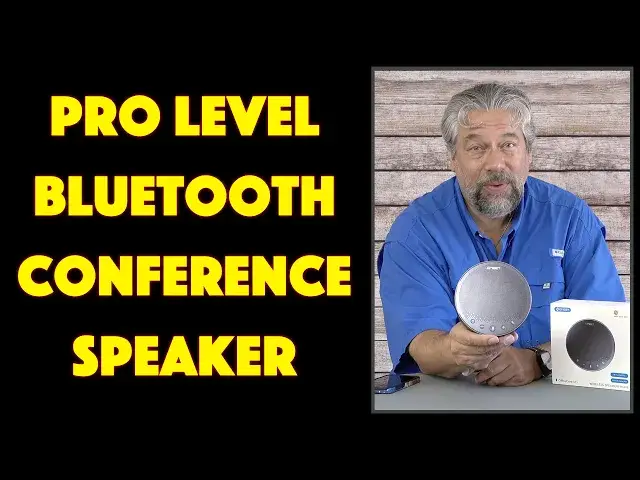
Still placing your smartphone on the table, pretending it's a great replacement for a proper conference call speaker and microphone setup? You know it's not, and the people on the other end of the call are probably fed up saying "I'm sorry, what?" and "Can you please repeat that?" The solution is the EMEET OfficeCore M3 Bluetooth Conference Speaker, ready to go for a conference space of up to 20 people - or more if you daisy chain more than one of them! Tech expert Dave Taylor tests out the EMEET M3 and lets you hear for yourself how it compares to the Apple iPhone 13 Pro when both are used for a conference call.
You can check the EMEET M3 out at: https://amzn.to/3Cr7E05
Then please visit Dave's Q&A Web site https://www.AskDaveTaylor.com/
#emeet #officecore #emeetm3 #speakerphone #conferencespeaker #bluetooth #askdavetaylor
Show More Show Less View Video Transcript
0:00
You don't need a big conference room for this to be a big win
0:02
Let's check it out. Dave Taylor here, and I'm checking out this
0:13
This is the E-Meat Office Core M3 Bluetooth conference speaker. It's really nice
0:19
Now, for a size comparison, here is my iPhone 13 Pro. So you can see it's more or less the same size
0:27
It's actually 6.8 inches by 6. 5 inches by 2.4 inches and 13.8 ounces. So it is about the same weight as my phone
0:40
But what this offers is a terrific set of features. It is designed to be in the middle of a conference room or a table or your coffee table or your desk
0:52
And it is a conference speaker. So you can put any audio you want on there and you can work with some
0:59
like Zoom or Skype or Microsoft Teams or Hangouts or GoToMeeting or WebEx or you could just be
1:08
on a phone call or you're on a FaceTime call even. And it's going to be used for audio pickup and you'll hear the person through its high
1:17
quality 5 watt speaker, which is going to sound a lot better than if you're just using your smartphone
1:23
In particular, if you're using your smartphone as a speakerphone, doesn't really work super well
1:29
I'll demonstrate that in just a minute. Now, what I want to tell you is that this has a 360 degree voice pickup
1:36
So wherever you are around it, you're going to get the same quality audio, a significant
1:41
difference from a smartphone because if I have it with the bottom, let's open this up
1:47
So unlock it. There we go. So if the bottom is facing me and you're sitting at that end, you're just not going to be heard
1:55
as loud. That's just the nature of how these are designed. But with this, it's intended to be all around
2:02
So you get that full omnidirectional and it's four different speakers. And there's an AI system trying to figure out who's talking and how do I maximize their volume to make sure that they're highly legible and easy to understand
2:17
Has noise reduction, has echo cancellation. It's full duplex. So if you find yourself stepping on someone else because you're both talking at the same time, it can do that
2:27
Old school conferences, speakerphones tend to be not duplex. So what happens is if you're talking, you literally don't hear anyone else talking
2:37
And if they're talking, generally it's ignoring your voice. So makes conversations a little bit stilted
2:44
But on the other hand maybe it good practice taking turns actually talking rather than constantly interrupting people We can talk to my children about that Separate conversation One of the cool things this can do is you can daisy chain more than one So if you have a huge
2:59
table or a huge conference space, you could have two of these, both one at each end
3:05
and then that together will actually work as a way to make sure people all around that big, long
3:12
table are going to be heard. That's really important. It is also plug and play with Mac
3:19
Android, iPhone, iOS, all of that. So I paired it with my phone and it just works flawlessly
3:27
Now, I want to tell you there's three different ways you could connect with this because you can use it Bluetooth
3:33
but they also have a little dongle in the bottom. So you could plug that into your PC
3:40
It goes right into that USBA slot and then it will have its own connection with this
3:47
which makes it really about as easy as it. as easy as it could possibly be and it has a neat little storage space on the bottom
3:53
but if you don't like either of those there's USBc on the side and you can plug in
4:00
USBc directly to your computer or device and then use it that way really cool
4:07
now let me give you a quick visual tour on the front you can see there are five
4:13
buttons and they are the multi-function e-meat button volume down mute volume up and then hang up and take the call if someone's ringing in and you want to answer a call easy enough and then on the side
4:29
There are a number of different controls. There's the power button which obviously is important
4:34
There is the Bluetooth pairing although I found that it defaults if it's not paired to anything
4:41
The first thing it does is it immediately goes into pairing mode which makes it super easy and then on the bottom you can see
4:48
that USBC for charging and for a USB connection, if that's what you prefer
4:54
And then there's a 3.5 millimeter jack that you can use if you want to have the, instead of
5:00
the speaker working, you want to just hear it through earbuds or headphones or maybe a bigger speaker
5:05
or an AV system. You can do that. The link is special for if you have more than one of these units and you want to daisy chain them
5:14
And then finally there's a lock because if you put this in a conference room and you're not always
5:18
in the room, you probably don't want this thing to walk away. That would be entirely logical
5:23
So I want to do two different demos. So actually, maybe we'll do three demos. Let's start by
5:29
powering it up. And let's see. So now it's powered up. And then it should pair with my phone
5:43
There we go I think that all paired And I can double check in my settings Let see Bluetooth Emeat Office Core connected
5:53
Good. Okay. So we have that. Now, what I want to do is I want to start by letting you hear the speaker
6:01
So I'm going to do that by playing some music, right? Now, this is not really intended to be a music speaker
6:07
So you'll hear that the audio reproduction tends to be heavily biased towards the music speaker
6:12
bias towards the sort of frequencies of a human voice. So don't expect a lot of bass. But
6:18
all right, my choice of music might not be something you'd be listening to normally, but
6:27
it actually sounds pretty darn good. And as you can hear, it gets pretty loud. And I can turn
6:34
the volume down. But I can also, let's see, I'll just stop that. It's a little bit much
6:42
Now I'm going to put it aside and I want to do a demo
6:46
So what I want to record first, I'm going to record myself speaking and pretending that my
6:53
phone is a speakerphone and I'm going to put it a fair distance away because I think
6:58
that's a fair demo. So, oh actually, no, hang on. That's not going to work because it's actually using this for the audio
7:08
So what we need to do for this demo is I'm going to turn this off. You'll understand the logic of what I'm doing here in just a second
7:15
So now, okay, this is a demo of me using my iPhone 13 Pro as a speakerphone
7:23
And it's not horrible, actually. It sounds okay, but if I turn the phone away from me, I definitely don't sound as good
7:31
Now, let me turn on and pair the E-Meat M3 and we'll compare the two
7:37
Now you're hearing me through the E-Meat Office Core M3. And one thing to notice is that the green light is locating me
7:46
That's that AI4 microphone system. And if I turn it 180 degrees, the green light will move
7:54
but otherwise I'm going to sound exactly the same. Now, to my ear, this sounds a whole lot better
8:00
than my phone did pretending to be a speakerphone. So let me stop the recording
8:05
And let me just say, it's a really cool device. Now, here's one more thing you can do
8:11
thing you can do is if I mute it, then you get that red circle all the way around. It's a big
8:16
visible, and obvious example to show you, hey, you're muted. The person at the other end can't
8:23
hear you. This is only, you know, if only Zoom had a big red frame so you'd know, instead of talking
8:29
and someone saying, you're muted, then you would have something like this. Nice indicator
8:36
So this serves a lot of different purposes this little light It gives you that red for If I unmute it it will now give me green to show me which speaker or which side it hearing
8:48
And then there's blue to show that it's paired with Bluetooth and everything
8:52
There's a lot going on here. Now, one of the most important things that I need to tell you is it has an 18-hour battery life when it's fully charged
9:01
So if you're using this in a conference room, as long as you leave it plugged in overnight as needed
9:08
The next morning, you can unplug it and you can be on a call, you can be on some long WebEx meeting or presentation for hours and hours and hours without having to worry about this thing dying
9:21
And of course, if you have a USB charger handy, you can always plug it in and continue using it
9:26
It totally understands how that works. So that's everything. The demos were a little complex to pull off, but I think you can hear that this is a really beneficial
9:38
for a lot of situations. Something like this, and they have smaller units that are more appropriate for smaller spaces
9:45
but something like this sitting on your desk adjacent to your computer and keyboard and everything can make a world of difference
9:52
If you spend a lot of time on the phone in your office, then this could be so nice
9:58
If you have constant calls with all the kids talking to grandma and grandpa who live a thousand miles away
10:04
having one of these on the coffee table or on the dining table will make you all sound so much better
10:10
It will give them such a better experience. And they're going to sound pretty good coming out of that speaker too
10:16
So it's everything I got. The only thing we need to talk about is the price
10:20
But before we get to the price, I'm going to ask if you could subscribe to my channel
10:24
Click or tap on that subscribe button, turn on notifications. We're connected
10:29
Sweet. Now, this is the EMEET office conference. core m3 Bluetooth conference speaker and it's a hundred ninety nine ninety nine
10:39
currently with a forty dollar discount for a hundred and fifty nine ninety nine at
10:45
amazon.com if you have a conference room I actually was just on a zoom call
10:51
with a group of people in a conference room the sound was awful I barely
10:55
understood what people were saying and really all I could hear was coughs
10:59
and sniffles which was horrible if they would have had this on their desk if
11:04
they would have had that on the table in the middle of that conference room, it would have been an
11:08
absolute game changer. Definitely one to check out. That's all I got. I'll catch you in my next video
#Audio Equipment
#Voice & Video Chat
#Teleconferencing