live_tv
Livestream Starting Soon
00
Hours
:
00
Minutes
:
00
Seconds
Up next in 10



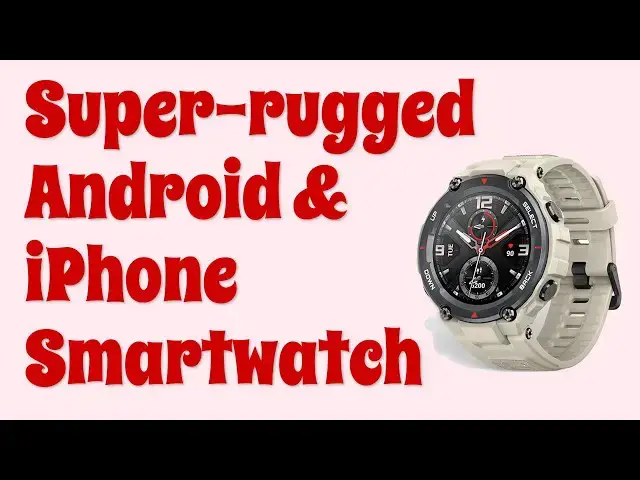
The AMAZFIT T-Rex Pro Smartwatch works with Android phones and iPhones and offers more features than you can even remember. From blood oxygen levels to tracking 100 different sports, heart rate to barometric pressure, altitude to compass directions, it can do everything. Even 300-feet deep in the ocean! Tech expert Dave Taylor has been wearing one for a few weeks and walks you through all the AMAZFIT T-Rex Pro main features and functionality with tons of closeups and more.
Check out the watch at https://www.AMAZFIT.com/
Check out Dave's Q&A at of https://www.AskDaveTaylor.com/
Find Dave here on YouTube as https://youtube.com/askdavetaylor
#android #iphone #smartwatch
Show More Show Less View Video Transcript
0:00
A rugged sports smart watch? Let's check this out
0:10
Dave Taylor here, and I'm checking out this. This is the Amaze Fit T-Rex Pro smart watch, and it's basically a notification watch
0:19
So what do I mean by that? Is that you will get notifications of phone calls, of text messages, of app notifications
0:27
anything you want from your paired device. It works with iPhone or Android, which is great, so it's very flexible
0:35
And as you can see, it's a big, rugged design. So here's a couple close-ups just for us to start
0:41
You can see that there's the dial on the outside, that it's fairly thick as watches go
0:47
and on the back are all the different lights and sensors, so it can calculate things like your blood oxygen level, your heart rate
0:56
There's a lot of data it can track. And so it interacts with the health app on your phone and gives you the ability to really keep track of how you're doing with your health
1:05
Now, a couple of other neat things. Now here, a notification just came in so you can see that
1:10
A couple of neat things is it does work with different GPS satellite systems so it can figure out where you are
1:16
I'm going to give you a demo that's going to show you how that works. It is 10 atmospheres water resistant, which means you can go down to 330 feet
1:24
Now, I don't know that I'd wear this as a dive watch. It's not really designed to be a dive watch per se
1:31
but that certainly means that if you're going to wear it while you're in the pool or while you're surfing in the ocean or something
1:36
then it's going to have no problems at all whatsoever. So blood oxygen saturation has a sleep monitor
1:43
though I don't tend to wear watches when I'm sleeping, a compass, altimeter, I'll show you all of that stuff
1:49
They say it's an 18-day battery life. If I find that about every four or five days I want to check
1:54
charge it. And worth noting is that it does have a kind of funky charger. There's a little base
2:00
and USB3 on the other end, but this then fits on to the back with magnets, and now it's ready to
2:07
charge. So that upside is that this stays sealed, so it's waterproof. The downside is that if you
2:14
lose this, you have to get another one from the company. This is not something you're just going to
2:18
get off of, you know, like some random vendor from Amazon or something. So tradeoffs. It is
2:24
is a silicone strap and it's pretty comfortable. As you can see, it has a lot of holes
2:31
So that's sort of part of the style, but when I put it on
2:35
it does mean as you want with this sort of watch, there's a lot of options to get it tight, loose
2:41
whatever your preference is, and then you just slip the clasp in
2:46
and what's neat is that the little piece here that goes over to hold the strap
2:52
actually has a tiny little rubber element that goes into one of those holes So it stays there It doesn sort of wander off and then have your unused portion of the strap sticking out
3:03
which a lot of watches tend to do. So as you should always do with these sort of sensor watches
3:09
you want it to be tight, but not too tight. If it's really loose on your wrist, then you're going to get inaccurate measurements
3:16
So enough me talking. Let's go ahead and jump into some close-ups
3:20
Here's my favorite watch face, but if you push and hold, then you can actually step through the different faces
3:28
There's not a huge variety, but there are more in the app that you can download
3:34
I'm going to go back to this one. I think that this is the fast and furious screen
3:38
So, as always, you pull down. That gets you settings. Go back up
3:44
Go from the bottom. And that gets you to your information about health and status
3:50
You can see I barely started moving today. I'll get to there
3:55
And then from the left gives me notifications. And of course those would pop up when they are live
4:02
And then on the right, this gives you the main menu of all the different apps
4:06
So some of them don't actually work unless it's on my wrist, but we can look at activity goal
4:12
You can go back. We can look at the compass. You can see which direction is north
4:20
You can also look at barometer, which is a little more interesting
4:24
So it actually looks for the GPS signal and it will give me altitude in addition to just the current barometric pressure
4:34
And so there we are, 5291. That's pretty darn close to my actual altitude, close enough that this actually is useful and helpful information
4:47
As always, you go back, you can see some of the other features there's settings this is different settings one thing I really like is I
5:00
can turn on vibrations only for incoming calls but not for notifications I find
5:05
that a really helpful setting and then we can go right back to the home screen so
5:10
now let me put it on my wrist and I'll show you one or two additional features
5:15
now with it on my wrist let's go ahead and look at my heart rate
5:19
which is a little elevated because I'm on camera and I'm standing at an awkward angle
5:25
but you can see that gives me that data and if I go back I can look at my blood oxygen level
5:32
and you have to hold pretty still for this to figure out the numbers
5:40
and hopefully while it's doing all the calculation notice the band around the edge is
5:49
slowly filling in So it giving me this text information but that kind of just to keep me occupied while I sitting here I going to go ahead and just jump to the end So there my number
6:01
93%. Okay. Now, you might have to check with your doctor to see if you're doing well or not
6:08
and remember, this is affected by your altitude. So I am a mile up from sea level, so that's
6:14
going to affect this number. But that's that data. And I can go back, and now I'm back on the
6:19
home screen. All of that's pretty cool, but it turns out that when you pair your watch with your
6:24
phone, there's also an app that is included, and that's the ZepHealth app. You can just download it for
6:30
free. It pairs, it sinks, and mostly it's a way of accessing data. So you can see here on the
6:37
inset that it actually just pulls data off the watch, which is pretty darn helpful, actually
6:43
but in terms of actually letting you make settings and changes, well, there's some things you can change
6:49
So I can do some settings here. I can go to settings
6:53
But these settings are really more about the settings of the app
6:58
rather than the settings of the watch. So you are not going to be able to get away from the fact
7:03
that you're going to have to use the watch to make settings and changes on the watch
7:08
But you can see this lets you change and look at some more watch faces
7:12
You can set alarms and add your schedule. You can address things like what happens when there's an incoming phone call
7:20
All of that all inside this app. Now, it turns out that Zep actually has other devices too
7:26
which if I go to this screen, then go to the top right, then..
7:33
Oh, sorry, that's the wrong spot. I have it actually paired with two different devices
7:38
So this one is just for the T-Rex Pro. And I really like the name T-Rex
7:43
It's like, you know, I feel like I should be a Jurassic Bark or something
7:47
Like, hold on, dinosaurs. Maybe that's just me. But you can see it actually collects the data from the watch
7:56
and gives you a really easy way to share it, take screenshots
8:00
show it with any of your medical consultants or your health coach or something
8:04
Or if you just want to use it yourself, if you want to go for a workout, and this supports over a hundred different workouts
8:10
But if you want to go for a workout, something as simple as walking around the block or something as, you know, really intense as like a marathon or something, then you can actually collect all the data on here and then get it onto your phone and then track how you're doing over days or weeks. Same with sleep and everything. So really, really a nice setup. Go ahead and turn off my recording. And there's a lot to like about this Amaze Fit. And it's not an Apple, Apple Watch
8:40
or something it's not the latest Samsung gear or anything but it's also at a more
8:45
modest price and it very attractive it very functional I found that wearing it and only having to charge it every four or five days is great And it actually depending on much face you have they generally show you battery status which is really nice
9:00
That's something I've found. It's a little tricky to find on Apple watches, for example, depending on what face you have
9:06
But with this, I can see it is indeed fully charged. And there's a spot in settings that also can show you your battery level
9:13
So you could just make a habit at some point each day. You're just like, let me double check
9:18
It looks like I need to charge it. So easy enough. It takes about an hour to charge from zero to 100%, plus or minus a little bit
9:26
But easy enough, don't lose the cable. And that's really it. There's a lot to like here
9:32
This is a really nice smart watch. It is bulky. It is thick
9:37
That is a style choice that they made. And there are buttons on the outside that
9:43
that I generally don't use, but you can figure out if you want to use the stopwatch function
9:48
these buttons will help you with stop, start, reset, all of that sort of thing
9:52
So really helpful if you're doing like wind sprints or something, you can use those to start and stop monitoring your body's reaction to the super intense workout
10:03
So really, only thing left to talk about is the price. And the price is kind of interesting
10:08
But before we get there, let me ask if you could go ahead and subscribe to my channel a click
10:13
or a tap on that subscribe button, super helpful. Leave a comment. Tell me what you wish I would have
10:18
shown more of and give me a thumbs up if you thought this was helpful and interesting. And with
10:23
that, let's talk about the price. Let me take it off so I'm going to show it to you. So this
10:31
is the Amaze Fit T-Rex Pro Smartwatch and it's 17999, except when I looked on their website
10:39
it was 15499, and they offered a 10% discount if you signed up for their mailing list
10:46
So that makes this under $150, if not under $140, I think
10:51
but makes it pretty darn affordable for people that want to get into the world of smart watches
10:57
and health tracking and everything in a way that's not some dorky little band or some $300
11:03
device. This is a nice middle ground that honestly just looks like a tough, rugged digital
11:09
watch. So lots to like, definitely one worth checking out at amazfit. Or amazefit.com
11:17
And with that, I'm going to put it back on and I need to get some walking in today
11:21
So I will hope to catch you with my next video because I'm off to a walk
11:26
So catch you later