Give your AI agents
full control of your
video platform
Upload videos, manage channels, track analytics, and organize playlists — all through natural language. One MCP server, any AI client.
Capabilities
Everything your AI needs to run
your video operations
Upload, link, and manage video content
Upload local video files, link external URLs, generate embed codes, and manage all video metadata — titles, descriptions, tags, thumbnails, and visibility settings.
- Upload local files with the Upload Helper
- Link external video URLs
- Generate and manage embed codes
- Edit titles, descriptions, and tags
Architecture
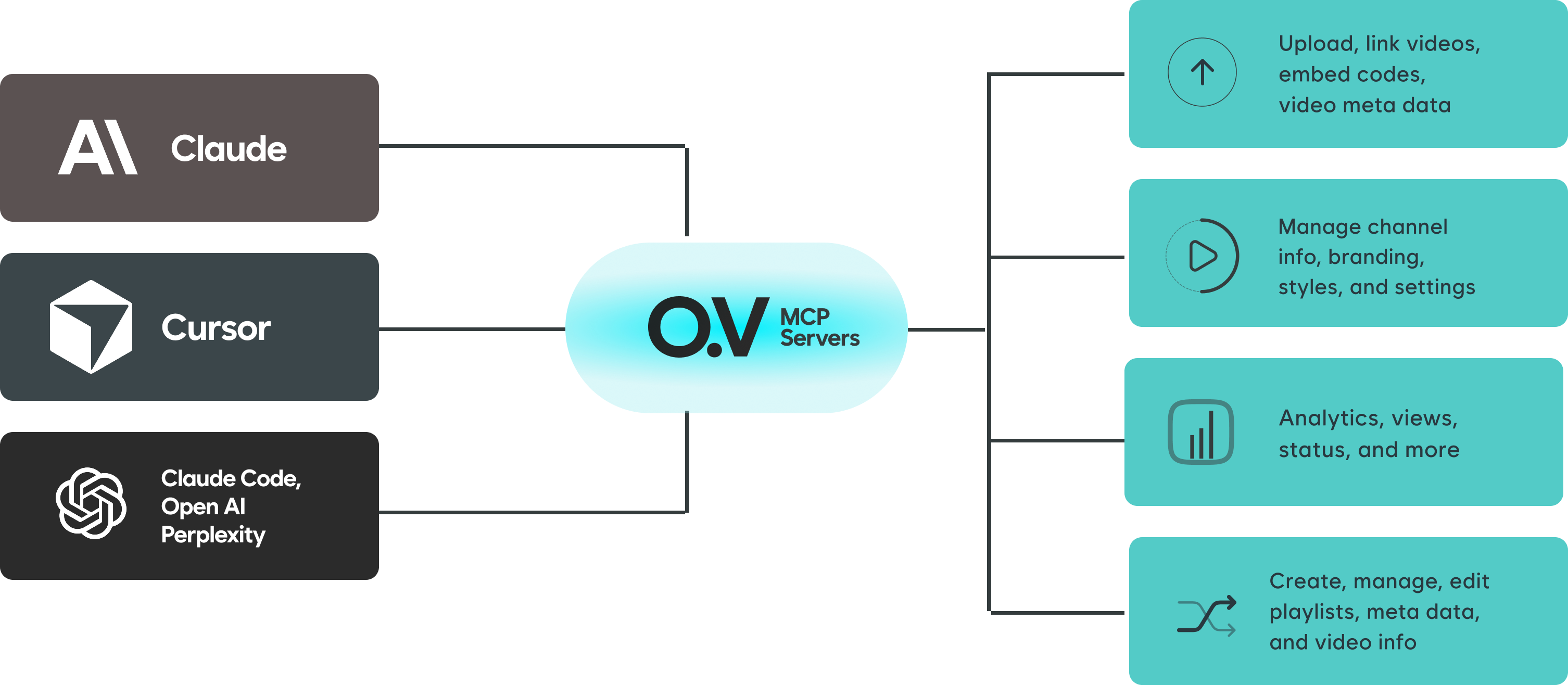
One server connects any AI client to your entire video platform
The open.video MCP server sits between your AI tools and your publishing account. Claude, Cursor, Windsurf, or any MCP-compatible client gets instant access through a single authenticated connection.
Setup
Connect in under 2 minutes
Choose your AI client and follow the steps. No API keys needed.
Add the open.video MCP server to your MCP config file.
Add this to your MCP config:
{
  "mcpServers": {
    "open-video": {
      "url": "https://mcp.open.video/mcp"
    }
  }
}For local file uploads, add the Upload Helper as a second server:
{
  "mcpServers": {
    "open-video": {
      "url": "https://mcp.open.video/mcp"
    },
    "open-video-upload": {
      "command": "npx",
      "args": ["-y", "open-video-upload-helper"]
    }
  }
}Call list_channels to verify the connection and complete sign-in.
Tools
Available MCP tools
A growing set of tools to manage every aspect of your video platform.
Videos
upload_videoUpload a local video file with metadatalink_videoLink an external video URL to your channelget_embed_codeGenerate an embed code for any videoupdate_videoUpdate title, description, tags, and settingsdelete_videoRemove a video from your channellist_videosList and filter videos on your channelChannels
list_channelsList all channels on your accountget_channelGet detailed channel informationupdate_channelUpdate channel info and settingsupload_channel_imageUpload branding images for your channelAnalytics
get_analyticsFetch views, engagement, and performance metricsget_video_statusCheck processing and publish statusPlaylists
create_playlistCreate a new playlistupdate_playlistEdit playlist metadata and orderingadd_to_playlistAdd videos to a playlistlist_playlistsList all playlists on your channelLLM Skill
Teach any AI how to use
Open.Video
Open.Video
LLM Skill
Download the Open.Video skill file and upload it to your LLM of choice to unlock deep expertise on how to use every Open.Video feature — including MCP integrations, video search, AI summaries, and more.
 Claude
 Perplexity
 Gemini
 Grok
Grok ChatGPT + any LLM
 skill.md — works with any LLM file upload
Create your open.video channel
Sign up for an open.video account, create your channel, and connect it to your AI workflow in minutes. No credit card required.