Up next in 10


How to Add Products to Shopify from Aliexpress (Step by Step)
Show More Show Less View Video Transcript
0:00
So you want to add products from AliExpress into your Shopify store
0:05
So this actually means that you want to make dropshipping, right? So if you want to do that
0:10
you want to find a dropshipping supplier from AliExpress that can be
0:15
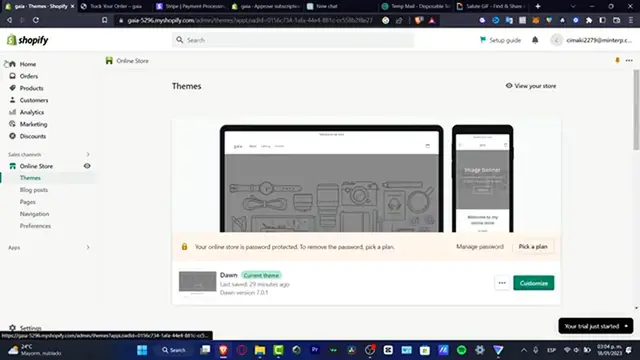
importing your stuff into your store. So what I want to do is to hit into apps
0:20
and here what I want to look out is for the AliExpress into the app store
0:25
of Shopify. And here's going to be sending me all the suppliers that I can
0:30
add into my actual store. For example, this is Spocket, there's Deezer, there's AliExpress
0:35
there's a lot of options. So in my case, I want to look out for the Spocket
0:40
because I'm currently into the United States. So after that, hit into the application
0:45
really, really simple. And after that, I just need to grant the access
0:50
and hit into install app. And once I have successfully done that, what I want to do
0:55
is to just create my account here into Spocket. So I can just copy my email
1:00
go here into Spocket. And what I want to do is to select the item
1:05
that I want to import. So we hit into the X mark like that. And here
1:10
I want to focus, let's say, for example, into this one, I want to add this into the import list
1:15
So if I go into the import list, I have this item that of course, what I want to do
1:20
is to hit into the edit product. So what I want to do is to change the title
1:25
For example, let's say Arrive Rep AP Pro 2 and delete this one
1:35
I want to import into my homepage collection of Shopify and hit into push to store
1:40
And just like that, my product has now been pushed into my actual store
1:45
If you want to have a specific collection, you want to go back into your store
1:50
hit into collections inside products. And here you want to create a collection
1:55
For example, I'm going to create new like this new arrivals of the 2023 and hit into safe. And you can just drag and drop all that information
2:05
And here, of course, I need to add a few images if you text and love that
2:10
So with that being said, I can go back into my products and just make sure that my item from
2:15
the dropshipping supplier has been added successfully into my store. And here it is. My Rep AP Pro is now been added successfully
2:25
So this is how we can do this in a very easy, easy way. Don't forget to like and subscribe guys if you want to see more
2:30
easy tools for Shopify. So I will see you on the next video
#Retail Equipment & Technology
#Shopping